

Intlayer
Per-component i18n that’s type-safe, AI-powered, and visually editable so you ship faster with zero bloat.
About Intlayer
Intlayer is the open-source internationalization pipeline that’s built for the modern developer who refuses to settle for clunky, outdated translation workflows. Forget manually managing JSON files or praying that your freelance translator doesn’t mess up the tone. Intlayer is optimized for automated AI translation, injecting application-level context directly into language models so your translations aren’t just accurate—they’re contextually aware. This means every string, every phrase, and every piece of content across your entire codebase maintains a consistent terminology and tone. No more isolated string translations that sound like they were written by different people. The system is fundamentally token-aware, designed to slash API costs and maximize efficiency. It uses smart context chunking to split large files into safe segments that won’t exceed model limits, and it audits existing dictionaries to only process missing keys—wasting zero tokens on redundant translations. This is for developers who want to integrate automated, contextually accurate translations directly into their CI workflows using local models or external API keys without unnecessary overhead. Whether you’re building a Next.js app, a React SPA, or a full-stack monorepo, Intlayer gives you the power to scale your internationalization efforts without scaling your budget or your headaches. It’s type-safe, it’s flexible, and it’s free. Intlayer is the tool that turns your codebase into a multilingual powerhouse, letting you focus on building features instead of wrestling with translation files.
Features of Intlayer
Context-Aware AI Translation
Intlayer doesn’t just translate strings in isolation—it injects your application’s context directly into the language model. This means every translation understands the surrounding code, the component it belongs to, and the overall tone of your project. The result? Consistent terminology and voice across all languages, from English to Japanese to Arabic. No more awkward phrasing or mismatched formalities. It’s like having a native-speaking editor on your team, but without the overhead. The AI processes your content with full awareness of where it lives and how it’s used, ensuring translations that feel native and intentional.
Token-Aware Optimization for Cost Efficiency
Every API call costs money, and Intlayer is built to respect that. The system is fundamentally token-aware, meaning it calculates exactly how many tokens each translation request will consume. It uses smart context chunking to break large files into safe segments that won’t exceed model limits, preventing costly errors. But the real magic is the audit feature: Intlayer scans your existing dictionaries and only processes missing keys. If a translation already exists, it’s skipped. This means zero wasted tokens on redundant work, slashing your API bills while keeping your translations complete and up to date.
Per-Component i18n with Type Safety
Define your translations right next to your components using a simple, type-safe dictionary structure. Intlayer’s t() function lets you declare all language variants in one place, and TypeScript ensures you never miss a key or mistype a locale. The compiler automatically extracts these definitions and generates dictionary files, keeping your codebase clean and your bundle light. This approach improves maintainability, reduces redundancy, and makes updates a breeze. No more hunting through massive JSON files—your content lives where it belongs, right next to the code that uses it.
Visual Editor and CMS Integration
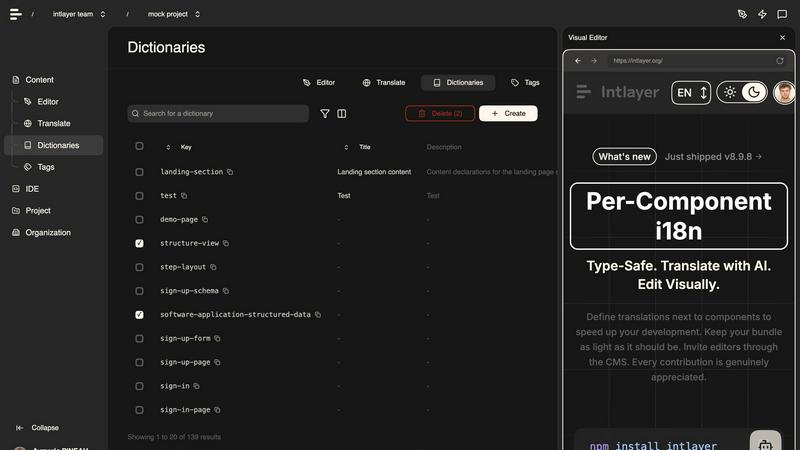
Intlayer isn’t just for developers. It comes with a free visual editor that lets content managers and editors build, edit, and organize components and pages without touching a single line of code. Drag, drop, and manage your multilingual content in real time. The CMS integrates seamlessly with your codebase, so every change is reflected instantly across all languages. This bridges the gap between devs and content teams, enabling collaboration without friction. Plus, the Intlayer CLI lets you test and fill content using AI, ensuring all translations are complete and accurate before they go live.
Use Cases of Intlayer
Scaling a SaaS Platform to Global Markets
You’ve built a killer SaaS product, and now it’s time to take it global. But managing translations for dozens of languages across hundreds of components is a nightmare. Intlayer lets you define translations per-component, so your team can work in parallel without stepping on each other’s toes. The AI translation pipeline handles the heavy lifting, injecting context from your app to ensure every button label, tooltip, and error message sounds natural in every language. You can integrate it into your CI pipeline, so every new feature automatically gets translated before deployment. No more manual handoffs, no more broken builds.
Building a Multilingual E-Commerce Store
E-commerce is brutal. You need product descriptions, reviews, checkout flows, and support content in multiple languages, and every mistranslation can cost you a sale. Intlayer’s context-aware AI ensures that your product copy maintains its persuasive tone across all locales. The token-aware optimization keeps your API costs low, even when you’re translating thousands of product pages. And with the visual editor, your marketing team can tweak translations without bugging developers. It’s the perfect setup for fast-growing stores that need to move quickly without sacrificing quality.
Managing Content-Heavy Documentation Sites
Documentation is the unsung hero of any good product. But translating docs is a slog—especially when they’re full of technical jargon and code examples. Intlayer’s smart context chunking breaks your docs into safe segments that won’t exceed model limits, so you can translate entire guides without errors. The audit feature ensures you’re only paying for new or changed content, not re-translating the same old pages. And because translations are defined per-component, you can update individual sections without touching the rest of the doc. Your users get accurate, up-to-date help in their native language, and you save time and money.
Enabling Developer-First Internationalization in Open Source Projects
Open source projects need to be accessible to a global audience, but contributors often speak different languages. Intlayer’s type-safe, per-component approach makes it easy for anyone to add translations without breaking the build. The AI pipeline can automatically fill in missing translations for any locale, so your project is always ready for new users. And since it’s open source itself, Intlayer fits right into the community ethos. You can set it up with minimal configuration, and contributors can use the visual editor to manage translations without needing deep technical knowledge. It’s the ultimate tool for democratizing internationalization.
Frequently Asked Questions
What makes Intlayer different from other i18n libraries?
Intlayer stands out because it’s built for AI-powered, context-aware translation. Most i18n tools just give you a way to store strings and swap them based on locale. Intlayer goes further by injecting your application’s context into the language model, ensuring translations are consistent in tone and terminology across your entire codebase. It’s also token-aware, meaning it optimizes API calls to save you money, and it comes with a visual editor for non-devs. Plus, it’s open source, type-safe, and designed to work seamlessly with modern frameworks like Next.js.
Do I need to use AI translation with Intlayer?
No, AI translation is optional. Intlayer gives you the flexibility to define your translations manually using the t() function, or you can leverage the AI pipeline to automate the process. If you prefer to write your own translations, you can do that. If you want to save time and let the AI handle it, you can plug in your API key and let Intlayer do the work. The audit feature ensures that even if you use AI, you’re only paying for missing translations, not re-translating existing ones.
How does Intlayer handle large files and API limits?
Intlayer uses a technique called smart context chunking. When you have a large file, it automatically splits it into smaller, safe segments that won’t exceed the token limits of your chosen language model. It then processes each chunk independently, ensuring no errors or truncations. This means you can translate entire documentation sites or massive component libraries without worrying about hitting API caps. The system also audits your existing dictionaries, so it only processes keys that are missing or have changed, further reducing token consumption.
Can non-developers use Intlayer to manage translations?
Absolutely. Intlayer comes with a free visual editor that’s built for content managers and editors. You can create, edit, and organize components and pages without touching any code. The editor integrates directly with your codebase, so changes are reflected instantly across all languages. This empowers your team to manage translations independently, reducing the bottleneck on developers. The CLI also includes a test command that uses AI to fill in missing content, ensuring everything is complete before you ship.
Similar to Intlayer

Zalcro
The pre-build planning tool for vibe coders and AI builders. Start with a conversation about your idea, get paste-ready prompts for your coding tool

Xeramail Temp Mail
Free temp mail and temporary email from Xeramail — get a disposable email address instantly, no sign-up. Skip spam and use custom domains.

AI Web Maker
AI WebMaker is an all-in-one, AI-driven platform that completely automates website creation and Promotion

Techietribe AI
Everything your online business presence needs, minus the clutter.

Unifyca
Unifyca is the chaotic client site whisperer that audits, centralizes, and backs up your entire WordPress agency empire from scattered chaos to total.

Open User Map
Ditch the dev drama and let your users own the map with frontend submissions, zero coding, and no Google API key needed.

Shadcn Examples
Stop copy-pasting boring UI kits and level up your app with ready-to-deploy Shadcn blocks that actually slap.

LaunchChair
LaunchChair turns your fuzzy idea into a market-validated MVP spec with dynamic AI prompts so you ship faster and stop guessing.