

Open User Map
Ditch the dev drama and let your users own the map with frontend submissions, zero coding, and no Google API key needed.
About Open User Map
Open User Map is the WordPress map plugin that finally puts the power back in your hands. Forget the days of begging for Google Maps API keys or wrestling with complex code. This tool lets you build an interactive, community-driven map that your visitors can actually contribute to. It is a full-featured mapping solution that transforms your static site into a living, breathing directory of user-generated content. Whether you are running a local business directory, a community events board, or a travel guide, this plugin lets your audience drop pins, add details, and share their world directly on your map. The core value proposition is simple: zero coding, zero API keys, zero headaches. With over 15,000 active installs and a perfect 5-star rating, it is the second most popular map plugin on WordPress.org for a reason. You get frontend submissions, approval workflows, and insane customization options like custom images for floor plans or event layouts, all without touching a single line of code. It is bold, it is edgy, and it is exactly what your site needs to level up from boring to interactive. No nonsense, just pure mapping fire.
Features of Open User Map
Frontend Location Submissions and Edits
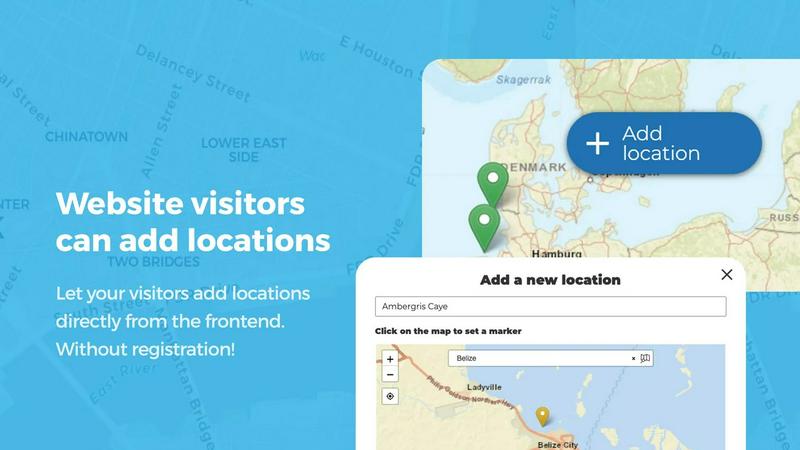
Let your visitors become map contributors with zero friction. They can click an Add Location button, drop a marker exactly where they want, and fill out the details. But you stay in control. Every submission hits your approval queue before going live, so no spam or garbage pollutes your map. Even better, users can edit their own existing locations later, meaning your map always has the freshest, most accurate data. It is crowd-sourcing without the chaos.
Marker Categories and Advanced Filtering
Stop drowning in a sea of random pins. Group your locations into slick marker categories, each with its own unique icon. Your visitors can then filter the map to see exactly what they want, whether it is restaurants, hiking trails, or event venues. Each location can even belong to multiple categories, so a coffee shop that also hosts live music shows up in both filters. It is organization that actually makes sense.
Lines, Areas, and Custom Image Maps
Go beyond boring pins. Open User Map lets you draw routes, paths, zones, and regions directly on your map. Highlight a running trail, mark a construction zone, or outline an event grounds. Distances and area sizes are calculated automatically, so your map is actually useful. And for the real flex, you can upload any image, a floor plan, a seating chart, a campus guide, and turn it into a fully interactive map with markers, custom fields, and filtering. It is next-level customization.
Advanced Filter Interface and Custom Fields
Create a filter sidebar that sits next to your map and lets visitors drill down by any custom field you configure. Add text boxes, links, checkboxes, and dropdowns to gather exactly the data you need. You can even inject custom HTML for branding or extra info. This is not just a map; it is a data collection machine that your users will actually want to interact with.
Use Cases of Open User Map
Community-Driven Local Business Directory
Build a killer directory where locals and visitors can add their favorite spots. A user drops a pin for a new taco joint, adds the hours, a link to their menu, and a photo. You approve it, and suddenly your map is the go-to guide for the best eats in town. With star ratings and upvotes, the best places rise to the top automatically. It is Yelp, but you own the data.
Interactive Event and Festival Maps
For conferences, music festivals, or community fairs, this plugin is a game changer. Upload a site layout image and let attendees drop pins for their favorite stages, food trucks, or restrooms. You can draw walking paths and mark VIP zones. The map becomes a real-time guide that everyone can contribute to, making the event smoother and more engaging for everyone involved.
Collaborative Travel and Adventure Guides
Create a map for hikers, cyclists, or road trippers where users can share their favorite trails, viewpoints, and hidden gems. Each location can include photos, difficulty ratings, and personal tips. The upvote feature lets the community highlight the best spots, and the approval workflow keeps out the junk. It is the ultimate tool for building a passionate, engaged community around shared adventures.
Property and Real Estate Showcasing
Real estate agents and property managers can let tenants or buyers add locations for available units, open houses, or neighborhood highlights. Use custom fields for price, square footage, and number of bedrooms. Draw boundaries around school districts or upcoming development zones. The map becomes a powerful, interactive listing tool that potential clients can explore on their own terms.
Frequently Asked Questions
Do I need a Google Maps API key to use Open User Map?
No way. That is the whole point. Open User Map works completely without a Google Maps API key. You do not need to set up billing, generate keys, or deal with any of that technical mess. Just install the plugin, and you are ready to roll. It is one of the biggest pain points that this plugin eliminates entirely.
How does the approval workflow work for user submissions?
It is simple and keeps you in the driver seat. When a visitor submits a new location, it goes straight to a moderation queue in your WordPress dashboard. You can review the details, edit them if needed, and then approve or reject the submission. Nothing goes live on your map until you say so, which means zero spam and full control over your content.
Can I use my own images as the map background?
Absolutely. This is one of the coolest features. You can upload any image, like a floor plan, a seating chart, an event layout, or a campus map, and turn it into a fully interactive map. Users can place markers on it, fill out custom fields, and filter locations just like they would on a traditional map. It is perfect for indoor spaces or custom layouts.
What kind of support and updates can I expect?
The plugin is actively maintained and regularly updated with new features. The free version is solid, but the PRO version gives you access to priority support and the full feature set. There is also a 7-day free trial for the PRO version with no credit card required, so you can test drive everything before you buy. The community is also very active, so help is never far away.
Similar to Open User Map


Free SEO Chrome Extension
Analyze any page instantly

Zalcro
The pre-build planning tool for vibe coders and AI builders. Start with a conversation about your idea, get paste-ready prompts for your coding tool

Xeramail Temp Mail
Free temp mail and temporary email from Xeramail — get a disposable email address instantly, no sign-up. Skip spam and use custom domains.

AI Web Maker
AI WebMaker is an all-in-one, AI-driven platform that completely automates website creation and Promotion

Techietribe AI
Everything your online business presence needs, minus the clutter.

Unifyca
Unifyca is the chaotic client site whisperer that audits, centralizes, and backs up your entire WordPress agency empire from scattered chaos to total.

Intlayer
Per-component i18n that’s type-safe, AI-powered, and visually editable so you ship faster with zero bloat.