

DocuExtractor
Transform your chaotic receipts and invoices into neat, structured data with DocuExtractor's lightning-fast AI magic.
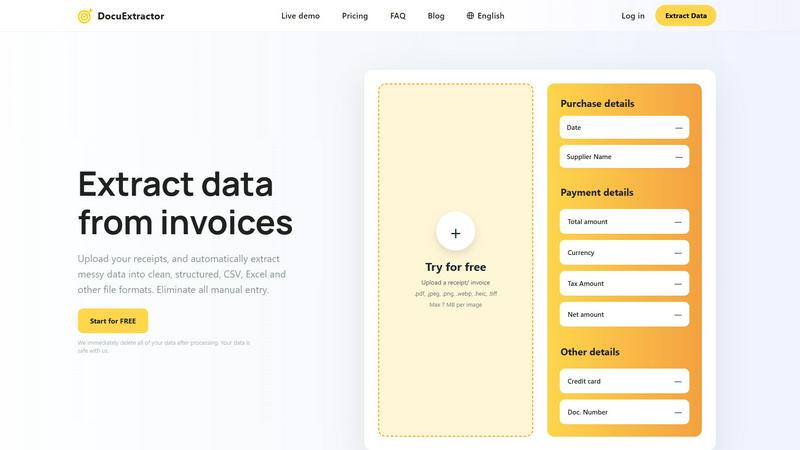
About DocuExtractor
Tired of drowning in a sea of crumpled receipts, blurry PDFs, and endless invoices? Say hello to DocuExtractor, your digital lifeguard in the chaotic waters of financial paperwork. This isn't just another converter; it's your AI-powered financial sidekick crafted to annihilate tedious manual data entry. Designed for the grind of accountants, bookkeepers, and finance pros, DocuExtractor harnesses a powerhouse combo of cutting-edge OCR, deep learning, and LLM (AI) to instantly transform your messy documents—receipts, invoices, bank statements, you name it—into pristine, structured data. Simply upload a batch, hit go, and watch it extract key details like dates, totals, supplier names, and tax amounts with insane 99.6% accuracy. The result? Clean, ready-to-use CSV or Excel files that slide perfectly into your accounting software, saving you hours of soul-crushing, error-prone typing every single week. It's fast, fully automated, and secure, with your data deleted post-processing. Stop wasting precious time on manual grind and start automating your financial workflow with DocuExtractor.
Features of DocuExtractor
Powerful Data Extraction
DocuExtractor employs cutting-edge Optical Character Recognition (OCR) paired with deep learning algorithms to accurately extract data from various document types, ensuring you receive structured information swiftly and efficiently.
Instant Conversions
Forget waiting around for conversions. With DocuExtractor, your documents are processed in seconds, allowing you to speed up your workflow and focus on what truly matters—growing your business.
Fully Automated Workflow
This platform is designed for ease of use. Just drag and drop your documents, and let the AI do the heavy lifting. No more tedious manual entry; it's all taken care of in a fully automated process that’s as easy as pie.
Enterprise-Ready Security
Your data security is paramount. DocuExtractor ensures enterprise-grade security measures are in place, and we immediately delete all of your data after processing, so you can rest easy knowing your information is safe with us.
Use Cases of DocuExtractor
Accountants and Bookkeepers
Accountants can streamline their workflow by uploading a batch of receipts and invoices directly into DocuExtractor. The extracted data can be seamlessly integrated into accounting software, saving countless hours each week.
Small Business Owners
Small business owners can utilize DocuExtractor to efficiently handle their financial documents. By automating data extraction, they can focus on scaling their business rather than being bogged down by paperwork.
Freelancers
Freelancers can benefit from DocuExtractor by easily managing their invoices and receipts. With accurate data extraction, they can ensure timely billing and expense tracking, freeing up time for creative work.
Financial Analysts
Financial analysts can utilize this tool to quickly extract data from various financial statements and reports. This allows them to analyze information faster and make data-driven decisions without being hindered by manual entry.
Frequently Asked Questions
How does DocuExtractor ensure data accuracy?
DocuExtractor utilizes advanced AI algorithms that achieve a remarkable 99.6% accuracy rate in data extraction. This ensures that the key information you need is extracted correctly the first time.
What types of documents can I upload?
You can upload a variety of document types, including receipts, invoices, bank statements, and more. Supported formats include PDF, JPG, PNG, and TIFF, among others.
Is my data safe with DocuExtractor?
Absolutely! Your data security is our top priority. We employ enterprise-grade security measures and delete all data post-processing to keep your information private and secure.
Can I process documents in different languages?
Yes! DocuExtractor supports over 45 languages, automatically detecting the language of your documents to ensure accurate data extraction regardless of the source language.
Explore more in this category:
Similar to DocuExtractor

AI Email Filter
AI Email Filter sorts incoming mail into folders using plain-language prompts you write. Works with any IMAP mailbox; bring your own LLM if you want.

Memwyre
Memwyre is an AI memory platform that gives every AI tool, agent, and conversation a persistent, shared memory you can search and reuse.

Escrozon
Escrow marketplace for buying and selling digital assets. The payment is held until the buyer confirms the handover.

Kody Tools
Free collection of online developer utilities, code formatters, and digital converters designed to streamline your daily workflow.

Map to GPS
Free GPX generator — draw a route on a map in your browser.


HomeAnswerBook
Practical, independent guides to home repairs, maintenance, costs, troubleshooting, and everyday fixes.

Seven Agence
Custom business software built around your company's workflows, replacing spreadsheets and disconnected tools with one centralized platform.