
Decode This Text vs DocuExtractor
Side-by-side comparison to help you choose the right AI tool.

Decode This Text
Decode This Text delivers swift, human-like insights to untangle your tricky conversations in just 30 seconds.
Last updated: February 28, 2026

DocuExtractor
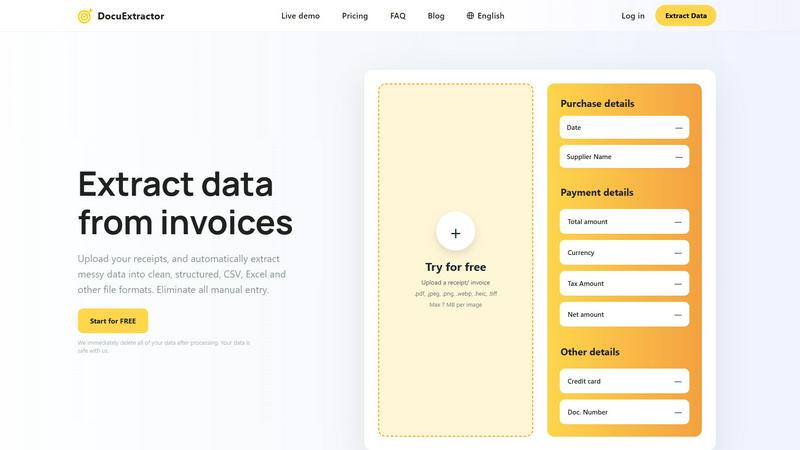
Transform your chaotic receipts and invoices into neat, structured data with DocuExtractor's lightning-fast AI magic.
Last updated: February 26, 2026
Visual Comparison
Decode This Text

DocuExtractor
Feature Comparison
Decode This Text
The Vault
Step into The Vault, your personal space to safely store and analyze past conversations. Keep track of your communication history and revisit insights anytime you need a refresher or a deeper understanding of your interactions. No more guessing games—get the clarity you deserve.
Quick Analysis
In just 30 seconds, you’ll get a comprehensive breakdown of any message. Paste it in, and let the tool dissect the words, tone, and timing. This feature ensures you’re not left on the edge of your seat, wondering what someone really meant. Clarity is just a click away.
Emotional Tone Detection
Not sure if they’re being sarcastic or serious? Our emotional tone detection feature measures the vibe of the conversation, helping you avoid potential misinterpretations. Understand the emotional temperature of messages and respond appropriately, ensuring your replies hit the right note.
Suggested Responses
Stuck on how to reply? No sweat! Decode This Text provides three tailored response options—calm, direct, or assertive. This feature empowers you to communicate effectively, whether you need to be diplomatic or straightforward, giving you the confidence to hit send without second-guessing.
DocuExtractor
Powerful Data Extraction
DocuExtractor employs cutting-edge Optical Character Recognition (OCR) paired with deep learning algorithms to accurately extract data from various document types, ensuring you receive structured information swiftly and efficiently.
Instant Conversions
Forget waiting around for conversions. With DocuExtractor, your documents are processed in seconds, allowing you to speed up your workflow and focus on what truly matters—growing your business.
Fully Automated Workflow
This platform is designed for ease of use. Just drag and drop your documents, and let the AI do the heavy lifting. No more tedious manual entry; it's all taken care of in a fully automated process that’s as easy as pie.
Enterprise-Ready Security
Your data security is paramount. DocuExtractor ensures enterprise-grade security measures are in place, and we immediately delete all of your data after processing, so you can rest easy knowing your information is safe with us.
Use Cases
Decode This Text
Professional Communication
Imagine receiving a one-word email from your boss. Is it frustration, indifference, or just their style? With Decode This Text, you can analyze that message and determine the best way to address your superior without stepping on toes.
Relationship Clarity
Ever got a text from your partner that left you scratching your head? Use this tool to decode their emotional tone and intentions, ensuring you respond in a way that fosters understanding and connection.
Friendships Under Scrutiny
When a friend suddenly goes silent after a chat, it can feel concerning. Decode This Text can help you assess whether they're truly busy or drifting away, providing insights that guide your next steps in maintaining that friendship.
Client Interactions
Navigating client relationships can be tricky, especially if their responses are vague. This tool analyzes their messages to reveal hidden meanings, helping you craft responses that keep the business relationship strong and clear.
DocuExtractor
Accountants and Bookkeepers
Accountants can streamline their workflow by uploading a batch of receipts and invoices directly into DocuExtractor. The extracted data can be seamlessly integrated into accounting software, saving countless hours each week.
Small Business Owners
Small business owners can utilize DocuExtractor to efficiently handle their financial documents. By automating data extraction, they can focus on scaling their business rather than being bogged down by paperwork.
Freelancers
Freelancers can benefit from DocuExtractor by easily managing their invoices and receipts. With accurate data extraction, they can ensure timely billing and expense tracking, freeing up time for creative work.
Financial Analysts
Financial analysts can utilize this tool to quickly extract data from various financial statements and reports. This allows them to analyze information faster and make data-driven decisions without being hindered by manual entry.
Overview
About Decode This Text
Decode This Text is your go-to tool for cutting through the communication fog and decoding those cryptic messages that leave you questioning everything. Whether it’s a vague email from your boss that makes you sweat, a text from a friend that feels like a riddle, or a message from a client that has you puzzled, this tool has your back. By simply pasting the conversation or describing the situation, you’ll receive a detailed analysis that reveals the true intentions, emotional undertones, and best responses. Designed for anyone looking to sharpen their communication skills, enhance relationships, and wipe out misunderstandings, Decode This Text is a game changer. With a slick, user-friendly interface and lightning-fast response times, you can engage with confidence, leaving behind the stress of overanalyzing every single word. Get ready to transform your interactions and navigate the tricky landscape of human communication like a pro.
About DocuExtractor
Tired of drowning in a sea of crumpled receipts, blurry PDFs, and endless invoices? Say hello to DocuExtractor, your digital lifeguard in the chaotic waters of financial paperwork. This isn't just another converter; it's your AI-powered financial sidekick crafted to annihilate tedious manual data entry. Designed for the grind of accountants, bookkeepers, and finance pros, DocuExtractor harnesses a powerhouse combo of cutting-edge OCR, deep learning, and LLM (AI) to instantly transform your messy documents—receipts, invoices, bank statements, you name it—into pristine, structured data. Simply upload a batch, hit go, and watch it extract key details like dates, totals, supplier names, and tax amounts with insane 99.6% accuracy. The result? Clean, ready-to-use CSV or Excel files that slide perfectly into your accounting software, saving you hours of soul-crushing, error-prone typing every single week. It's fast, fully automated, and secure, with your data deleted post-processing. Stop wasting precious time on manual grind and start automating your financial workflow with DocuExtractor.
Frequently Asked Questions
Decode This Text FAQ
How does Decode This Text ensure privacy?
Your conversations are 100% anonymous. No humans read your texts, so you can analyze your messages without worrying about your privacy being compromised.
Can I use images instead of text?
Absolutely! If typing isn't your thing, simply upload a screenshot of your chat. The tool will read and analyze the conversation for you, making it super convenient.
What type of messages can I analyze?
You can analyze any form of communication—texts, emails, or even social media messages. If it’s confusing, Decode This Text can help clarify it.
How quickly will I get my analysis?
You’ll receive your analysis in about 30 seconds. In the fast-paced world we live in, waiting around is a thing of the past; clarity is just a click away!
DocuExtractor FAQ
How does DocuExtractor ensure data accuracy?
DocuExtractor utilizes advanced AI algorithms that achieve a remarkable 99.6% accuracy rate in data extraction. This ensures that the key information you need is extracted correctly the first time.
What types of documents can I upload?
You can upload a variety of document types, including receipts, invoices, bank statements, and more. Supported formats include PDF, JPG, PNG, and TIFF, among others.
Is my data safe with DocuExtractor?
Absolutely! Your data security is our top priority. We employ enterprise-grade security measures and delete all data post-processing to keep your information private and secure.
Can I process documents in different languages?
Yes! DocuExtractor supports over 45 languages, automatically detecting the language of your documents to ensure accurate data extraction regardless of the source language.
Alternatives
Decode This Text Alternatives
Decode This Text is your go-to tool for breaking down the baffling messages that life throws your way. Falling under the productivity and management category, this innovative app delivers quick, human-like analyses that unveil the true intentions behind the words, helping you navigate through confusion with style. Users often seek alternatives due to factors like pricing, specific features, or platform compatibility that better fit their unique needs. When on the hunt for an alternative, consider the ease of use, response times, and the range of features each option offers. Look for tools that not only promise clarity but also enhance your communication skills and overall relationships. Choose wisely to ensure you’re equipped with the best option for decoding the complexities of modern conversation.
DocuExtractor Alternatives
DocuExtractor is your go-to tool for transforming chaotic financial paperwork into organized, structured data. As a powerhouse in the productivity and management category, it leverages AI technology to eliminate the tedious manual entry that drains your energy and time. Users often seek alternatives due to various reasons such as pricing concerns, feature sets that may not align with their needs, or compatibility issues with specific platforms. When scouting for a worthy contender, consider the accuracy of data extraction, the range of document types supported, user-friendliness, and whether it integrates seamlessly with your existing accounting software. Finding the right fit can make all the difference in streamlining your financial workflow and kicking those manual entry blues to the curb.