
Alternatives to RoomCreator
Explore the best alternatives and competitors to RoomCreator.
Explore 20 alternatives to RoomCreator. Compare features, pricing, and find the best fit for your needs.

VD6S
VD6S is a free online YouTube video downloader that supports HD, 4K and up to 8K downloads. Save videos in MP4 or audio in multiple formats.

Medrecords AI
Medical record review with cited chronologies, summaries and report drafts. Every line links to its source page. From 10 cents per deduplicated page.

AnyRedact
Free online auto redaction tool with AI for PDFs, images, Word, PowerPoint, Excel, text and audio. Files are never stored.
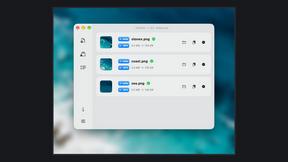
Zipic
Native image compression for Mac and Windows (Windows beta), with a local CLI and AI skill for automated image workflows.

ButterShare
Realtime peer-to-peer file transfer in the browser. Send files directly between devices, no account and no upload to a server.

Save X post
The easiest way to save X videos offline: no app to install and no account to create. Paste the link, choose HD or 4K, and the MP4 is yours.

Xobito
WhatsApp Business API platform with AI agents, automation, CRM, and broadcasts — one workspace to run support, sales, and marketing on WhatsApp.


Foreman
See every app and what it's using in plain English, and end or slow down the one that's hogging your Mac.

Dot & Dash
Learn Morse code on a machine you can press. Write and send messages, turn Morse into text and back, and key Morse in any app on your Mac.
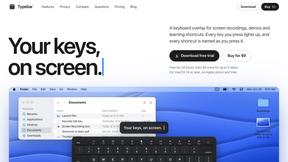
Typebar
Every key you press lights up on an on-screen keyboard, and each shortcut is named as you press it.

LightScreen
Free light screen tool online. Turn any display into a flashlight, ambient light, or solid-color screen. No download or sign-up.

PLRental
Rental agency software: scan a customer ID, get a signed contract in under a minute, and manage fleet, customers, and invoices.


Pixdok
PixDok is a browser-based toolkit for common document and image tasks without requiring desktop software installation.

Screen Issues
Free Online Screen Test Tool - Instantly diagnose dead pixels, lines, color issues, and flickering. Multiple test modes, no download needed.

Mainspring
Mainspring turns the settings macOS hides into 90+ one-click, fully reversible power-ups for Finder, Dock, screenshots and more. $29 once.

Crumb
A Mac menu bar app for a full disk. See what is using your space, read whether it comes back on its own, and remove only what you tick.

Everywhere
Fast file search for the Mac. Results as you type, files inside Mail and Photos, works with Wi-Fi off. $19 once.

About RoomCreator Alternatives
RoomCreator is your instant AI design genie, the app that transforms a single photo of your tired room into a stunning, realistic makeover in just ten seconds flat. It lives in the fast-paced world of AI interior design software, a category built for dreamers who want to skip the years of design school and get straight to the visual wow. This tool is all about speed, simplicity, and that instant gratification of seeing your space reimagined with new layouts, colors, and furniture without lifting a paintbrush. So why would anyone look beyond this magic? Even the coolest tools aren't a one-size-fits-all. Some users might hit a paywall and need a different pricing model, while power users might crave more advanced features or granular control over every cushion and corner. Others might need specific platform access or simply want to shop around in a booming market. When you're scouting for an alternative, keep your non-negotiables front of mind: think about your budget, the depth of customization you really need, whether you want to focus on interiors, exteriors, or both, and how important professional-grade outputs are versus quick, inspirational sparks.
FAQs about RoomCreator Alternatives
What is RoomCreator?
RoomCreator is a brilliantly simple AI-powered room design tool that generates stunning, realistic redesigns from a single photo in just 10 seconds. It's built for homeowners and DIY lovers with zero design skills who want to visualize smart layout changes, new color schemes, furniture swaps, and complete makeovers instantly. You simply upload a picture of your kitchen, bedroom, living room, or exterior and get a transformative preview before committing to any real-world purchases or renovations.
Who is RoomCreator for?
RoomCreator is crafted for everyday homeowners and DIY enthusiasts who want to reimagine their spaces without the complexity of traditional design software. It's perfect for someone planning a quick renovation, struggling with a small or awkward layout, or just wanting to test-drive bold ideas like a new exterior paint color or a full kitchen overhaul before spending a dime. If you want professional-looking design concepts without the skills, time, or budget for an interior designer, this is your tool.
Is RoomCreator free?
RoomCreator offers a free trial to let users experience its core AI magic and see the instant transformation of their own spaces. This allows you to test the waters, upload your photo, and generate those initial stunning redesigns to gauge its potential for your project. For ongoing, unlimited access to all its features and high-resolution outputs, you would explore their premium subscription plans.
What are the main features of RoomCreator?
The core power of RoomCreator is its 10-second AI redesign from a single photo, delivering smart layout suggestions that improve a room's flow and function. Key features include instant visualization of new wall colors, flooring, and furniture arrangements, specialized tools for kitchen and bedroom makeovers, an exterior paint color visualizer, and realistic 3D previews with natural lighting. The before-and-after comparison slider lets you instantly see the dramatic impact of your new design.