

Yaps AI
Yaps is your private AI sidekick that turns speech into text, connects your notes, and answers questions—all offline.
About Yaps AI
Yaps AI is a private, offline-first productivity tool for people who think faster than they type. It is a single app that combines dictation, AI-powered notes, conversational chat, and read-aloud features into one focused workspace. Designed for macOS, Windows, and Android, Yaps lets you capture ideas, emails, documents, and messages by simply speaking. Your speech is converted into clean, self-corrected text in about 300 milliseconds, landing wherever your cursor is. No cloud round-trip, no uploads, and no account required. Yaps is built for creators, writers, developers, and anyone who wants to build a lasting knowledge base without breaking their flow. Every dictation can be saved as a searchable Markdown note, organized as ordinary files, and connected using backlinks and wiki-links. You can ask your notes questions, get answers with citations, and have the AI read selected text back to you. On Android, Yaps includes a full keyboard with voice, tap, and glide typing, autocorrect, themes, and clipboard tools. All core workflows run privately and offline once local models are installed. This is your vault, not a chatbot guessing. Yaps is free forever, with no account needed, and it puts you in full control of your words and your knowledge.
Features of Yaps AI
Dictation to Any App
Hold a key, speak, and release. Yaps delivers clean, self-corrected text directly into any application where your cursor is active. Whether you are writing an email, coding, or taking notes, the dictation works at the speed of speech, with no delay and no cloud dependency. It is designed to keep you in flow, not break your momentum.
Connected Notes with Backlinks
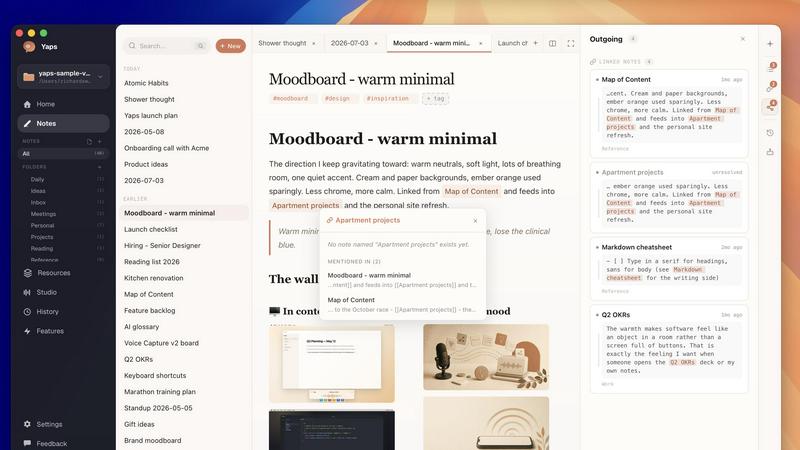
Yaps turns your dictations into a real second brain. Every note supports backlinks and wiki-links, weaving your ideas together automatically. You can connect related thoughts, revisit decisions, and build a web of knowledge that grows with you. Your vault is plain Markdown, fully yours, and fully searchable.
Conversational AI Chat with Your Notes
Ask a question, and Yaps answers from your own notes only. It never searches the open internet. The AI provides answers with citations back to the exact note, so you always know where the information came from. Compare files, reconnect ideas, and turn scattered knowledge into useful next steps.
Offline-First and Private
All core dictation, notes, AI chat, and read-aloud workflows run on your machine. Once local models are installed, Yaps works in airplane mode with no cloud round trip. Nothing is uploaded, no account is needed, and your data never leaves your device. Privacy is baked into the design, not an afterthought.
Android Keyboard with Voice Typing
On Android, Yaps includes a complete keyboard that supports voice, tap, and glide typing. It features autocorrect, customizable themes, and clipboard tools. Voice typing is fully on-device, so you can dictate into any app without sending your speech to a server.
Read-Aloud Audio Tools
Yaps can read selected text and saved material aloud. This helps you review work, absorb information, and stay productive when reading a screen is inconvenient. It is a built-in tool for multitasking and accessibility.
Use Cases of Yaps AI
Capturing Ideas on the Go
When inspiration strikes, you do not have time to type. Yaps lets you dictate ideas, thoughts, and observations instantly. You can save them as voice notes or clean text, then organize them later. This is perfect for brainstorming sessions, meetings, or moments of clarity during a commute.
Building a Personal Knowledge Base
Every dictation can become part of a searchable Markdown knowledge base. You can save voice notes, web pages, and your own writing as plain files. With backlinks and wiki-links, you can connect ideas across projects, revisit decisions, and build a living repository of your thinking.
Drafting Emails and Documents Hands-Free
Professionals who need to write fast can dictate emails, reports, and documents directly into their preferred applications. Yaps works with any app, so you can compose without touching a keyboard. This is ideal for busy managers, writers, and developers who want to maintain momentum.
Asking Questions and Getting Answers from Your Notes
Instead of searching through folders, you can ask Yaps questions about your saved content. The AI scans your notes and returns answers with citations. Use this to recall decisions from past meetings, compare information across files, or reconnect related ideas. It turns information into action.
Frequently Asked Questions
How does Yaps ensure my data stays private?
Yaps is designed as an offline-first application. All core workflows, including dictation, notes, AI chat, and read-aloud, run on your machine once local models are installed. Nothing is uploaded to a cloud server, no account is required, and your data never leaves your device. You are in full control.
Does Yaps require an internet connection to work?
No. Yaps works offline and is ready for airplane mode. After you install the local models, you can dictate, search your notes, chat with AI, and use read-aloud features without any internet connection. There is no cloud round-trip for dictation or AI processing.
What platforms does Yaps support?
Yaps is available for macOS, Windows, and Android. You can download it free for Windows and Mac, or get it on Android via the Google Play Store. iOS support is coming soon. The app also offers a Homebrew installation option for macOS users.
Can I use Yaps to dictate into any application?
Yes. Yaps dictation works by holding a key, speaking, and releasing. The clean, self-corrected text appears wherever your cursor is active, including in notes, email clients, code editors, and messaging apps. It is designed to be universal and non-disruptive.
Is Yaps really free?
Yes. Yaps is free forever with no account needed. There are no hidden costs, no subscription tiers, and no data caps. You can download the app and start using all its core features immediately without paying anything.
Pricing of Yaps AI
Yaps is free forever. No account is required. You can download the app for macOS, Windows, or Android and use all core features including dictation, connected notes, AI chat, read-aloud, and the Android keyboard without any cost. There are no subscription plans, no usage limits, and no hidden fees.
Explore more in this category:
Similar to Yaps AI

@fuck.it - email with attitude
Private email. Pure. Secure. Exclusive. No ads, no tracking, no data selling. GDPR compliant, EU-hosted.

xfiles
PDFs, images and audio. No uploads. No account. No added watermarks.

FreeVideoGenerator
Free AI video generator: turn text prompts and photos into video clips with Sora 2, Veo 3.1, Wan and more. Free starter credits, no watermark download


VidhyaGen - Image Converter
All-in-one web platform for fast image conversion, compression, editing, and essential digital file utilities in one easy interface.

SEO for SaaS
Cited, fact-checked SEO articles for SaaS and app founders, published to your blog and rewritten when they lose clicks.

Flip a Coin
Free online coin flip, yes/no, dice, spin wheel & random number tools. No signup, truly random, works instantly on any device.

sakuttoAI
A free suite of online tools for everyday tasks like PDF compression, image conversion, text diff and CSV to Excel.