

Transcriptor Pro
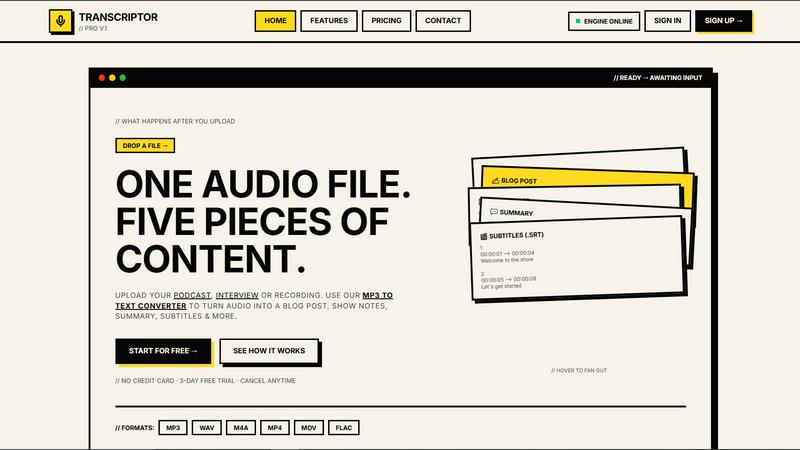
Drop one audio file and get five pieces of content instantly with studio-grade AI transcription.
About Transcriptor Pro
Transcriptor Pro is the AI-powered transcription platform that turns your audio and video files into five pieces of content from a single upload. It is built for creators, teams, journalists, and businesses who are tired of wasting hours on manual transcription and content repurposing. Drop in an MP3, MP4, WAV, MOV, or FLAC file, and the engine delivers studio-grade transcripts with 99.4% accuracy in under two minutes per hour of audio. But this is not just a speech-to-text tool. Transcriptor Pro is a full content generation machine. It auto-labels every speaker, provides word-level timestamps, and lets you chat with your transcript to extract key insights instantly. Beyond the raw text, the platform uses AI to generate summaries, blog posts, show notes, and subtitles. It supports over 40 languages with zero configuration required. Whether you are a podcaster turning episodes into SEO articles, a journalist transcribing Zoom interviews, or a team handling batch uploads, Transcriptor Pro transforms your recordings into actionable, publish-ready content. No credit card is required to start, and the 3-day free trial gives you full access to all features. Cancel anytime. This is the fastest way to go from one audio file to a full content ecosystem.
Features of Transcriptor Pro
Instant Transcription with 99.4% Accuracy
Upload any audio or video file, from MP3 to FLAC, and get a clean, timestamped transcript in under two minutes per hour of recording. The AI engine delivers studio-grade accuracy at 99.4%, handling background noise, accents, and multiple languages without breaking a sweat. You do not need to configure anything. Just drop the file and the text appears. This is the fastest MP3 to text converter you will find, designed for creators who ship content daily and cannot afford to wait around.
Speaker Identification with Auto-Labeling
Transcriptor Pro automatically detects and labels every speaker in your recording. No manual tagging, no guessing who said what. Whether it is a two-person interview, a six-person panel, or a chaotic corporate meeting, the AI separates voices and assigns clear labels like Speaker 1, Host, or Guest. This feature is specialized for Zoom meeting transcription and podcast interviews, giving you a clean, readable transcript that makes editing and quoting effortless. Know who said what instantly.
Chat with Your Transcript
After transcription, the fun begins. You can ask your transcript anything. Type a question like, "What were the three main points?" or "Find every time the guest mentioned pricing" and the AI scans the entire document to give you precise answers. Your transcript becomes a searchable, queryable knowledge base. This is not just a static text file. It is a living document you can interrogate for insights, quotes, and data. Perfect for journalists, researchers, and content teams who need to extract value fast.
AI Content Repurposing Engine
One upload gives you five pieces of content. Transcriptor Pro automatically generates a full SEO blog post, professional show notes with timestamps, a structured summary with key takeaways, and subtitles in SRT or VTT format. The blog post is formatted with headings and paragraphs, ready to publish. The show notes include topic breakdowns and key quotes. The summary gives you the TL;DR in one click. Stop spending 30 minutes writing episode summaries or repurposing content manually. This AI does it in seconds.
Use Cases of Transcriptor Pro
Podcasters Turning Episodes into Content Gold
Podcasters can upload a single episode and instantly get a transcript, blog post, show notes, summary, and subtitles. This means you can publish a full SEO-optimized article on your website, post professional show notes on your podcast host, create social clips from key quotes, and add captions to your video version. All from one upload. No more spending hours writing show notes or hiring a transcriber. Transcriptor Pro handles the grunt work so you can focus on recording and engaging with your audience.
Journalists Transcribing Interviews in Real Time
Journalists and reporters can transcribe Zoom interviews, phone calls, or in-person recordings with automatic speaker labels. The word-level timestamps let you click any word and jump to that exact moment in the audio for verification. You can then chat with the transcript to find specific quotes or topics. Export the final text as TXT, DOCX, or copy it straight to your clipboard. This tool turns hours of interview audio into searchable, citable, and editable text in minutes. No more rewinding tapes or guessing who said what.
YouTubers Boosting SEO with Transcripts
YouTubers can upload their video files and get accurate transcripts with timestamps. These transcripts can be exported as SRT subtitles for captions or embedded directly into the video description for SEO. Search engines love transcript-rich pages, and Transcriptor Pro makes it easy to rank higher. The AI also generates a blog post from your video, giving you a second piece of content for your website. One upload feeds your YouTube channel, your blog, and your social media strategy.
Corporate Teams Handling Batch Meeting Transcriptions
Businesses and teams handling multiple weekly meetings, client calls, or training sessions can upload batch files and get consistent, accurate transcripts every time. The speaker identification feature is perfect for Zoom meeting transcription, ensuring every participant is labeled correctly. The chat feature lets team members ask specific questions about past meetings without rewatching the entire recording. Export in CSV or JSON for integration with CRM or project management tools. This is the ultimate tool for teams who need to archive, search, and repurpose their spoken content.
Frequently Asked Questions
What file formats does Transcriptor Pro support?
Transcriptor Pro supports MP3, WAV, M4A, MP4, MOV, and FLAC. You can upload audio files from podcasts, interviews, or voice memos, as well as video files from YouTube, Zoom recordings, or your phone. The AI engine handles all these formats without any conversion needed. Just drag and drop your file and the platform does the rest.
How accurate is the transcription?
The AI delivers studio-grade accuracy at 99.4%. This is achieved through advanced speech recognition models that handle background noise, multiple speakers, accents, and different recording qualities. For the best results, upload clean audio with minimal background noise. The platform also provides word-level timestamps so you can verify and edit any section manually if needed.
Can I use Transcriptor Pro for languages other than English?
Yes. Transcriptor Pro supports over 40 languages including Spanish, French, German, Arabic, Hindi, Urdu, Japanese, Portuguese, Chinese, Korean, Italian, Russian, Dutch, Turkish, Polish, Swedish, and Romanian. You do not need to configure anything. Just upload your file in any supported language and the AI automatically detects and transcribes it. This makes it a global tool for international teams and creators.
What can I do with the generated content?
You can export your transcript in TXT, DOCX, SRT, VTT, CSV, and JSON formats. The blog post and show notes are ready to copy and paste into your website or podcast host. The subtitles can be uploaded directly to YouTube or video editing software. You can also chat with your transcript to extract key points, quotes, or action items. The content is yours to use, edit, and republish however you want.
Explore more in this category:
Similar to Transcriptor Pro


gamespadtesterpro.com
Test your controller online for free with Gamepad Tester Pro. Check PS5, PS4, Xbox, Nintendo Switch and PC gamepads for buttons, sticks, triggers, vib

Map to GPS
Free GPX generator — draw a route on a map in your browser.

SnitchFeed
SnitchFeed is an agentic social listening tool that surfaces high-intent conversations on LinkedIn, X, Hackernews, and more for GTM and product teams.


AutoDM
AutoDM is an Instagram automation platform for creators, businesses, and online sellers.


Y-Line
Y-Line is the ultimate CRM that handles all scheduling, automated reminders and analytics for your business - so you can focus on your clients