

SkipBait
SkipBait is your YouTube cheat code, serving up instant timestamped summaries, actionable to-dos, and a web-savvy AI chat so you can skip the fluff.
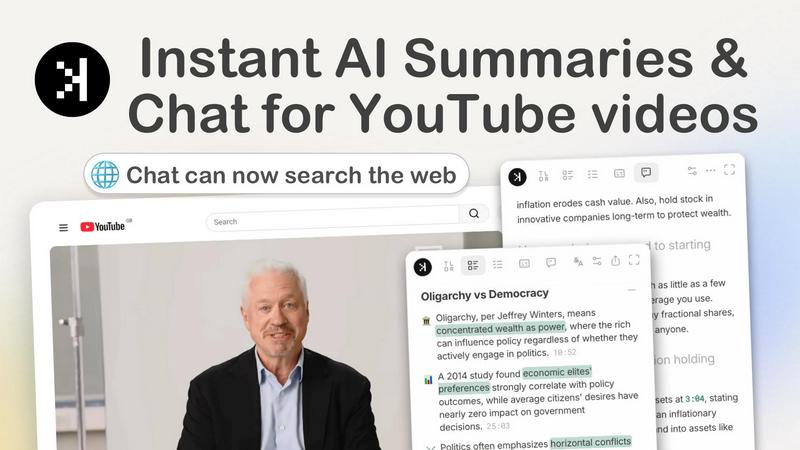
About SkipBait
SkipBait is a savage Chrome extension that turns your YouTube doom-scrolling into actual productivity. It is an AI-powered tool that summarizes any YouTube video and helps you save hours on long videos without leaving YouTube. Open any video, click summarize, and get an honest title, TLDR, timestamped outline, and scannable actionable insights, each grounded with clickable timestamps that jump to the exact moment. This tool is built for students, researchers, professionals, and lifelong learners who are tired of wasting time on fluff content. SkipBait does not just scrape the transcript like every other basic summarizer. It uses real-time web search to answer your questions, so when a video mentions a claim, a person, or a study you want to fact-check, you just ask the AI and get grounded answers without switching tabs. For dense videos like health podcasts, lectures, or tech deep-dives, SkipBait pulls every actionable recommendation into a scannable, timestamped list that you can actually use. You can also search the full transcript, translate it into 20+ languages, and copy, export, or share the entire summary bundle in one click. Stop just watching and start engaging with the content that actually matters.
Features of SkipBait
Honest Title and TLDR
SkipBait cuts through the clickbait and gives you an honest title and a one-sentence summary that tells you exactly what the video is really about. No more sitting through five minutes of intro fluff to realize the video is useless. This feature lets you glance at the summary and decide in seconds whether the content is worth your time, saving you from hours of regret.
AI Breakdown with Timestamped Outline
Get a topic-by-topic breakdown of any video, with each point linked to an exact timestamp that jumps you to the moment the topic is discussed. This is perfect for long-form content like documentaries, lectures, or podcasts. You can skip straight to the parts that matter without scrubbing through the timeline like a caveman. The AI organizes the entire video into a clean, scannable outline.
AI Chat with Web Search
This is the feature that makes SkipBait different from every other YouTube summarizer. Instead of just searching the transcript for answers, the AI chat searches the web in real time to answer your questions. When a video mentions a controversial claim or a person you want to explore, you just ask the chat and get answers grounded in online sources, not hallucinations. No tab-switching required.
Actionable To-Dos and Recommendations
SkipBait turns what the speaker says into grounded recommendations and to-dos that you can actually act on. For dense videos like health podcasts, tutorials, or business talks, the AI extracts every actionable piece of advice and presents it in a scannable list with timestamps and quotes. You walk away with a checklist of things to do, not just a vague memory of what was said.
Searchable Transcripts in 20+ Languages
Get the full transcript of any video and translate it into over 20 languages. The transcript auto-scrolls as the video plays, so you can read along or jump to specific sections. You can also search the transcript for keywords, making it easy to find specific moments without watching the entire video again. Copy, export, or share the transcript in one click.
Use Cases of SkipBait
Students Turning Lectures into Notes and PDF Exports
Students can use SkipBait to instantly summarize long lecture videos, get timestamped outlines of key topics, and export the entire summary bundle as a PDF for study notes. Instead of spending hours rewatching lectures, students get a clean, organized breakdown of everything they need to know, complete with actionable takeaways and searchable transcripts.
Researchers Screening Documentaries and Videos
Researchers who need to screen multiple documentaries or long-form videos can use SkipBait to get instant summaries and AI breakdowns. The timestamped outline lets them jump to specific sections of interest, while the AI chat with web search helps them fact-check claims and explore related topics without leaving the video. This cuts research time from hours to minutes.
Professionals Keeping Up with Industry Podcasts
Busy professionals can stay on top of industry podcasts and thought leadership content without listening to every minute. SkipBait gives them an honest TLDR and actionable insights that they can scan in seconds. They can also ask the AI chat follow-up questions about specific strategies or tools mentioned in the podcast, getting web-grounded answers instantly.
Lifelong Learners Who Want Answers Beyond the Video
Lifelong learners who watch educational content can use SkipBait to go deeper than the video itself. The AI chat with web search lets them ask questions about concepts, historical context, or related topics, getting answers that pull from the entire internet, not just the transcript. This transforms passive watching into an interactive learning experience.
Frequently Asked Questions
What is SkipBait?
SkipBait is a Chrome extension that generates AI summaries, gets transcripts, and allows you to chat with YouTube videos using AI. The chat includes web search so answers are based on both the video's content and online sources, not just the transcript alone. It works on any Chromium-based browser like Chrome, Brave, Edge, Arc, Opera, and Vivaldi.
Is SkipBait free to use?
Yes, the free tier includes 2 AI summary bundles daily, unlimited transcripts, and a monthly quota of chat messages and translations. This gives you plenty of access to test the tool and see if it fits your workflow before considering any paid upgrades.
How do I start using SkipBait to summarize YouTube videos?
Install SkipBait from the Chrome Web Store, then visit any YouTube video page. The extension will appear on the page, and you can click the summarize button to get an instant summary, transcript, and AI breakdown. You can also start chatting with the video immediately from the side panel.
Does SkipBait work on long YouTube videos?
Yes, SkipBait works on long YouTube videos as long as the video has usable transcript data. Live streams or videos without transcripts may not be supported, but the vast majority of YouTube content with captions will work perfectly. The AI handles hours-long podcasts and lectures with ease.
Pricing of SkipBait
SkipBait offers a free tier that includes 2 AI summary bundles daily, unlimited transcripts, and a monthly quota of chat messages and translations. This allows users to try the core features without any upfront cost. For users who need more summaries, chat messages, or translations, there may be paid upgrade options available, but the free tier provides substantial value for casual and moderate users.
Explore more in this category:
Similar to SkipBait

Easemic
Free open-source Android comic & manga cloud reader streaming encrypted libraries from S3, WebDAV & OPDS.

CloneWebsite
Clone any webpage pixel-perfect, export HTML/CSS/ZIP or React/Vue components.

GenX
All-in-one AI workspace to generate images, videos, and audio with multiple leading AI models.

Uniclip
Clip pages, take full-page screenshots and batch-capture list data to Notion, Feishu, Obsidian, Markdown, CSV or JSON.

TroveKey
Search tabs, Chrome bookmarks and history, run browser commands, and save webpages and social posts locally—no account.


KS-Agents
Measure climate, talent and skills with validated surveys, 360° feedback and AI interviews, and turn the data into decisions HR can defend.

Bloom
An adaptive AI tutor that turns topics or your materials into courses, lessons, and answers tailored to how you learn.