

SeeCalc
SeeCalc blasts marketing math into the future with free, private, reverse-solving calculators that crunch the numbers instantly.
About SeeCalc
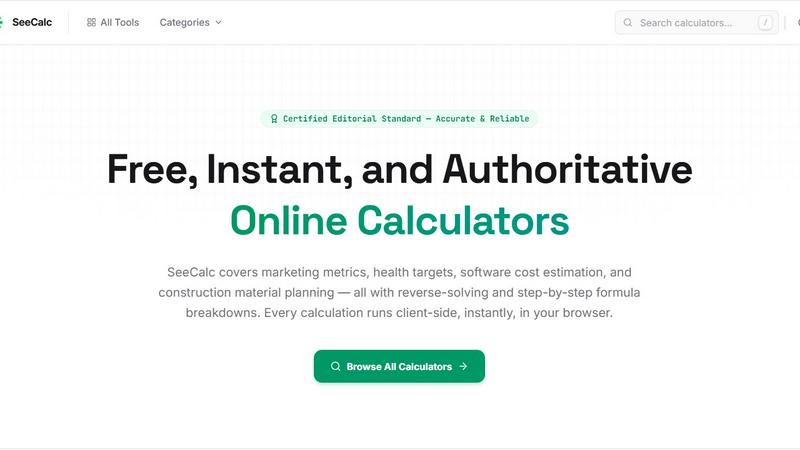
SeeCalc is the brainchild of a solo developer who got sick of bloated, slow, and shady online calculators that sell your data or hide the math. This platform is a straight-up arsenal of 56+ free, instant, and authoritative calculators covering everything from marketing metrics and health targets to software cost estimation and construction material planning. It is built for the modern hustler, marketer, freelancer, small business owner, or DIY warrior who needs fast answers without the fluff. Every single calculation runs 100% client-side in your browser, meaning your data never touches a server. That is next-level privacy. SeeCalc’s main value proposition is transparency: every tool shows you the exact formula, offers step-by-step breakdowns, and lets you reverse-solve for any variable. No black boxes, no guesswork. It is built by one passionate dev for the people who need real, authoritative math, instantly. Whether you are calculating CPM for a campaign, your daily water intake, or the cost to build an app, SeeCalc gives you the raw power of a calculator with the clarity of a textbook. It is fast, it is free, and it is built to stay that way.
Features of SeeCalc
Reverse-Solving on Every Tool
This is not your grandma's calculator. Every tool in SeeCalc lets you flip the script. Instead of just plugging in numbers to get one result, you can reverse-solve for any variable in the formula. Need to know what ad spend gets you a specific CPM? Done. Want to find the hours needed to hit a dev budget? Easy. This feature turns a simple calculator into a full-on problem-solving machine, saving you time and mental energy.
100% Client-Side Privacy
Your data is your business, literally. SeeCalc runs all calculations directly in your web browser using JavaScript. That means zero data is sent to any server, ever. No cookies, no tracking, no selling your info to third parties. For marketers working on sensitive campaign budgets or developers pricing out confidential projects, this is a non-negotiable feature. It is math in a bubble, and that bubble is your browser.
Step-by-Step Formula Breakdowns
SeeCalc does not just give you the answer; it shows you how it got there. Every tool includes a clear, human-readable breakdown of the formula used, including the exact values you entered. This is a game-changer for learning, auditing your work, or explaining your numbers to a client or boss. You are not just getting a number; you are getting the full math lesson, instantly.
Specialist Domain Hubs
SeeCalc organizes its 56+ tools into 12 specialist domains like Marketing, Health, Dev Cost, Construction, and Finance. Each hub is a dedicated resource with industry-standard formulas, worked examples, and relevant FAQs. This structure makes it dead simple to find the exact tool you need without wading through a mess of irrelevant calculators. It is like having a dozen expert consultants in your pocket.
Use Cases of SeeCalc
Instant Campaign Budgeting for Digital Marketers
A media buyer needs to quickly calculate the required ad spend to achieve a target CPM for a new campaign. Instead of fumbling with spreadsheets, they open SeeCalc's CPM calculator, enter their desired CPM and expected impressions, and instantly get the budget. They can also reverse-solve to see how many impressions they can get with a fixed budget. The step-by-step breakdown helps them explain the math to their client in seconds.
Personal Health and Hydration Tracking
A health-conscious individual wants to dial in their daily water intake based on their body weight. They use SeeCalc's Water Intake Calculator, which uses the clinically recognized 0.67 fl oz per pound formula. They input their weight, and the tool outputs their goal in fluid ounces, liters, and glasses. The reverse-solve feature lets them see what weight a specific intake level corresponds to, helping them set informed hydration goals.
Estimating Software Development Costs
A startup founder is getting quotes from dev agencies and needs a quick sanity check. They use SeeCalc's App Development Cost calculator. They input estimated hours and hourly rate, and the tool spits out the total cost, including a buffer for unexpected work. They can also reverse-solve to see how many hours they can afford with a fixed budget. This gives them instant leverage in negotiations and prevents budget blowouts.
Construction Material Planning for DIY Projects
A homeowner is planning to build a brick wall in their backyard. They need to know how many bricks to buy. Using SeeCalc's Construction Calculator, they input the wall dimensions and brick size. The tool instantly calculates the total brick count and material cost. The step-by-step formula breakdown shows them exactly how the area and brick coverage are calculated, ensuring they order the right amount and avoid costly trips back to the hardware store.
Frequently Asked Questions
Are the calculations on SeeCalc really free to use?
Yes, every single calculator on SeeCalc is completely free to use. There are no hidden paywalls, subscription fees, or limits on the number of calculations you can run. The entire platform is built and maintained by a solo developer who believes that essential math tools should be accessible to everyone, without any financial barriers.
How do I know the formulas used are accurate?
SeeCalc prioritizes transparency and authority. Every tool displays its exact formula, and the calculations are based on industry-standard, clinical, or evidence-based formulas. The developer actively maintains the platform to ensure accuracy. You can verify the math yourself by looking at the step-by-step breakdown provided with every result.
How does client-side privacy protect my data?
Client-side privacy means all calculations are performed directly within your web browser using JavaScript. Your data is never sent to, stored on, or processed by any external server. This protects sensitive information like campaign budgets, personal health data, or proprietary project costs from being intercepted, logged, or sold by third parties.
Can I use SeeCalc on my mobile phone?
Absolutely. SeeCalc is built as a responsive web application that works seamlessly on any device with a modern web browser, including smartphones and tablets. The interface is designed to be clean and functional on smaller screens, so you can get your answers on the go, whether you are at a job site, in a meeting, or at home.
Explore more in this category:
Similar to SeeCalc

xfiles
PDFs, images and audio. No uploads. No account. No added watermarks.


Turbotools
Free online web tools: PDF converter, image compressor, word counter, text reverse, JSON formatter & generator. 100% free with no sign-ups!

Ecommerce Data API
Amazon research data APIs for developers, sellers and AI agents. Integrate product, keyword and market research through REST APIs and MCP.

sakuttoAI
A free suite of online tools for everyday tasks like PDF compression, image conversion, text diff and CSV to Excel.

BlazePhoenix
On-chain DEX aggregator: the swap route is computed inside the transaction that executes it. No API key, no signup.


Zalcro
The pre-build planning tool for vibe coders and AI builders. Start with a conversation about your idea, get paste-ready prompts for your coding tool