

ProcessSpy
ProcessSpy is your ultimate Mac sidekick, slicing through system noise to give you pro-level process intel with zero bloat.
About ProcessSpy
Tired of macOS Activity Monitor giving you the silent treatment? It's like a bouncer at a club who won't tell you who's inside or what they're up to. Enter ProcessSpy – your all-access backstage pass to the gritty underbelly of your Mac. This is the native, no-compromise process explorer that macOS power users and developers have been craving. Built from the ground up for macOS, it ditches the bloat of cross-platform frameworks to deliver a slick, fast, and deeply integrated experience. Think of it as the Sysinternals Process Explorer for the Mac, but with that signature Apple polish. Whether you're a developer debugging a rogue Java app, a sysadmin hunting down resource hogs, or just a curious user who wants to know exactly what every process is doing, ProcessSpy pulls back the curtain. It visualizes process hierarchies, inspects open files and connections, and lets you terminate stubborn apps with extreme prejudice. With advanced features like JavaScript filtering, regex search, and detailed historical tracking, it transforms vague system anxiety into crystal-clear control. Stop guessing and start knowing.
Features of ProcessSpy
Advanced Process Tree & Aggregate Intel
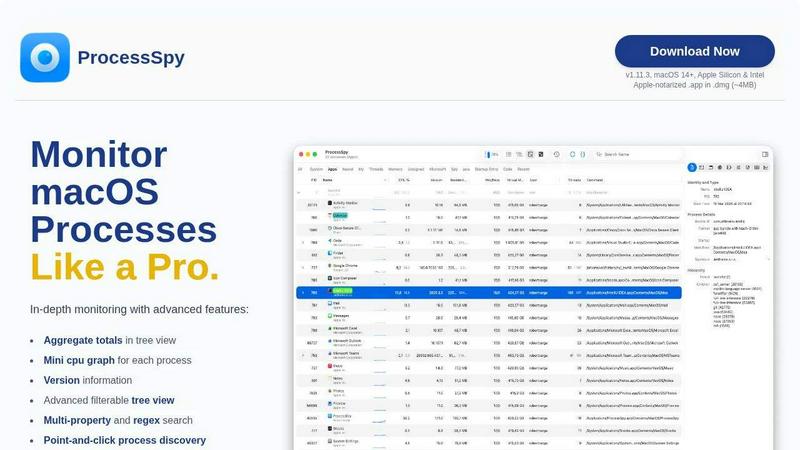
ProcessSpy doesn't just list processes; it maps the entire dynasty. Its hierarchical tree view shows you exactly who spawned who, revealing the hidden relationships between apps, daemons, and agents. The real magic? Aggregate totals. See the combined CPU, Memory, and Thread usage of an entire application family at a glance. No more mental math – instantly identify which app tree is hogging your resources, not just a single innocent-looking leaf process.
Surgical-Strike Search & JavaScript Filters
Forget basic name searches. ProcessSpy's quick-search bar is a power tool that supports multi-property hunts and full regular expressions. Hunt for processes with "node" in the name AND a specific port in its arguments. But the real flex? JavaScript Filters. Write custom logic to create insanely specific filters based on any process property. Tag all processes using more than 10% CPU that started in the last 5 minutes? Done. This is query-level precision for your system's activity.
Forensic-Grade Process Inspection
Click on any process and go deep. ProcessSpy exposes what Apple hides: the full command-line path, version information right in the main table, and open files/network connections. Unlock the paid features, and you get the full forensic suite: inspect entitlements, Info.plist contents, environment variables, code signatures, and even what launched it. It's like having X-Ray vision and a lie detector test for every single thing running on your Mac.
Process History & Post-Mortem Analysis
ProcessSpy has a memory. With the paid version, it records historical data for CPU, Memory, and Threads, letting you replay resource spikes and export timelines to CSV. Even cooler? It remembers finished processes. That app that crashed mysteriously an hour ago? You can still review its command line, env vars, and resource history. It even shows a countdown until the data is purged. This turns transient system events into debuggable, analyzable artifacts.
Use Cases of ProcessSpy
Debugging "Ghost" Resource Hogs
Your Mac's fans are screaming, but Activity Monitor shows nothing obvious. Fire up ProcessSpy, sort by the aggregate CPU/Memory tree view, and you'll instantly see the true culprit – maybe a hidden child process of your browser or a runaway indexing daemon. The mini CPU graphs per process give you a live visual cue, allowing you to pinpoint and annihilate the phantom resource drain in seconds.
Developer Environment Sleuthing
Juggling multiple Java, Python, or Node versions? Activity Monitor just shows "java". Useless. ProcessSpy displays the full path and version, so you can instantly tell which JDK 11 vs. JDK 17 process belongs to which project. Check environment variables to see loaded configs and use the powerful search to find all processes using a specific library or command-line flag. It cuts through the dev environment chaos.
Security & Privacy Auditing
What is that weird "helper" process running? Who launched it? ProcessSpy lets you audit everything. Inspect signatures and entitlements to verify legitimacy. See all open network connections and files to understand what data it's accessing. Use JS filters to flag unknown or unsigned processes automatically. It's an essential tool for the privacy-paranoid and security-conscious to maintain a clean digital house.
Cleaning Up Stubborn Apps & Login Items
An app won't quit? Find its main process and its entire entourage of helpers and agents in the tree view and force-kill the whole lineage. Use the "Launched By" info (paid) to trace a pesky process back to its source startup item (Launch Agent/Daemon), so you can disable it for good. It's the ultimate tool for surgically removing software residue and keeping your boot process clean.
Frequently Asked Questions
Is ProcessSpy safe to install on my Mac?
Absolutely. It's not some sketchy download from a random forum. ProcessSpy is Apple-notarized and distributed as a signed .app inside a .dmg file. This means Apple has scanned and verified it for known malware. It runs natively and efficiently on both Intel and Apple Silicon Macs without any shady cross-platform layers.
What's the deal with the free vs. paid features?
The core app is free and massively more powerful than Activity Monitor. The one-time license ($24.99) unlocks the pro-tier forensic toolkit: Process History Recording, remembering finished processes, viewing Environment Variables, Entitlements, Signatures, and advanced launch context. It's a lifetime license for unlimited devices, paying for deep, persistent system insight.
Does it work on older versions of macOS?
ProcessSpy is built for the modern Mac stack. It officially supports macOS 14 (Sonoma) and newer, including the latest macOS 26 Tahoe. It leverages newer native APIs for performance and features, so it's not built for legacy systems. Always check the website for the latest compatibility info.
How does it compare to the built-in Activity Monitor?
It's not a comparison; it's an annihilation. Activity Monitor is a basic dashboard. ProcessSpy is a diagnostic and forensic lab. We show full command lines, paths, versions, and hierarchies. We offer regex/JS search, aggregate resource views, and deep inspection capabilities that Apple simply doesn't provide. See the detailed feature comparison table on our site – it's a clean sweep.
Pricing of ProcessSpy
ProcessSpy offers a powerful free version with core exploration features. A one-time Professional License is available for $24.99. This lifetime license unlocks all advanced features (Process History, Environment Variables, Entitlements view, etc.), includes all future updates, and can be used on unlimited devices for a single user. You can purchase it directly via Gumroad.
Similar to ProcessSpy

BlazePhoenix
On-chain DEX aggregator: the swap route is computed inside the transaction that executes it. No API key, no signup.

SightRadar
Face recognition API, a drop-in replacement for AWS Rekognition. Index, search, compare and detect faces, billed per photo with no subscription.


AFFLIGO
AFFLIGO brings free online PDF, image, video, text, and calculator tools together to make everyday digital tasks easier.


TrueProxies
Premium Residential & Datacenter Proxies with 15M+ IPs

Sprite Sheet Maker
A free browser-based toolkit for creating, cutting, converting, and previewing sprite sheet animations.