

JustPDF
JustPDF is your go-to, privacy-first PDF toolkit that lets you merge, compress, and convert files effortlessly—all without leaving your browser.
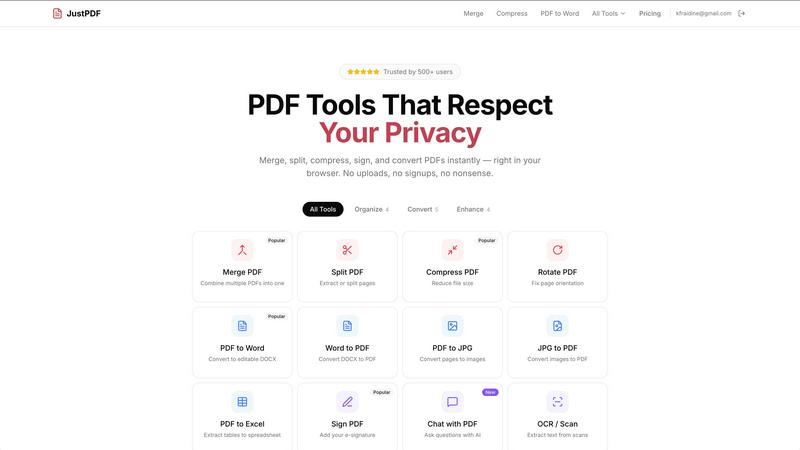
About JustPDF
Welcome to the future of PDF management with JustPDF, the ultimate browser-based toolkit that’s about to revolutionize your document game! Forget the hassle of uploading your sensitive files to the cloud; JustPDF keeps everything local, processing your PDFs right in your browser using cutting-edge JavaScript and WebAssembly technology. No more worries about privacy or data breaches! Whether you're a student, a busy professional, or anyone who deals with PDFs, JustPDF has got your back with 17 powerful tools designed to make your life easier. Merge, split, compress, convert, and even sign PDFs without ever leaving your device. The icing on the cake? It’s free for casual users with a generous limit of three operations per day, and if you want to go all out, the Pro version starts at just $4 a month for unlimited access. Plus, it’s FERPA-compliant, making it perfect for educational use. Get ready to unleash the full potential of your PDFs without compromising on speed, privacy, or price.
Features of JustPDF
Merge PDF
Combining multiple PDFs into one seamless document has never been easier! Just drag and drop your files and watch as JustPDF works its magic, merging them into a single, tidy package. Perfect for organizing reports, presentations, and all those scattered documents into one cohesive file.
Compress PDF
Need to shrink those hefty PDF files down to size? The Compress PDF feature lets you reduce file sizes in seconds while maintaining quality. No sign-ups, no hassle—just drag and drop your PDF, and you’re good to go! Perfect for email attachments or saving storage space.
PDF to Word
Transform your static PDFs into editable Word documents effortlessly! With our PDF to Word feature, you can convert your files into DOCX format, making it easy to tweak, edit, or repurpose your content without starting from scratch. Say goodbye to tedious typing!
Chat with PDF
Get interactive with your documents using our innovative Chat with PDF feature! This AI-powered tool allows you to ask questions and get insights from your PDF files. It’s like having a personal assistant who knows your documents inside out, ready to help you navigate through information quickly.
Use Cases of JustPDF
For Students
Imagine having all your class notes, articles, and research papers perfectly organized in one place. JustPDF makes it easy for students to merge, split, and convert PDFs, ensuring you have all the information you need at your fingertips for that next big assignment or presentation.
For Professionals
In the fast-paced business world, efficiency is key. JustPDF empowers professionals to streamline their document workflow—whether it’s merging reports, compressing files for easy sharing, or converting contracts into editable formats. Stay ahead of the game with powerful tools at your disposal!
For Educators
With FERPA compliance, JustPDF is the go-to choice for educators. Whether you need to sign student forms, unlock restricted PDFs, or convert academic materials, JustPDF provides a safe and reliable platform to handle all your educational documents.
For Creative Projects
Artists, designers, and content creators can use JustPDF to manage their portfolios and project files efficiently. Convert images to PDFs, compress large portfolios for easy sharing, or merge multiple project documents into a single file. Keep your creative work organized and accessible.
Frequently Asked Questions
Is JustPDF free to use?
Absolutely! JustPDF offers a free tier that allows you to perform three operations per day without any signup. If you need more, the Pro version starts at a low monthly fee for unlimited access.
How does JustPDF keep my files private?
JustPDF processes all files locally in your browser using JavaScript and WebAssembly, meaning your documents never leave your device. You can verify this by checking the Network tab in your browser's DevTools.
What types of files can I convert with JustPDF?
JustPDF supports a wide array of conversions including PDF to Word, Word to PDF, JPG to PDF, PDF to JPG, PDF to Excel, and more. It’s your one-stop shop for all PDF-related tasks!
Can I use JustPDF offline?
Yes! JustPDF is 100% browser-based, allowing you to work offline without any internet connection. Just load the tools you need, and you're set to go wherever your work takes you.
Explore more in this category:
Similar to JustPDF

Zachai
Host exams for any class: handwritten papers, quizzes, essays and OMR sheets. AI drafts grades against your rubric; you edit and publish.

Panzoe
Panzoe is an all-in-one AI platform for personal productivity, business automation, AI assistants, content creation, and custom AI solutions.

AFFLIGO
AFFLIGO brings free online PDF, image, video, text, and calculator tools together to make everyday digital tasks easier.

PromptMafia
Real AI prompts from founders, with the result

Novastart
Novastart brings apps and files onto an infinite canvas where people and AI agents can work together.

MileagePilot
Official mileage rates, calculators, and log templates for the US, UK, Canada, Australia, and more.

AUTOMATER.ai
A tray helper for every AI coding tool: sessions, alerts and usage in one place

Leads Reddit
LeadsReddit helps founders, marketers, and sales teams find people on Reddit who are actively looking for what they sell. Instead of scrolling through