

Didon
Didon is the AI sidekick that secretly screenshots your Mac to auto-log your day, then drops raw insights so you can stop guessing and start grinding.
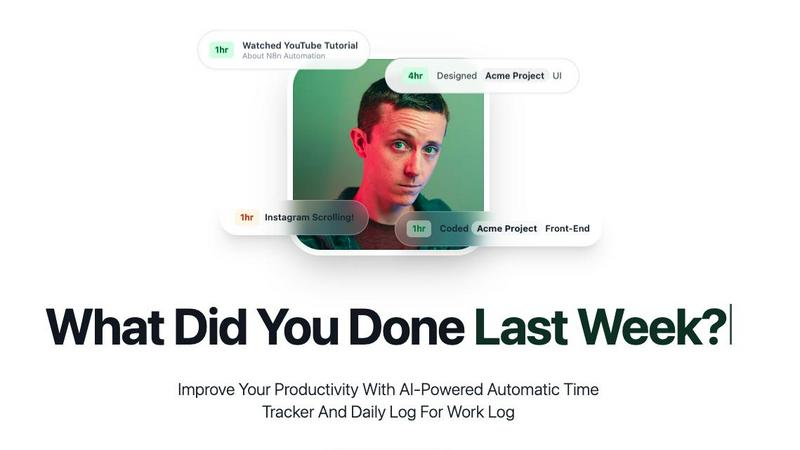
About Didon
Didon is the AI-powered automatic time tracker that finally answers the question, "What did I actually do today?" without you lifting a finger or clicking a single start/stop button. This isn't your grandpa's productivity app. Didon runs silently in the background, capturing periodic snapshots of your screen and using a local AI brain to analyze exactly where your time vanishes. No manual timers, no guesswork, no lying to yourself about how much you actually worked. It gives you a brutally honest, crystal-clear picture of your workday, from deep focus coding sessions to those sneaky 45-minute Instagram spirals. Everything happens locally on your machine, meaning your data stays locked down and private while you get the raw truth about your workflow, focus patterns, and productivity habits. Didon is built for freelancers, remote workers, team leads, and anyone who wants to stop wasting time and start owning their day. It helps you identify distractions, optimize your schedule, and make smarter decisions about how you work, all without changing the way you work. Think of it as your personal productivity detective that never sleeps and never judges, it just delivers the facts. With features like project goal setting, auto-pause on sleep, CSV log exports, and a natural language "Ask Your Data Anything" feature, Didon turns your chaotic workday into a structured, actionable daily log. Whether you're billing clients, running a team, or just trying to figure out why you feel busy but get nothing done, Didon gives you the insights you need to level up.
Features of Didon
Background AI Monitoring
Didon operates like a ghost in the machine, quietly capturing periodic screen snapshots while you work. No start/stop buttons, no manual timers, no interruptions. The system runs in the background and automatically logs your activity, giving you a complete, accurate timeline of your day without any effort on your part. It even auto-pauses when your computer goes to sleep and auto-launches when you boot up, so you never miss a second of tracking.
Local AI Analysis with Total Privacy
Your data never leaves your device. Didon uses a local LLM to analyze your screen captures directly on your machine. It identifies what application you're using, what task you're performing, and which project it belongs to, all while keeping your sensitive information completely private. No cloud servers, no data breaches, no awkward moments. The AI extracts useful information and saves it securely, ensuring your privacy remains a top priority.
Define Projects and Goals
Stop letting your AI guess what matters. Didon lets you define your project goals and specific objectives upfront. You tell the system what "productive" looks like for you, and it uses that context to intelligently categorize your work. Whether you're designing a UI, coding a backend, or attending meetings, Didon tags your time accurately and gives you relevant insights based on your actual priorities.
Ask Your Data Anything
This is where Didon gets next-level. Instead of staring at boring charts, you can ask natural language questions about your work logs. "What type of work do I spend most time on?" "What time is my most productive time?" "How much time did I spend on Frontend this week?" "Which project took the most time today?" The AI instantly digs through your data and gives you clear, conversational answers. It's like having a personal data analyst on speed dial.
Use Cases of Didon
Freelancers Who Need Accurate Client Billing
If you're billing by the hour, you know the pain of trying to remember what you actually worked on last Tuesday. Didon eliminates the guesswork. It automatically logs every task, project, and duration, and lets you export detailed daily logs to CSV. You get bulletproof data for your invoices, no more awkward "I think I worked about 3 hours" conversations. Clients get transparency, you get paid accurately, and everyone wins.
Remote Teams Tracking Productivity Without Micromanagement
Team leads and managers need visibility without being creepy. Didon gives you the data you need to understand team workflow patterns, identify bottlenecks, and optimize schedules, all without hovering over shoulders. The local AI analysis means team members keep their privacy while still providing aggregate insights. You can see who's crushing it, who needs support, and where your team's time is actually going, all from a data-driven perspective.
Personal Productivity Hacks for Self-Improvement
Ever feel like you're busy all day but somehow get nothing done? Didon is your reality check. It shows you exactly where your time leaks are, whether it's social media scrolling, unnecessary meetings, or context switching. You can identify your peak productivity hours, spot patterns of distraction, and make data-backed decisions to restructure your day. It's like having a fitness tracker for your work habits.
Project Managers Juggling Multiple Clients and Deadlines
When you're managing multiple projects across different clients, keeping track of time allocation is a nightmare. Didon automatically categorizes your work by project, showing you exactly how much time you spent on each one. You can ask questions like "Which project took the most time today?" and get instant answers. This makes resource planning, deadline forecasting, and client reporting a breeze.
Frequently Asked Questions
What do I need to do to get the best tracking results?
The key is setting up your context properly. Define your project goals and specific objectives in the app so the AI knows what to look for. The more detail you provide upfront, the more accurate your categorization and insights will be. After that, just work normally. Didon handles the rest automatically.
How does the automatic tracking work?
Didon runs as a background process on your computer. It takes periodic snapshots of your screen at set intervals and sends them to a local AI model on your device for analysis. The AI identifies the application, task, and project based on your predefined context. No manual input required, it just works silently in the background.
Is my data private and secure?
Absolutely. All screen analysis happens locally on your machine using a local LLM. Your data never touches our servers or any third-party cloud. This means your sensitive information, client data, and personal projects stay completely private and secure. You own your data, period.
Can I export my work logs?
Yes, you can export your daily work logs to CSV format. This is perfect for billing clients, creating reports for your team, or doing your own personal analysis in a spreadsheet. The export includes detailed information about time, activity, description, project, and duration.
Pricing of Didon
Didon offers three pricing tiers to fit your workflow and budget. The Trial gives you a full week of unlimited access with no credit card required, perfect for testing the waters. The Monthly plan at $15 per month (billed annually at $180/year) unlocks unlimited CSV log exports, smart context and project goals, and advanced productivity insights. For the power users, the Lifetime plan is a one-time payment of $149 (regularly $299) that includes all features, free updates for life, and dedicated 1:1 priority support. This is a launch offer with a limited-time countdown, so if you want to own Didon forever, now is the time to lock in.
Similar to Didon

Briefpanel
Monitor web pages and get the exact field that changed, item by item. Pay per page read, no subscription.


DeskBot
DeskBot for Kalshi event contracts. $1 first month, then $19.99/mo. Trading can lose money. Not affiliated with Kalshi.


explint.com
Install the ExpLint MCP to flag inconsistencies, missing metrics, and anti-patterns across your A/B test backlog.

Engineering on Web
Free CAD, FEA simulation and SPC statistics in your browser, with an AI assistant that builds CAD features.

KS-Agents
Measure climate, talent and skills with validated surveys, 360° feedback and AI interviews, and turn the data into decisions HR can defend.

Bloom
An adaptive AI tutor that turns topics or your materials into courses, lessons, and answers tailored to how you learn.