ScopeSnap vs TinyFast
Side-by-side comparison to help you choose the right AI tool.

ScopeSnap
ScopeSnap transforms messy discovery notes into structured scopes and polished proposals in minutes, making project planning a breeze.
Last updated: March 18, 2026

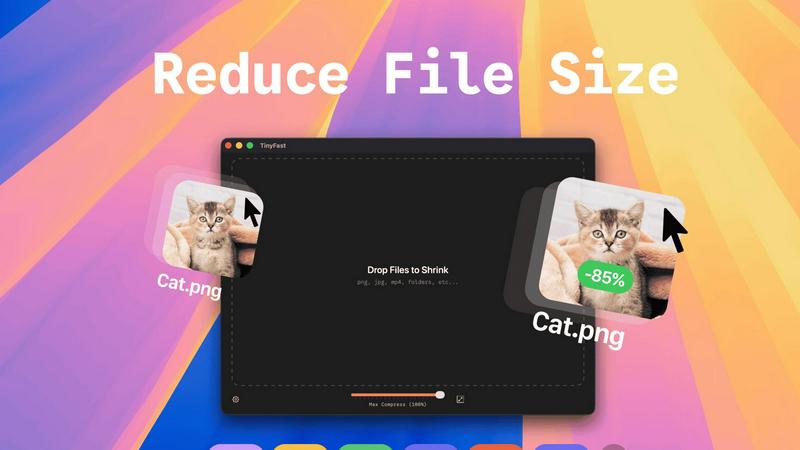
Compress images, videos, and PDFs on your Mac instantly and privately with a simple drag and drop using TinyFast.
Last updated: February 26, 2026
Visual Comparison
ScopeSnap

TinyFast
Feature Comparison
ScopeSnap
AI-Powered Backlog Generation
Turn your discovery notes into actionable items effortlessly. ScopeSnap uses AI to generate epics and scope items from your raw input, surfacing open questions and flagging assumptions to ensure nothing slips through the cracks.
Seamless Refinement and Estimation
Gone are the days of vague estimates. ScopeSnap allows you to review your structured backlog, assign roles, set accurate estimates, and resolve any lingering questions, ensuring you are always on point with your project scope.
Polished Proposals and Statements of Work
With just a few clicks, create stunning, professional proposals or statements of work ready to impress your clients. ScopeSnap transforms your refined scope into a visually appealing document that showcases your expertise and professionalism.
Stay Updated with Product Enhancements
Never miss a beat with ScopeSnap. Subscribe to receive product updates, scoping tips, and insights on the latest features rolling out. Stay ahead of the curve and optimize your workflow like a pro without the spam.
TinyFast
Batch & Drag-Drop Shrink
With TinyFast, you can drop entire folders into the app and get optimized files in mere seconds. This batch processing feature is a game changer, eliminating the need for tedious one-by-one compression, so you can focus on what really matters.
Blazing-Fast Compression
Experience the thrill of reducing large files in seconds with TinyFast's optimized native engines. Say goodbye to waiting for uploads and downloads, and hello to instant results that keep your workflow flowing smoothly.
Resize Resolution
Need to tweak the resolution of your images or videos? TinyFast allows you to automatically resize them during compression, ensuring that your files are not just smaller but also perfectly tailored to your needs.
100% Local & Private
Your files are your business, and TinyFast gets that. That's why this app keeps everything on your device. No uploads, no cloud servers—just pure, unadulterated privacy. Perfect for those who deal with sensitive information and want peace of mind.
Use Cases
ScopeSnap
Freelance Developers
Freelancers can utilize ScopeSnap to streamline their project scoping process, converting chaotic notes into structured outlines and precise estimates, enabling them to manage client expectations effectively.
Software Agencies
Agencies can leverage ScopeSnap for collaborative projects, allowing multiple team members to contribute to scope refinement and ensuring that proposals reflect the collective expertise and insights of the whole team.
Consultants
Consultants can enhance their service delivery with ScopeSnap by quickly converting client discussions into actionable project scopes and polished proposals, making their workflow more efficient and professional.
Startups
Startups seeking to communicate their vision to potential investors can use ScopeSnap to create clear and compelling project scopes and proposals, helping them secure funding and partnerships with confidence.
TinyFast
Designers Optimizing Visual Assets
Graphic designers can use TinyFast to compress their PNGs, JPEGs, and SVGs without losing quality. This ensures faster loading times for websites and apps, ultimately enhancing user experience and boosting performance.
Video Editors Streamlining Projects
Video editors can streamline their workflow by compressing MP4 and MOV files quickly, allowing them to share previews or upload to editing software without the hassle of large file sizes slowing them down.
Developers Managing Code Files
For developers, TinyFast is a lifesaver when it comes to compressing JS, CSS, and JSON files. This feature not only saves bandwidth but also speeds up website loading times, giving users a seamless browsing experience.
Musicians Preparing Audio Files
Musicians can take advantage of TinyFast to compress their MP3 files for easier sharing and distribution. Whether it’s for music streaming or sending tracks to collaborators, TinyFast makes it easy and efficient.
Overview
About ScopeSnap
Welcome to the world of ScopeSnap, where chaos meets clarity in the realm of freelance development and software agencies. If you’re tired of sifting through messy discovery notes, struggling to pin down project scopes, or spending hours crafting proposals that never quite hit the mark, you're in the right place. ScopeSnap is your secret weapon, designed specifically for freelancers, consultants, and software agencies that thrive on custom development projects. Leveraging the power of AI, ScopeSnap transforms those rough ideas and scattered notes into a structured project scope, precise estimates, and polished client-ready proposals in mere minutes. No more vague outlines or missed requirements; with ScopeSnap, every feature is dissected, understood, and confidently estimated. Say goodbye to the tedious back-and-forth and hello to streamlined workflows, allowing you to focus on what you do best—building amazing software.
About TinyFast
TinyFast is the ultimate macOS app designed for those who refuse to compromise on speed and privacy when compressing files. Whether you're a developer, designer, or digital creator, TinyFast is tailored to fit seamlessly into your workflow. This powerful application allows you to compress an array of file types—images, videos, documents, and audio—without any online hassles. Forget the slow uploads and the anxiety of trusting your sensitive assets to unknown servers. With TinyFast, all processing happens locally on your Mac, ensuring that your files remain confidential and your compression is lightning-fast. Imagine dragging and dropping your files and watching them shrink in seconds without sacrificing quality. Join the tribe of over 500 Mac users who have revolutionized their file management with TinyFast. It’s time to ditch the clunky online tools and embrace a solution that respects your time and privacy.
Frequently Asked Questions
ScopeSnap FAQ
How does ScopeSnap utilize AI in the scoping process?
ScopeSnap harnesses AI to analyze your discovery notes, automatically generating epics and scope items, which helps to identify open questions and assumptions, making the scoping process faster and more accurate.
Can I customize the generated proposals?
Absolutely! ScopeSnap allows you to personalize your proposals and statements of work. You can tweak the content, add branding elements, and ensure that the final document aligns with your style and your client's expectations.
Is ScopeSnap suitable for teams?
Yes, ScopeSnap is designed to facilitate collaboration. It allows multiple users to contribute to the project scope, making it an excellent tool for teams in software agencies or collaborative freelance projects.
What types of projects can I use ScopeSnap for?
ScopeSnap is versatile and suitable for various custom software development projects, whether you are working on web applications, mobile apps, or complex software solutions. It adapts to different scopes and requirements seamlessly.
TinyFast FAQ
How does TinyFast ensure my files remain private?
TinyFast processes all files locally on your Mac, meaning nothing is uploaded to external servers. Your sensitive information stays secure and confidential throughout the compression process.
What file types does TinyFast support?
TinyFast supports a wide range of file types, including images (PNG, JPG, GIF), videos (MP4, MOV), documents (PDF, DOCX), code files (JS, CSS), and audio (MP3), making it a universal tool for all your compression needs.
Can I compress multiple files at once?
Absolutely! TinyFast allows you to drag and drop entire folders, enabling batch compression that saves you valuable time. You can optimize multiple files in seconds without breaking a sweat.
Is there a free version of TinyFast?
Yes! TinyFast offers a free version that allows you to compress up to 5 files per day. This gives you access to all core features, perfect for those who want to try out the app before committing to a paid plan.
Alternatives
ScopeSnap Alternatives
ScopeSnap is a cutting-edge AI tool designed to revolutionize how freelance developers and software agencies approach project scoping and proposal generation. By transforming chaotic discovery notes into structured project scopes and polished proposals, it falls firmly into the Productivity & Management category. Users often seek alternatives to ScopeSnap due to varying needs in pricing, feature sets, integration capabilities, or platform requirements. When hunting for an alternative, consider factors such as ease of use, customization options, scalability, and overall value for your specific workflow. --- [{"question": "What is ScopeSnap?", "answer": "ScopeSnap is an AI-driven tool that helps freelance developers and software agencies streamline project scoping and proposal creation."},{"question": "Who is ScopeSnap for?", "answer": "ScopeSnap is designed for freelancers, consultants, and software agencies that regularly scope and estimate custom development projects."},{"question": "Is ScopeSnap free?", "answer": "The pricing details for ScopeSnap are not specified, but it typically offers a range of features tailored for professionals."},{"question": "What are the main features of ScopeSnap?", "answer": "Main features include breaking down project ideas into estimatable tasks, refining scopes iteratively, and automatically generating client-ready proposals."}]
TinyFast Alternatives
TinyFast is the ultimate macOS app for compressing images, videos, and PDFs in a flash. Tailored for the tech-savvy, it empowers users to drag and drop files for instant, local compression—no uploads or delays. While many love TinyFast, users often find themselves on the hunt for alternatives due to varying needs such as pricing, feature sets, or platform compatibility. Some might seek more advanced options, while others could be drawn to free solutions that still pack a punch. When searching for alternatives, consider factors like ease of use, compression quality, and privacy features. Look for tools that keep your data local and offer a seamless user experience. Ultimately, the right alternative should match your workflow while providing the speed and efficiency you crave.