SureThing.io vs TinyFast
Side-by-side comparison to help you choose the right AI tool.

SureThing.io
SureThing.io is your autonomous business partner that learns your style and grinds 24/7.
Last updated: March 19, 2026

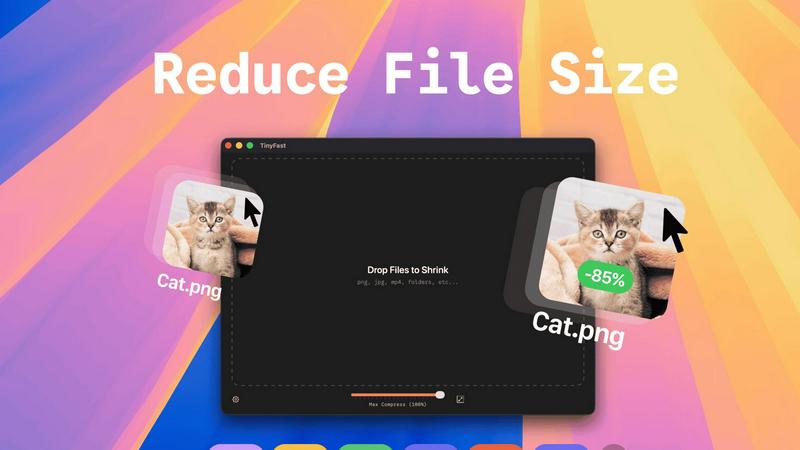
Compress images, videos, and PDFs on your Mac instantly and privately with a simple drag and drop using TinyFast.
Last updated: February 26, 2026
Visual Comparison
SureThing.io

TinyFast
Feature Comparison
SureThing.io
Proactive Autonomous Operation
This agent doesn't wait for an invitation. It operates on a 24/7 loop, actively monitoring your digital environment and taking pre-authorized actions. It scans your inbox for priority signals, manages calendar conflicts before they happen, and follows up on pending tasks across connected apps, ensuring momentum never dies because you stepped away.
State-of-the-Art Agentic Memory
The game-changer. SureThing's memory is persistent and deep. It remembers your communication style, your project goals, your preferences for certain contacts, and the context of past conversations across weeks and months. The longer you work together, the smarter it gets, requiring less instruction and making fewer mistakes.
Enterprise-Grade Security & Compliance
This isn't a toy. SureThing is built on a foundation of trust, achieving SOC 2 certification and Google CASA Tier 2 compliance. Your data and your workflows are locked down with enterprise-level security protocols, so you can delegate sensitive tasks without a second thought.
Cross-App Action & Integration
SureThing works where you work. It seamlessly connects to your core apps (like Gmail, calendar, and project tools) to take meaningful action. It can draft and send emails, adjust meetings, update project statuses, and more, creating a cohesive, automated workflow ecosystem on your behalf.
TinyFast
Batch & Drag-Drop Shrink
With TinyFast, you can drop entire folders into the app and get optimized files in mere seconds. This batch processing feature is a game changer, eliminating the need for tedious one-by-one compression, so you can focus on what really matters.
Blazing-Fast Compression
Experience the thrill of reducing large files in seconds with TinyFast's optimized native engines. Say goodbye to waiting for uploads and downloads, and hello to instant results that keep your workflow flowing smoothly.
Resize Resolution
Need to tweak the resolution of your images or videos? TinyFast allows you to automatically resize them during compression, ensuring that your files are not just smaller but also perfectly tailored to your needs.
100% Local & Private
Your files are your business, and TinyFast gets that. That's why this app keeps everything on your device. No uploads, no cloud servers—just pure, unadulterated privacy. Perfect for those who deal with sensitive information and want peace of mind.
Use Cases
SureThing.io
The Solo Founder's Force Multiplier
Launching a go-to-market strategy alone? SureThing acts as your entire support team. It manages inbound lead emails, schedules founder demos, follows up with potential customers, and keeps project timelines on track, enabling one person to execute like a small army.
The Executive's Chief of Staff
For overwhelmed leaders, SureThing becomes a digital chief of staff. It triages the executive inbox, drafts preliminary responses, prepares daily briefs by summarizing key communications, and manages complex scheduling across multiple time zones, reclaiming hours of focused work time.
The Project Manager's Silent Partner
Keep complex projects flowing without micromanagement. SureThing monitors task progress across platforms, sends automated, context-aware reminders to team members, updates project dashboards, and flags potential blockers before they derail your timeline.
The Creative's Administrative Shield
Writers, developers, and creatives can offload the administrative drag. SureThing handles client communication, invoices, meeting scheduling, and research follow-ups, building a protective wall around your deep work sessions so you can stay in the zone.
TinyFast
Designers Optimizing Visual Assets
Graphic designers can use TinyFast to compress their PNGs, JPEGs, and SVGs without losing quality. This ensures faster loading times for websites and apps, ultimately enhancing user experience and boosting performance.
Video Editors Streamlining Projects
Video editors can streamline their workflow by compressing MP4 and MOV files quickly, allowing them to share previews or upload to editing software without the hassle of large file sizes slowing them down.
Developers Managing Code Files
For developers, TinyFast is a lifesaver when it comes to compressing JS, CSS, and JSON files. This feature not only saves bandwidth but also speeds up website loading times, giving users a seamless browsing experience.
Musicians Preparing Audio Files
Musicians can take advantage of TinyFast to compress their MP3 files for easier sharing and distribution. Whether it’s for music streaming or sending tracks to collaborators, TinyFast makes it easy and efficient.
Overview
About SureThing.io
Forget the chatbots that just sit there, waiting for you to do all the thinking. SureThing.io is your autonomous digital wingman, an AI agent with a memory that actually sticks. It's built for the movers and shakers, the solo founders, the overwhelmed executives, and anyone who's tired of being the bottleneck in their own workflow. This isn't a reactive tool; it's a proactive partner. It learns your voice, understands your goals, and gets to work 24/7 across your connected apps. While you're crushing your day (or finally getting some sleep), SureThing is in the trenches: monitoring your inbox, drafting replies that sound like you, managing your chaotic schedule, and tracking projects to keep everything moving. Its killer feature? Persistent, state-of-the-art memory. It remembers your preferences, your patterns, your past decisions, and your contacts across every single interaction. It learns from mistakes and adapts to how you actually work, not how a manual says you should. Built with enterprise-grade, SOC 2 certified and Google CASA Tier 2 compliant security, SureThing is engineered for real-world reliability, not just flashy demos. This is the agent you can actually trust with your real work.
About TinyFast
TinyFast is the ultimate macOS app designed for those who refuse to compromise on speed and privacy when compressing files. Whether you're a developer, designer, or digital creator, TinyFast is tailored to fit seamlessly into your workflow. This powerful application allows you to compress an array of file types—images, videos, documents, and audio—without any online hassles. Forget the slow uploads and the anxiety of trusting your sensitive assets to unknown servers. With TinyFast, all processing happens locally on your Mac, ensuring that your files remain confidential and your compression is lightning-fast. Imagine dragging and dropping your files and watching them shrink in seconds without sacrificing quality. Join the tribe of over 500 Mac users who have revolutionized their file management with TinyFast. It’s time to ditch the clunky online tools and embrace a solution that respects your time and privacy.
Frequently Asked Questions
SureThing.io FAQ
How is SureThing different from a chatbot like ChatGPT?
Chatbots are reactive tools you query for answers. SureThing is an autonomous, proactive agent. It has long-term memory, works across your apps, and takes action on your behalf without you needing to prompt it constantly. It's a teammate, not a search engine.
What does "remembers you" actually mean?
It means SureThing builds a persistent profile of your work style. It learns your email tone, your scheduling preferences, which contacts are high-priority, and the goals of your ongoing projects. This context carries over forever, so you don't have to re-explain yourself every day.
Is it safe to let an AI agent access my email and calendar?
Absolutely. Security is our bedrock. SureThing is SOC 2 certified and Google CASA Tier 2 compliant, meeting rigorous enterprise security standards. We use strict access controls and encryption. You remain in full control, approving its key actions and access permissions.
Can I control what actions SureThing takes?
Yes, you're always in the driver's seat. You set the guardrails, permissions, and approval levels. SureThing operates within the boundaries you define and can be configured to seek approval for significant actions, like sending certain emails or scheduling high-stakes meetings.
TinyFast FAQ
How does TinyFast ensure my files remain private?
TinyFast processes all files locally on your Mac, meaning nothing is uploaded to external servers. Your sensitive information stays secure and confidential throughout the compression process.
What file types does TinyFast support?
TinyFast supports a wide range of file types, including images (PNG, JPG, GIF), videos (MP4, MOV), documents (PDF, DOCX), code files (JS, CSS), and audio (MP3), making it a universal tool for all your compression needs.
Can I compress multiple files at once?
Absolutely! TinyFast allows you to drag and drop entire folders, enabling batch compression that saves you valuable time. You can optimize multiple files in seconds without breaking a sweat.
Is there a free version of TinyFast?
Yes! TinyFast offers a free version that allows you to compress up to 5 files per day. This gives you access to all core features, perfect for those who want to try out the app before committing to a paid plan.
Alternatives
SureThing.io Alternatives
SureThing.io is the autonomous business management agent that works for you 24/7. It's not another chatbot you have to babysit; it's a proactive, memory-powered sidekick in the productivity and management space. It learns your style, handles your grunt work across apps, and gets smarter with every interaction. People hunt for alternatives for all the usual reasons. Maybe the price tag doesn't fit their startup budget, or they need specific integrations SureThing hasn't baked in yet. Some teams just vibe better with a different interface or need a tool hyper-focused on one task, like only email or only scheduling. When you're scouting for a different ride, don't just chase shiny features. Ask if it's built for real work or just flashy demos. Look for something with legit security credentials that won't ghost you when things get complex. The goal is finding an agent that actually earns your trust, not just your attention.
TinyFast Alternatives
TinyFast is the ultimate macOS app for compressing images, videos, and PDFs in a flash. Tailored for the tech-savvy, it empowers users to drag and drop files for instant, local compression—no uploads or delays. While many love TinyFast, users often find themselves on the hunt for alternatives due to varying needs such as pricing, feature sets, or platform compatibility. Some might seek more advanced options, while others could be drawn to free solutions that still pack a punch. When searching for alternatives, consider factors like ease of use, compression quality, and privacy features. Look for tools that keep your data local and offer a seamless user experience. Ultimately, the right alternative should match your workflow while providing the speed and efficiency you crave.