
SimpleDraw vs vaethat
Side-by-side comparison to help you choose the right AI tool.

SimpleDraw
Effortlessly create precise floor plans and layouts online with SimpleDraw's powerful and user-friendly drawing tool.
Last updated: February 26, 2026

vaethat
Vaethat is your go-to AI tool for effortlessly enhancing 3D renders with stunning detail and clarity, all while.
Last updated: February 28, 2026
Visual Comparison
SimpleDraw
vaethat

Feature Comparison
SimpleDraw
Accurate Measurements & Scale Drawing
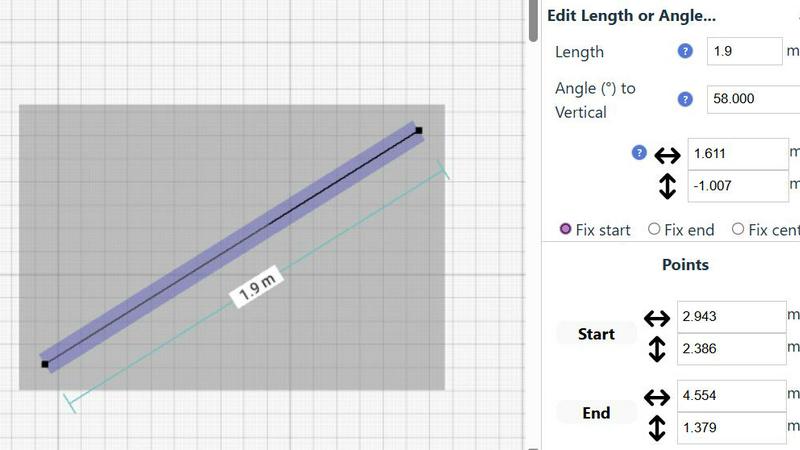
With SimpleDraw, precision is the name of the game. Get ready to create scale drawings that are spot on, thanks to accurate measurements and smart alignment tools. No more guessing—just pure, unadulterated accuracy at your fingertips!
Specialized Floor Plan Creator
Dive into the dedicated Floor Plan Mode, where the magic really happens! Design intricate floor plans complete with walls, doors, and windows in just a click. Watch as measurements update in real-time, making the planning process smoother than ever.
Smart Alignment System
Tired of frustrating placements? SimpleDraw's Smart Alignment System is here to save the day! It intuitively positions your points and lines exactly where you want them, ensuring your designs are sharp and precise. Plus, zoom in for that granular control when you need it!
Comprehensive Measurement System
Customize your precision with a comprehensive measurement system that offers fine control over displayed metrics. Whether you prefer metric or standard US units, SimpleDraw has you covered. Dynamic contextual measurements keep you informed as you create, making sure everything is just right.
vaethat
AI Render Upscaling
Transform your architectural renders with AI render upscaling that boosts resolution and sharpness while preserving clean geometry. This feature ensures that your designs maintain their integrity, giving you high-quality images that are presentation-ready.
Detail Refinement
Every detail counts in architectural visualization, and with Vaethat's detail refinement, fine textures, edges, and small architectural elements are enhanced for a crisper, polished look. Get ready to bring your designs to life with stunning detail that captures attention.
Material and Lighting Enhancement
Perceived realism is key in archviz, and this feature works wonders by improving material definition, boosting contrast, and achieving optimal lighting balance. Your images will not only look real; they'll feel real, making viewers experience your designs on a whole new level.
Noise and Artifact Cleanup
Rendering artifacts and noise can ruin an otherwise fantastic image. Vaethat cleans up these distractions, producing cleaner and more professional results. With this feature, every project can shine without the unwanted interruptions of visual clutter.
Use Cases
SimpleDraw
Kitchen & Bathroom Renovations
Planning a kitchen or bathroom overhaul? SimpleDraw lets you visualize your renovations with accurate measurements, ensuring your design flows beautifully before the first hammer strikes!
Room Layouts & Furniture Planning
Transform any room into a masterpiece with SimpleDraw! Design bedroom layouts or office spaces, and see how furniture fits seamlessly into your vision—no more awkward purchases!
House & Apartment Plans
Create detailed floor plans for your home or rental listings quickly and easily. SimpleDraw is perfect for space planning, helping you maximize every square inch of your property!
Community-Driven Feedback
Join a community that evolves with you! SimpleDraw encourages user feedback to shape future features, making it not just a tool, but a collaborative experience that grows based on real needs.
vaethat
Client Presentations
Make a lasting impression during client presentations by using Vaethat to enhance your architectural renders. High-quality images can help convey your design intent more effectively, making it easier for clients to visualize the final outcome.
Portfolio Development
As an architect or visualizer, your portfolio is your calling card. Utilize Vaethat to enhance your existing renders, ensuring they are stunning and impactful. Stand out from the competition by showcasing only the best versions of your work.
Marketing Materials
When it comes to marketing, first impressions matter. Use Vaethat to enhance images for brochures, websites, and social media. High-quality visuals can significantly boost engagement and interest in your projects, driving more potential clients your way.
Project Approvals
Navigating the approval process can be tough. With Vaethat, you can produce crystal-clear images that highlight your design's strengths, making it easier for stakeholders to understand and approve your vision without confusion or hesitation.
Overview
About SimpleDraw
Say goodbye to the headaches of complex design software and hello to SimpleDraw, the online tool that makes scale drawing feel like a walk in the park! Whether you're a DIY enthusiast dreaming up the perfect home or a seasoned renovator looking to visualize your next big project, SimpleDraw has your back. This free platform allows you to create precise floor plans and room layouts without the need for sign-ups or downloads—just jump into your browser and start crafting your vision. With an array of user-friendly tools, you can design everything from kitchen layouts to entire house plans with confidence and accuracy. The best part? You get the professional touch of CAD software wrapped in a sleek, easy-to-use interface. So, unleash your creativity and let SimpleDraw transform your ideas into stunning visual representations that pen and paper simply can't compete with.
About vaethat
Vaethat is the revolutionary AI-powered tool that is changing the game in architectural visualization. Specifically designed for archviz professionals, this cutting-edge software takes your 3D renders and cranks them up a notch, enhancing clarity, sharpness, and realism like you’ve never seen before. No more settling for mediocre images that don’t do justice to your hard work. With Vaethat, you can effortlessly upscale your renders, ensuring that every detail, from the tiniest textures to the grandest structures, pops with life and vibrancy. It’s not just a tool; it’s your secret weapon to impress clients, enhance presentations, and elevate your artistic vision. Say goodbye to complex workflows and hello to a streamlined process where uploading, enhancing, and exporting is as easy as a few clicks. Join the ranks of 3D artists who trust Vaethat to keep their designs pristine and impactful.
Frequently Asked Questions
SimpleDraw FAQ
Is SimpleDraw really free to use?
Absolutely! SimpleDraw is completely free, with no hidden costs or sign-ups required. Just jump in and start drawing!
Do I need any special software to use SimpleDraw?
Nope! SimpleDraw works directly in your browser, meaning you can access all its features without the hassle of downloads or installations.
Can I save my drawings?
While SimpleDraw allows you to create and edit your designs easily, make sure to download or take screenshots of your work, as it does not offer a cloud saving feature yet.
How can I give feedback or suggest new features?
We love hearing from our users! Join our Discord community to share your thoughts, suggestions, and feature requests, and help us shape the future of SimpleDraw together!
vaethat FAQ
How does the AI render enhancer calculate credits?
Credits are calculated based on the number of images processed and the complexity of enhancements applied. This ensures that you get the best value for your projects without any surprises.
Can I use the archviz AI upscaler with V-Ray, Lumion, Enscape, 3ds Max, and SketchUp?
Absolutely! Vaethat is designed to work seamlessly with these popular rendering platforms, making it an ideal addition to your existing workflow for maximum flexibility and ease of use.
What makes this AI post-production tool different from manual editing?
Unlike manual editing, Vaethat leverages advanced AI technology to deliver consistent, high-quality enhancements without the tedious adjustments. You simply upload your images, and the AI does the heavy lifting, saving you time and effort.
Can I upgrade or downgrade my AI enhancement plan anytime?
Yes! Vaethat provides the flexibility to upgrade or downgrade your enhancement plan as needed, ensuring that you can adapt to your workload and project demands without being locked into a long-term commitment.
Alternatives
SimpleDraw Alternatives
SimpleDraw is a cutting-edge web-based tool that lets you create stunning and precise scale drawings and floor plans with ease. As part of the design tools category, it caters to everyone from DIY enthusiasts to professional renovators, making it a go-to platform for visualizing projects without the hassle of complicated software. However, users often seek alternatives for various reasons, including pricing, additional features, or specific platform compatibility. When searching for a new tool, it's crucial to consider factors like ease of use, the range of design features, and whether the platform aligns with your project needs. Finding the right fit can elevate your creative process and enhance your design experience.
vaethat Alternatives
So you've heard the buzz about vaethat, the AI-powered archviz enhancer that's turning good renders into mind-blowing masterpieces. It lives in the world of design tools, specifically built for 3D artists and architects who need their visuals to slap. But let's be real, even the hottest tool isn't a one-size-fits-all. People hunt for alternatives for all kinds of reasons—maybe the price tag doesn't vibe with your budget, you need features it doesn't have, or your workflow lives on a different platform entirely. Choosing the right sidekick for your render game is crucial. You're not just picking software; you're choosing a partner in crime for your creative process. Look beyond the hype and ask the hard questions. Does it play nice with your core 3D software? Can it handle the specific kind of magic you need, whether that's insane material detail or obliterating render noise? Think about your output needs and how seamlessly a new tool can integrate without killing your flow. At the end of the day, it's about finding that perfect match that elevates your work without the headache. The goal is to amplify your vision, not complicate it. Focus on tools that understand the archviz grind and deliver that crisp, client-winning quality you demand, in a way that works for you.