

vaethat
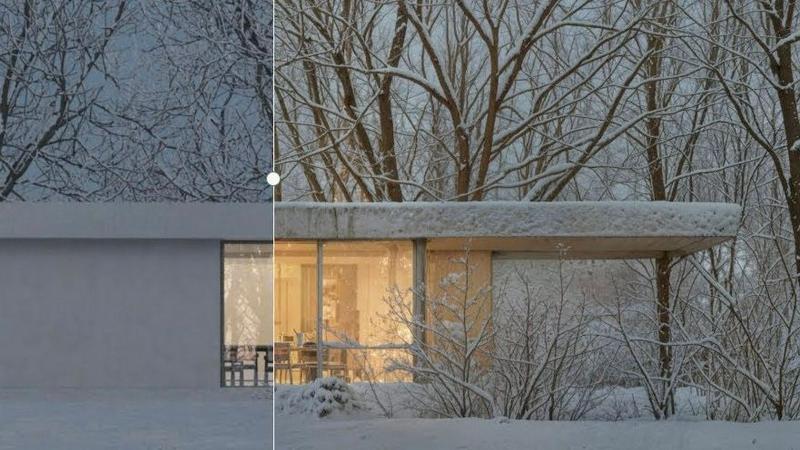
Vaethat is your go-to AI tool for effortlessly enhancing 3D renders with stunning detail and clarity, all while.
About vaethat
Vaethat is the revolutionary AI-powered tool that is changing the game in architectural visualization. Specifically designed for archviz professionals, this cutting-edge software takes your 3D renders and cranks them up a notch, enhancing clarity, sharpness, and realism like you’ve never seen before. No more settling for mediocre images that don’t do justice to your hard work. With Vaethat, you can effortlessly upscale your renders, ensuring that every detail, from the tiniest textures to the grandest structures, pops with life and vibrancy. It’s not just a tool; it’s your secret weapon to impress clients, enhance presentations, and elevate your artistic vision. Say goodbye to complex workflows and hello to a streamlined process where uploading, enhancing, and exporting is as easy as a few clicks. Join the ranks of 3D artists who trust Vaethat to keep their designs pristine and impactful.
Features of vaethat
AI Render Upscaling
Transform your architectural renders with AI render upscaling that boosts resolution and sharpness while preserving clean geometry. This feature ensures that your designs maintain their integrity, giving you high-quality images that are presentation-ready.
Detail Refinement
Every detail counts in architectural visualization, and with Vaethat's detail refinement, fine textures, edges, and small architectural elements are enhanced for a crisper, polished look. Get ready to bring your designs to life with stunning detail that captures attention.
Material and Lighting Enhancement
Perceived realism is key in archviz, and this feature works wonders by improving material definition, boosting contrast, and achieving optimal lighting balance. Your images will not only look real; they'll feel real, making viewers experience your designs on a whole new level.
Noise and Artifact Cleanup
Rendering artifacts and noise can ruin an otherwise fantastic image. Vaethat cleans up these distractions, producing cleaner and more professional results. With this feature, every project can shine without the unwanted interruptions of visual clutter.
Use Cases of vaethat
Client Presentations
Make a lasting impression during client presentations by using Vaethat to enhance your architectural renders. High-quality images can help convey your design intent more effectively, making it easier for clients to visualize the final outcome.
Portfolio Development
As an architect or visualizer, your portfolio is your calling card. Utilize Vaethat to enhance your existing renders, ensuring they are stunning and impactful. Stand out from the competition by showcasing only the best versions of your work.
Marketing Materials
When it comes to marketing, first impressions matter. Use Vaethat to enhance images for brochures, websites, and social media. High-quality visuals can significantly boost engagement and interest in your projects, driving more potential clients your way.
Project Approvals
Navigating the approval process can be tough. With Vaethat, you can produce crystal-clear images that highlight your design's strengths, making it easier for stakeholders to understand and approve your vision without confusion or hesitation.
Frequently Asked Questions
How does the AI render enhancer calculate credits?
Credits are calculated based on the number of images processed and the complexity of enhancements applied. This ensures that you get the best value for your projects without any surprises.
Can I use the archviz AI upscaler with V-Ray, Lumion, Enscape, 3ds Max, and SketchUp?
Absolutely! Vaethat is designed to work seamlessly with these popular rendering platforms, making it an ideal addition to your existing workflow for maximum flexibility and ease of use.
What makes this AI post-production tool different from manual editing?
Unlike manual editing, Vaethat leverages advanced AI technology to deliver consistent, high-quality enhancements without the tedious adjustments. You simply upload your images, and the AI does the heavy lifting, saving you time and effort.
Can I upgrade or downgrade my AI enhancement plan anytime?
Yes! Vaethat provides the flexibility to upgrade or downgrade your enhancement plan as needed, ensuring that you can adapt to your workload and project demands without being locked into a long-term commitment.
Explore more in this category:
Similar to vaethat

LooksMeter
Upload one photo for a free PSL score and face rating. 47 tools cover face shape, symmetry, color season and more. No signup needed.

VirtualTryOn
Try on clothes, glasses, rings, hairstyles, and hair colors on your own photos with AI.

InkAge
Preview a tattoo on your own skin and see how it ages after 10, 30 and 50 years, or how laser removal would fade it.

Cardify
Write Markdown on the left, get a finished knowledge card on the right. 30+ themes, custom size and fonts, PNG/SVG/PDF export.

AI Room Makeover
Explore room redesigns and focused furniture, wall-color or material changes from your photo, with optional reference images.

Spaceora
Explore AI room and garden designs using real furniture and climate-matched plants.

PhotoGenerAI
Create and edit AI photos from text prompts and reference images. Try free credits, with paid Pro settings available.

The Kiss
Turn two photos into a cinematic AI kissing video. Pick one of 13 kiss video templates; 30 free credits on sign-up.