Pinssaver vs Shrinkpad
Side-by-side comparison to help you choose the right AI tool.

Pinssaver
Download Pinterest videos, images, and GIFs in HD or 4K for free with PinsSaver—fast, easy, and watermark-free.
Last updated: February 26, 2026

Shrinkpad
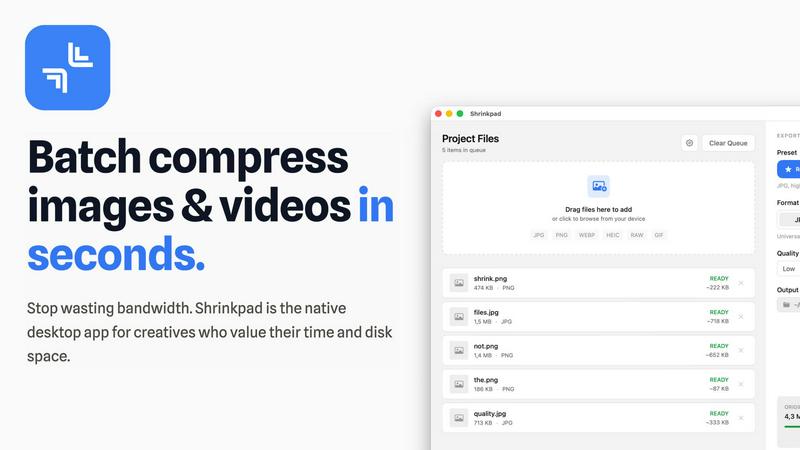
Shrinkpad crushes image and video sizes in bulk, saving you time and space with effortless one-drop compression.
Last updated: February 26, 2026
Visual Comparison
Pinssaver

Shrinkpad
Feature Comparison
Pinssaver
High-Quality Downloads
With Pinssaver, you can download Pinterest videos, images, and GIFs in stunning HD, 2K, or even 4K quality. This feature ensures that you get the best possible visual experience, whether you're using it for personal enjoyment or professional projects.
User-Friendly Interface
Navigating through Pinssaver is a breeze. The modern, minimalist design allows users to paste their links and download content in seconds. Even if you're a first-time user, you'll find the experience intuitive and hassle-free.
No Watermarks
Say goodbye to cluttered visuals! Pinssaver provides high-quality downloads without any watermarks, allowing you to enjoy your saved content in its original glory, perfect for sharing or using in your projects.
Cross-Device Compatibility
No matter what device you’re using, Pinssaver has got you covered. It works seamlessly on smartphones, tablets, and desktops, so you can download and access your favorite Pinterest content wherever you are.
Shrinkpad
Lightning Fast Compression
Say goodbye to sluggish processing times. Shrinkpad is optimized for Apple Silicon, using multi-threaded compression to handle thousands of files in minutes. This means you can spend less time waiting and more time creating.
Folder Mode
With Shrinkpad's Folder Mode, you can drop an entire folder and watch as it automatically detects and compresses all supported images and videos inside. This one-drop import feature eliminates tedious dragging and dropping, making batch processing a breeze.
Smart Detection
Never worry about file formats again. Shrinkpad's Smart Detection automatically identifies over 30 image formats, including RAW, and all major video formats. Non-media files are safely ignored, allowing you to focus only on what matters.
Auto Compression Settings
Stop guessing your compression settings. Shrinkpad intelligently analyzes the visual complexity of each file, applying the perfect compression ratio without sacrificing quality. This means cleaner files with no artifacts, giving you results that truly matter.
Use Cases
Pinssaver
Collecting Inspiration
As a designer or artist, you can use Pinssaver to collect design ideas and creative references from Pinterest. Save those inspirational videos and images to build a personal moodboard that fuels your creativity.
Saving Tutorials
Whether you're a DIY enthusiast or a cooking aficionado, Pinssaver lets you save tutorials and recipes for later viewing. Download your favorite how-to videos and keep them handy for when you're ready to dive in.
Building a Personal Archive
Everyone loves a good collection. Use Pinssaver to create a personal archive of your favorite videos and images. Organize content by themes or projects, and have it all at your fingertips whenever inspiration strikes.
Content Creation for Social Media
If you're a content creator or influencer, Pinssaver is essential for curating engaging posts. Download and organize videos and images that resonate with your audience, ensuring you always have fresh content to share.
Shrinkpad
Creative Professionals
Photographers and designers can batch compress multiple images simultaneously, saving precious time while ensuring their portfolios maintain high visual standards. Shrinkpad helps keep your creative workflow smooth and efficient.
Web Development
Web developers can significantly reduce app bundle sizes and website load times, enhancing user experience. Faster loading times improve LCP scores, which can lead to better SEO performance and user engagement.
Video Production
Videographers can optimize large video files for quicker uploads and smoother streaming. With Shrinkpad, compressing high-resolution footage is a snap, ensuring that your media retains its quality without taking up unnecessary space.
Team Collaboration
For small studios or teams, Shrinkpad streamlines asset management by enabling bulk processing. This allows everyone on the team to access optimized media without clogging up shared drives, fostering better collaboration and efficiency.
Overview
About Pinssaver
Pinssaver is the ultimate tool for anyone looking to snag videos, images, and GIFs from Pinterest without breaking the bank. Designed for creators, DIY enthusiasts, and anyone with a passion for curating visual content, Pinssaver allows you to download your favorite Pinterest finds in high-definition formats including 1080p, 2K, and even 4K. Forget about the limitations of Pinterest's browsing experience; with Pinssaver, you can keep your inspiration close at hand, whether you are on your phone, tablet, or desktop. This user-friendly platform is built for speed and simplicity, making it a breeze to download high-quality content without the fuss of watermarks or complicated steps. Plus, it's available in multiple languages, so you can use it comfortably no matter where you're from. Pinssaver is about unleashing your creativity and ensuring you have access to your favorite content anytime, anywhere.
About Shrinkpad
Shrinkpad is the ultimate game-changer for creatives looking to streamline their image and video compression process on Mac. This native desktop app is designed for those who value their time and resources, allowing you to batch compress hundreds of media files in mere seconds. No more waiting around for uploads or dealing with cloud storage; Shrinkpad operates entirely on your device, ensuring maximum privacy and zero internet dependency. Whether you're a photographer, designer, or developer, Shrinkpad empowers you to optimize your assets with unparalleled efficiency. With support for over 50 formats, including JPG, PNG, HEIC, WebP, MP4, and MOV, you can reduce file sizes by up to 90% while maintaining stunning visual quality. It’s not just about saving space; it’s about reclaiming your creative flow.
Frequently Asked Questions
Pinssaver FAQ
Is Pinssaver really free to use?
Absolutely! Pinssaver is completely free with no hidden fees or subscriptions. Enjoy downloading as much content as you like without worrying about costs.
Do I need to create an account to use Pinssaver?
Nope! Pinssaver values your privacy. You can use the service without creating an account, ensuring your data remains private and secure.
What formats can I download videos in?
Pinssaver allows you to download videos in various formats, including HD, 1080p, 2K, and 4K, depending on the original video quality available on Pinterest.
Is it safe to use Pinssaver?
Definitely! Pinssaver never stores your personal data or tracks your usage. Your privacy is a top priority, so you can download content with complete peace of mind.
Shrinkpad FAQ
Can I use Shrinkpad for free?
Yes, Shrinkpad offers a Free Starter plan that provides essential tools for casual use, allowing you to batch compress up to 10 files at a time.
What file formats does Shrinkpad support?
Shrinkpad supports over 50 formats, including common ones like JPG, PNG, HEIC, WEBP, MP4, and MOV, making it versatile for all your media needs.
Does Shrinkpad support video compression?
Absolutely! Shrinkpad not only compresses images but also handles various video formats, ensuring that your media files are optimized for any platform.
How many files can I process at once?
With the Free Starter plan, you can process up to 10 files per batch. However, upgrading to the Personal or Team plans allows for unlimited batch processing, giving you the freedom to work without limits.
Alternatives
Pinssaver Alternatives
Pinssaver is your ultimate sidekick in the realm of social media, specifically designed to help you download eye-catching videos, images, and GIFs from Pinterest. This powerhouse tool caters to a diverse crowd, from creative professionals to everyday users looking to curate their own digital treasure trove. With high-definition options available, it's no wonder users flock to Pinssaver for those perfect aesthetic finds. However, the quest for alternatives often arises due to varying needs like pricing, specific features, or compatibility with different platforms. Some users may crave additional functionalities or a sleeker interface, while others might prioritize cost-effectiveness. When hunting for an alternative, consider factors such as ease of use, download quality, and any unique features that align with your creative vision, ensuring you find a perfect match for your content-saving escapades.
Shrinkpad Alternatives
Shrinkpad is your ultimate sidekick in the world of batch image and video compression, specifically crafted for Mac users who crave speed and efficiency. This power-packed app allows creatives to streamline their workflow, effortlessly dragging and dropping tons of files or entire folders for instant compression. With a local processing approach, privacy is paramount, and users can compress their media without the hassle of waiting or relying on cloud services. Despite Shrinkpad's stellar features, users often seek alternatives due to various factors like pricing, unique functionalities, or compatibility with different platforms. When hunting for an alternative, consider the ease of use, file format support, compression efficiency, and whether it meets your specific needs as a creative. Finding the right tool can make all the difference in maintaining your creative flow without skipping a beat.