

Shrinkpad
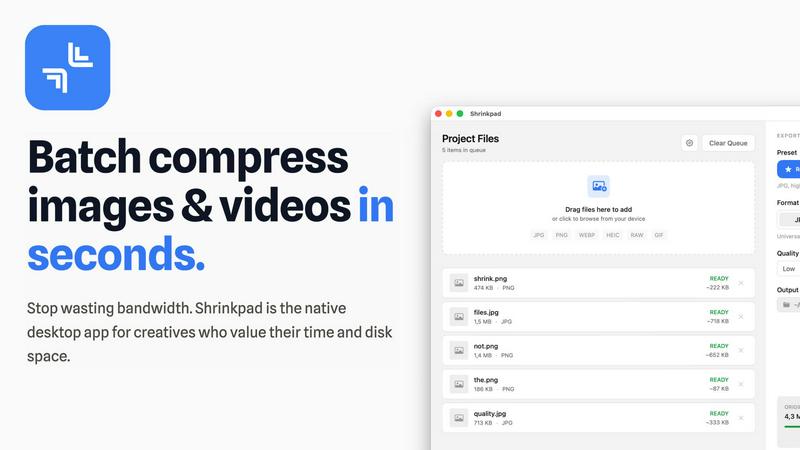
Shrinkpad crushes image and video sizes in bulk, saving you time and space with effortless one-drop compression.
About Shrinkpad
Shrinkpad is the ultimate game-changer for creatives looking to streamline their image and video compression process on Mac. This native desktop app is designed for those who value their time and resources, allowing you to batch compress hundreds of media files in mere seconds. No more waiting around for uploads or dealing with cloud storage; Shrinkpad operates entirely on your device, ensuring maximum privacy and zero internet dependency. Whether you're a photographer, designer, or developer, Shrinkpad empowers you to optimize your assets with unparalleled efficiency. With support for over 50 formats, including JPG, PNG, HEIC, WebP, MP4, and MOV, you can reduce file sizes by up to 90% while maintaining stunning visual quality. It’s not just about saving space; it’s about reclaiming your creative flow.
Features of Shrinkpad
Lightning Fast Compression
Say goodbye to sluggish processing times. Shrinkpad is optimized for Apple Silicon, using multi-threaded compression to handle thousands of files in minutes. This means you can spend less time waiting and more time creating.
Folder Mode
With Shrinkpad's Folder Mode, you can drop an entire folder and watch as it automatically detects and compresses all supported images and videos inside. This one-drop import feature eliminates tedious dragging and dropping, making batch processing a breeze.
Smart Detection
Never worry about file formats again. Shrinkpad's Smart Detection automatically identifies over 30 image formats, including RAW, and all major video formats. Non-media files are safely ignored, allowing you to focus only on what matters.
Auto Compression Settings
Stop guessing your compression settings. Shrinkpad intelligently analyzes the visual complexity of each file, applying the perfect compression ratio without sacrificing quality. This means cleaner files with no artifacts, giving you results that truly matter.
Use Cases of Shrinkpad
Creative Professionals
Photographers and designers can batch compress multiple images simultaneously, saving precious time while ensuring their portfolios maintain high visual standards. Shrinkpad helps keep your creative workflow smooth and efficient.
Web Development
Web developers can significantly reduce app bundle sizes and website load times, enhancing user experience. Faster loading times improve LCP scores, which can lead to better SEO performance and user engagement.
Video Production
Videographers can optimize large video files for quicker uploads and smoother streaming. With Shrinkpad, compressing high-resolution footage is a snap, ensuring that your media retains its quality without taking up unnecessary space.
Team Collaboration
For small studios or teams, Shrinkpad streamlines asset management by enabling bulk processing. This allows everyone on the team to access optimized media without clogging up shared drives, fostering better collaboration and efficiency.
Frequently Asked Questions
Can I use Shrinkpad for free?
Yes, Shrinkpad offers a Free Starter plan that provides essential tools for casual use, allowing you to batch compress up to 10 files at a time.
What file formats does Shrinkpad support?
Shrinkpad supports over 50 formats, including common ones like JPG, PNG, HEIC, WEBP, MP4, and MOV, making it versatile for all your media needs.
Does Shrinkpad support video compression?
Absolutely! Shrinkpad not only compresses images but also handles various video formats, ensuring that your media files are optimized for any platform.
How many files can I process at once?
With the Free Starter plan, you can process up to 10 files per batch. However, upgrading to the Personal or Team plans allows for unlimited batch processing, giving you the freedom to work without limits.
Explore more in this category:
Similar to Shrinkpad

xfiles
PDFs, images and audio. No uploads. No account. No added watermarks.

FreeVideoGenerator
Free AI video generator: turn text prompts and photos into video clips with Sora 2, Veo 3.1, Wan and more. Free starter credits, no watermark download

Favore AI
AI images, videos, and editing in one creative workspace

VidhyaGen - Image Converter
All-in-one web platform for fast image conversion, compression, editing, and essential digital file utilities in one easy interface.

Turbotools
Free online web tools: PDF converter, image compressor, word counter, text reverse, JSON formatter & generator. 100% free with no sign-ups!

Artcraft AI
AI image and video studio in your browser: generate and edit images, turn photos into videos, edit clips by sentence.

ViewMax Studio
AI video generator that turns one prompt into shorts, UGC-style ads and faceless videos, with script, voiceover and captions included.

Gas Station Dance AI
Turn your photos into a viral gas station dance video with AI