
FilexHost vs Shrinkpad
Side-by-side comparison to help you choose the right AI tool.

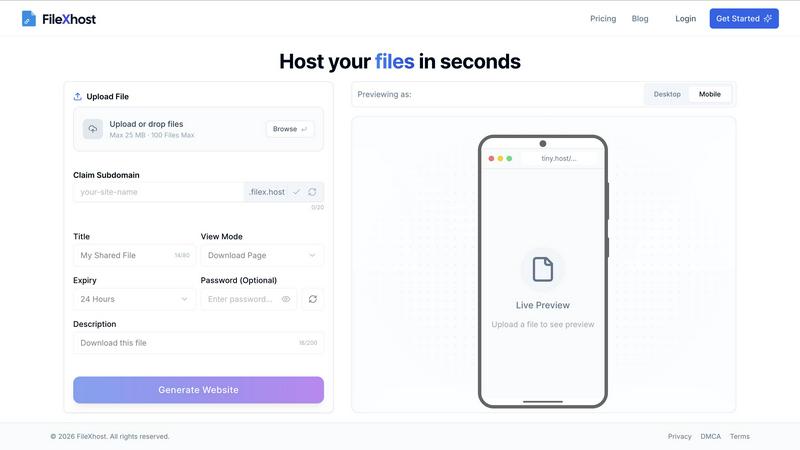
FilexHost lets you drag and drop files to create instant shareable links, making hosting and sharing a breeze.
Last updated: February 28, 2026

Shrinkpad
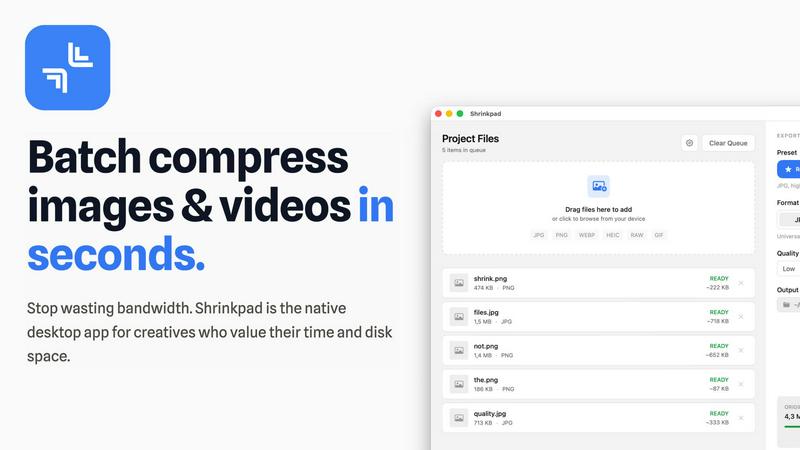
Shrinkpad crushes image and video sizes in bulk, saving you time and space with effortless one-drop compression.
Last updated: February 26, 2026
Visual Comparison
FilexHost
Shrinkpad
Feature Comparison
FilexHost
Simple Drag & Drop
Forget about complex setups and command-line nightmares. With FilexHost, all you need to do is drag and drop your file into the generator. It’s as effortless as it sounds—no tech expertise required. This feature is designed for everyone who craves speed and simplicity.
Built-In Viewers
FilexHost automatically renders a seamless experience for various file types. Whether it's a PDF, spreadsheet, or media file, the platform provides dedicated viewers for each format. This means your audience can engage with your content directly in their browser, elevating the sharing experience.
Secure by Default
Security is non-negotiable in today's digital landscape. FilexHost provides automatic SSL certificates for all hosted files, ensuring that your data is encrypted and safe from prying eyes. Plus, with optional password protection, you can keep your sensitive files under wraps.
Blazing Fast Global CDN
Speed is the name of the game, and FilexHost delivers with its global Content Delivery Network (CDN). Your files are served from the nearest server, ensuring low latency and quick load times anywhere in the world. Say goodbye to frustrating delays and hello to instant access.
Shrinkpad
Lightning Fast Compression
Say goodbye to sluggish processing times. Shrinkpad is optimized for Apple Silicon, using multi-threaded compression to handle thousands of files in minutes. This means you can spend less time waiting and more time creating.
Folder Mode
With Shrinkpad's Folder Mode, you can drop an entire folder and watch as it automatically detects and compresses all supported images and videos inside. This one-drop import feature eliminates tedious dragging and dropping, making batch processing a breeze.
Smart Detection
Never worry about file formats again. Shrinkpad's Smart Detection automatically identifies over 30 image formats, including RAW, and all major video formats. Non-media files are safely ignored, allowing you to focus only on what matters.
Auto Compression Settings
Stop guessing your compression settings. Shrinkpad intelligently analyzes the visual complexity of each file, applying the perfect compression ratio without sacrificing quality. This means cleaner files with no artifacts, giving you results that truly matter.
Use Cases
FilexHost
Quick Document Sharing
Need to send a report or a presentation without the fuss? FilexHost allows you to upload documents and get a shareable link in seconds. Perfect for last-minute submissions or collaborative projects—no login required for the recipient.
Showcasing Creative Work
Artists, designers, and creatives can host their portfolios effortlessly. With built-in viewers for images and PDFs, you can present your work in a professional manner that impresses clients and peers alike. It's all about making your creative vision shine.
Deploying Static Websites
Developers rejoice! FilexHost makes deploying static websites a breeze. Just zip your files, upload, and get a live URL to share with the world. Ideal for testing, demos, or even live projects, it saves you time and effort.
Storing Large Media Files
Got videos or high-resolution images to share? FilexHost supports large file uploads, making it the go-to solution for media professionals. With a dedicated media player and fast access, your audience can experience your content without any hiccups.
Shrinkpad
Creative Professionals
Photographers and designers can batch compress multiple images simultaneously, saving precious time while ensuring their portfolios maintain high visual standards. Shrinkpad helps keep your creative workflow smooth and efficient.
Web Development
Web developers can significantly reduce app bundle sizes and website load times, enhancing user experience. Faster loading times improve LCP scores, which can lead to better SEO performance and user engagement.
Video Production
Videographers can optimize large video files for quicker uploads and smoother streaming. With Shrinkpad, compressing high-resolution footage is a snap, ensuring that your media retains its quality without taking up unnecessary space.
Team Collaboration
For small studios or teams, Shrinkpad streamlines asset management by enabling bulk processing. This allows everyone on the team to access optimized media without clogging up shared drives, fostering better collaboration and efficiency.
Overview
About FilexHost
Welcome to FilexHost, the ultimate game-changer in file hosting that makes sharing files as easy as dragging and dropping. In a world where time is money and simplicity reigns supreme, FilexHost caters to everyone—from creatives needing to showcase their work, to professionals sharing important documents, and even developers deploying static websites. With a sleek interface and lightning-fast performance, FilexHost ensures your files are not just hosted, but served with style. You can host anything from presentations to videos, and even code snippets, all while maintaining a professional appearance with custom URLs. The magic happens in seconds, providing instant access to your files without the hassle of sign-ups or logins. Elevate your file-sharing experience with FilexHost, where speed, security, and simplicity converge.
About Shrinkpad
Shrinkpad is the ultimate game-changer for creatives looking to streamline their image and video compression process on Mac. This native desktop app is designed for those who value their time and resources, allowing you to batch compress hundreds of media files in mere seconds. No more waiting around for uploads or dealing with cloud storage; Shrinkpad operates entirely on your device, ensuring maximum privacy and zero internet dependency. Whether you're a photographer, designer, or developer, Shrinkpad empowers you to optimize your assets with unparalleled efficiency. With support for over 50 formats, including JPG, PNG, HEIC, WebP, MP4, and MOV, you can reduce file sizes by up to 90% while maintaining stunning visual quality. It’s not just about saving space; it’s about reclaiming your creative flow.
Frequently Asked Questions
FilexHost FAQ
What is FilexHost?
FilexHost is a user-friendly file hosting platform designed for effortless file sharing. It allows individuals and businesses to upload and share any type of file instantly, with a focus on speed, security, and ease of use.
Is it really free?
Yes, FilexHost offers a free tier perfect for quick sharing and testing. You can host up to 1,000 files with a maximum of 25 MB per file, making it an excellent choice for personal or light-use scenarios.
What file types are supported?
FilexHost supports a wide variety of file types including documents (PDF, RTF, TXT), data files (XLSX, CSV), images (JPG, PNG, WEBP), and media files (MP4, MP3). This versatility makes it suitable for many different use cases.
How do I update my site?
Updating your files on FilexHost is as simple as re-uploading the new version. Just drag and drop your updated file, and the platform will generate a new link if necessary. Your audience will always have access to the latest version.
Shrinkpad FAQ
Can I use Shrinkpad for free?
Yes, Shrinkpad offers a Free Starter plan that provides essential tools for casual use, allowing you to batch compress up to 10 files at a time.
What file formats does Shrinkpad support?
Shrinkpad supports over 50 formats, including common ones like JPG, PNG, HEIC, WEBP, MP4, and MOV, making it versatile for all your media needs.
Does Shrinkpad support video compression?
Absolutely! Shrinkpad not only compresses images but also handles various video formats, ensuring that your media files are optimized for any platform.
How many files can I process at once?
With the Free Starter plan, you can process up to 10 files per batch. However, upgrading to the Personal or Team plans allows for unlimited batch processing, giving you the freedom to work without limits.
Alternatives
FilexHost Alternatives
FilexHost is a revolutionary platform within the file hosting category that simplifies the way we share and manage files. With its intuitive drag-and-drop interface, users can effortlessly create shareable links for a variety of file types, from images to documents. However, as needs evolve, users often seek alternatives to FilexHost for reasons such as pricing, feature sets, or specific platform compatibility. Whether you’re a creative, a professional, or a developer, finding the right file hosting solution that aligns with your unique requirements is essential. When exploring alternatives, it’s crucial to focus on user-friendly interfaces, security features, and the ability to handle multiple file formats smoothly. Additionally, consider the performance and speed of the platform, as well as any cost factors that may influence your decision. Ultimately, the right choice will elevate your file-sharing experience and meet your demands seamlessly.
Shrinkpad Alternatives
Shrinkpad is your ultimate sidekick in the world of batch image and video compression, specifically crafted for Mac users who crave speed and efficiency. This power-packed app allows creatives to streamline their workflow, effortlessly dragging and dropping tons of files or entire folders for instant compression. With a local processing approach, privacy is paramount, and users can compress their media without the hassle of waiting or relying on cloud services. Despite Shrinkpad's stellar features, users often seek alternatives due to various factors like pricing, unique functionalities, or compatibility with different platforms. When hunting for an alternative, consider the ease of use, file format support, compression efficiency, and whether it meets your specific needs as a creative. Finding the right tool can make all the difference in maintaining your creative flow without skipping a beat.