AI Photo Generator vs Shrinkpad
Side-by-side comparison to help you choose the right AI tool.

AI Photo Generator
Generate stunning, photorealistic AI photos from text or your own images, no skills needed.
Last updated: March 11, 2026

Shrinkpad
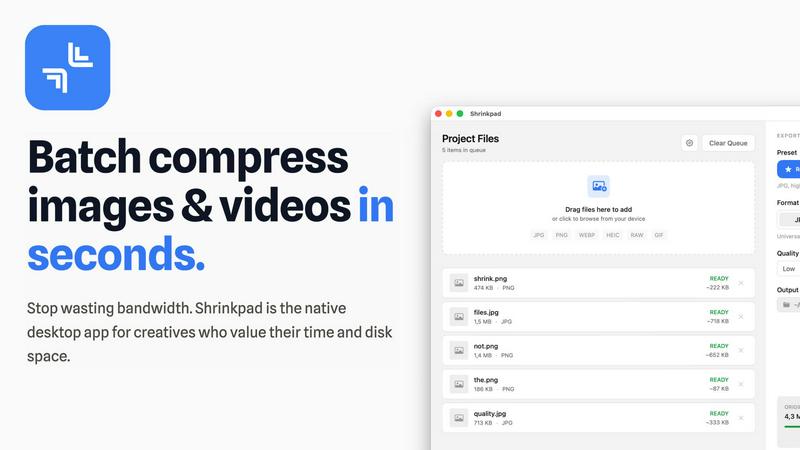
Shrinkpad crushes image and video sizes in bulk, saving you time and space with effortless one-drop compression.
Last updated: February 26, 2026
Visual Comparison
AI Photo Generator

Shrinkpad
Feature Comparison
AI Photo Generator
Prompt-to-Masterpiece Engine
Our AI doesn't just listen; it gets you. Feed it natural language describing your scene—think "a cyberpunk samurai in neon rain, cinematic lighting"—and watch as it nails the lighting, composition, and minute details. It's tuned for high fidelity, turning your words into visuals that are ready for prime time, no endless rerolls needed.
Infinite Style Library & Model Hub
Why settle for one look? Dive into a massive library of aesthetic presets, from hyper-realistic photography and vibrant anime to classic oil paintings and futuristic 3D renders. Even better, choose from top-tier AI models like Flux, Ideogram, and SDXL directly in the workflow to match the perfect engine to your project's style and speed needs.
Seamless Photo Transformation
Got a basic photo? Let's transform it. Upload any image—a simple selfie, a product shot—and use text commands to restyle it completely. Turn that selfie into a professional headshot, change the background, or reimagine it as an epic movie poster. It’s the ultimate control for editing and ideation without starting from scratch.
Lightning-Fast Cloud Processing
Forget waiting ages for renders. Our optimized cloud architecture is built for speed, generating high-res images in seconds, not minutes. This means faster iteration, quicker A/B testing for campaigns, and more time creating instead of waiting. Speed is a feature, and we've got it on turbo.
Shrinkpad
Lightning Fast Compression
Say goodbye to sluggish processing times. Shrinkpad is optimized for Apple Silicon, using multi-threaded compression to handle thousands of files in minutes. This means you can spend less time waiting and more time creating.
Folder Mode
With Shrinkpad's Folder Mode, you can drop an entire folder and watch as it automatically detects and compresses all supported images and videos inside. This one-drop import feature eliminates tedious dragging and dropping, making batch processing a breeze.
Smart Detection
Never worry about file formats again. Shrinkpad's Smart Detection automatically identifies over 30 image formats, including RAW, and all major video formats. Non-media files are safely ignored, allowing you to focus only on what matters.
Auto Compression Settings
Stop guessing your compression settings. Shrinkpad intelligently analyzes the visual complexity of each file, applying the perfect compression ratio without sacrificing quality. This means cleaner files with no artifacts, giving you results that truly matter.
Use Cases
AI Photo Generator
Content Creation & Social Media
Craft unique, eye-catching, and copyright-free visuals for YouTube thumbnails, Instagram stories, and TikTok clips in minutes. Stand out in crowded feeds with custom-generated art that perfectly captures your video's vibe, ensuring your content pops and your brand stays fresh.
Marketing & Advertising Assets
Empower marketing teams and entrepreneurs to produce stunning, on-brand visuals for digital ads, website banners, email campaigns, and presentations without blowing the budget on stock photos or designers. Generate perfect product scenes and campaign visuals for rapid testing and deployment.
Professional Branding & Portraits
Generate profile-ready, consistent headshots and character visuals for personal brands, team pages, and professional networks. Use the AI Face Generator workflow to build a library of on-brand portraits without the cost and hassle of a photoshoot.
Design & Ecommerce Visuals
Create realistic product photography, lifestyle shots, and botanical imagery for ecommerce sites, print materials, and design mockups. Generate perfect plant photos or scene expansions to fill catalogs and marketing materials with high-quality, bespoke imagery.
Shrinkpad
Creative Professionals
Photographers and designers can batch compress multiple images simultaneously, saving precious time while ensuring their portfolios maintain high visual standards. Shrinkpad helps keep your creative workflow smooth and efficient.
Web Development
Web developers can significantly reduce app bundle sizes and website load times, enhancing user experience. Faster loading times improve LCP scores, which can lead to better SEO performance and user engagement.
Video Production
Videographers can optimize large video files for quicker uploads and smoother streaming. With Shrinkpad, compressing high-resolution footage is a snap, ensuring that your media retains its quality without taking up unnecessary space.
Team Collaboration
For small studios or teams, Shrinkpad streamlines asset management by enabling bulk processing. This allows everyone on the team to access optimized media without clogging up shared drives, fostering better collaboration and efficiency.
Overview
About AI Photo Generator
Stop dreaming about visuals and start creating them. AI Photo Generator (aiphotogenerator.dev) is your all-access pass to professional-grade digital art, powered by cutting-edge neural networks. This isn't just another toy; it's a production-ready creative suite that demolishes the barrier between your wildest ideas and stunning visual reality. Whether you're typing a detailed text prompt or uploading a photo for a glow-up, our platform delivers photorealistic results, cinematic scenes, or any artistic style you can imagine—in seconds. Built for the fast-paced creator, it turns anyone into a design powerhouse without needing a single technical skill. From solo content creators crafting viral thumbnails to marketing teams pumping out ad assets on a deadline, this tool is the secret weapon for generating copyright-free, jaw-dropping visuals that actually match your vision. Get ready to generate, edit, and dominate.
About Shrinkpad
Shrinkpad is the ultimate game-changer for creatives looking to streamline their image and video compression process on Mac. This native desktop app is designed for those who value their time and resources, allowing you to batch compress hundreds of media files in mere seconds. No more waiting around for uploads or dealing with cloud storage; Shrinkpad operates entirely on your device, ensuring maximum privacy and zero internet dependency. Whether you're a photographer, designer, or developer, Shrinkpad empowers you to optimize your assets with unparalleled efficiency. With support for over 50 formats, including JPG, PNG, HEIC, WebP, MP4, and MOV, you can reduce file sizes by up to 90% while maintaining stunning visual quality. It’s not just about saving space; it’s about reclaiming your creative flow.
Frequently Asked Questions
AI Photo Generator FAQ
Is there a free plan to try it out?
Absolutely. You can start generating for free with our entry-level plan. It's the perfect way to test the workflow, experiment with prompts, and see the quality firsthand before committing any funds. No design skills or credit card are required to begin.
Can I use the generated images for commercial projects?
Yes, you own the output. Images generated on our platform are cleared for commercial use, so you can confidently use them in client work, advertising campaigns, merchandise, and social media without worrying about copyright strikes.
How does the Image-to-Image feature work?
Simply upload a reference photo. The AI uses it as a structural and stylistic baseline. Then, you instruct it with text on what to change—like "make it sunset," "add a cat," or "change the style to watercolor." It regenerates the image based on your edits while preserving the core composition.
What makes your generator faster than others?
We built our infrastructure from the ground up for speed, leveraging optimized cloud processing and direct access to efficient AI models. This eliminates the long queues and slow renders common on other platforms, delivering your results in seconds for a seamless, iterative creative process.
Shrinkpad FAQ
Can I use Shrinkpad for free?
Yes, Shrinkpad offers a Free Starter plan that provides essential tools for casual use, allowing you to batch compress up to 10 files at a time.
What file formats does Shrinkpad support?
Shrinkpad supports over 50 formats, including common ones like JPG, PNG, HEIC, WEBP, MP4, and MOV, making it versatile for all your media needs.
Does Shrinkpad support video compression?
Absolutely! Shrinkpad not only compresses images but also handles various video formats, ensuring that your media files are optimized for any platform.
How many files can I process at once?
With the Free Starter plan, you can process up to 10 files per batch. However, upgrading to the Personal or Team plans allows for unlimited batch processing, giving you the freedom to work without limits.
Alternatives
AI Photo Generator Alternatives
AI Photo Generator is a powerhouse in the AI image creation space, a tool that lets you conjure up professional visuals from simple text or photos. It's the go-to for creators who want to skip the learning curve and get straight to generating stunning, copyright-free art in seconds. But let's keep it real—no single tool is the perfect fit for everyone. You might be hunting for alternatives because your budget needs a different vibe, or you crave a specific feature this platform doesn't hit. Maybe you're all about a different user interface or your workflow demands integration with other apps. The search is on for something that matches your unique creative tempo. When you're scouting for other options, don't just chase the shiny object. Dig into what really matters: the quality and consistency of the outputs, the flexibility of the styles, how fast it actually spits out your ideas, and of course, the price tag. Your ideal alternative should feel like an extension of your brain, not a battle with a bot.
Shrinkpad Alternatives
Shrinkpad is your ultimate sidekick in the world of batch image and video compression, specifically crafted for Mac users who crave speed and efficiency. This power-packed app allows creatives to streamline their workflow, effortlessly dragging and dropping tons of files or entire folders for instant compression. With a local processing approach, privacy is paramount, and users can compress their media without the hassle of waiting or relying on cloud services. Despite Shrinkpad's stellar features, users often seek alternatives due to various factors like pricing, unique functionalities, or compatibility with different platforms. When hunting for an alternative, consider the ease of use, file format support, compression efficiency, and whether it meets your specific needs as a creative. Finding the right tool can make all the difference in maintaining your creative flow without skipping a beat.