Hush Touch | Voice-to-Text for MacOS vs Read PDF Aloud
Side-by-side comparison to help you choose the right AI tool.

Hush Touch | Voice-to-Text for MacOS
Hush Touch turns your voice into text on Mac, learning your jargon offline with zero subscriptions for just $20.
Last updated: February 28, 2026

Read PDF Aloud
Transform any PDF into lifelike speech in 142 languages with Read PDF Aloud—your free AI-powered listening buddy.
Last updated: February 28, 2026
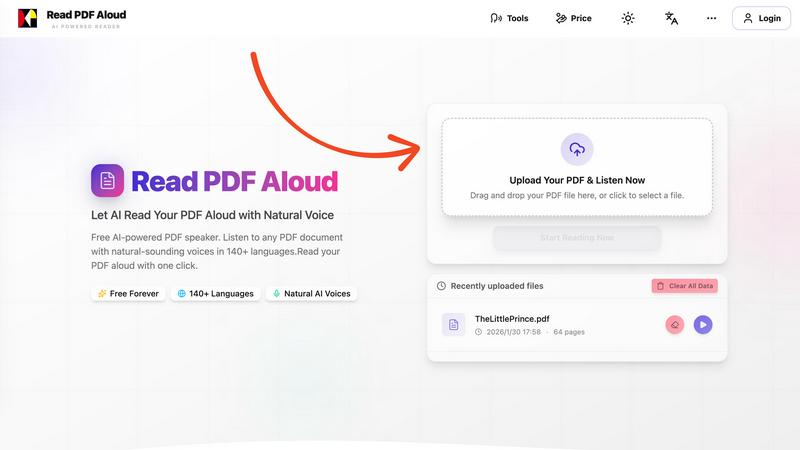
Visual Comparison
Hush Touch | Voice-to-Text for MacOS

Read PDF Aloud
Feature Comparison
Hush Touch | Voice-to-Text for MacOS
Dual-Engine Recognition
Hush Touch utilizes a powerhouse dual-engine recognition system that combines DictationTranscriber and SFSpeechRecognizer. This dynamic duo ensures your spoken words flow naturally while accurately capturing your custom vocabulary. The Apple Intelligence final pass polishes everything to perfection, giving you the best of both worlds: fluidity and precision.
Custom Vocabulary
No more fumbling with generic terms that just don’t cut it! Hush Touch allows you to store up to 500 custom vocabulary terms, auto-learning from your corrections. Whether you’re tossing around technical jargon, brand names, or medical terms, this app adapts to your unique way of speaking, making dictation feel more intuitive and personalized.
Smart Text Processing
Get ready for some serious productivity boosts! Hush Touch features advanced smart text processing that removes filler words and auto-corrects common issues, like that pesky "actually" that often slips into your speech. It also formats voice snippets for repeated phrases and can even create numbered lists—all processed in real time on your Mac, keeping everything efficient and smooth.
Adaptive Learning
This is where Hush Touch really steps up its game. The app learns from your corrections and context, adapting to your personal speaking style. By leveraging frequency-weighted language models, it ensures that your most-used terms and phrases are always at the forefront, making your dictation experience faster and more accurate with every use.
Read PDF Aloud
Free to Use
Dive into the world of audio PDFs without spending a dime! Read PDF Aloud is absolutely free, offering daily credits to all registered users. Say goodbye to subscription fees and hello to unlimited listening.
PDF OCR
With cutting-edge optical character recognition, Read PDF Aloud decodes even the most complex documents. Scanned PDFs? No problem. Handwritten notes? Bring it on! This feature ensures you never miss a word, making it perfect for all types of content.
Natural AI Voices
Choose from a diverse library of realistic AI voices that make your PDF reading experience engaging and enjoyable. Whether you prefer a soothing tone or a more dynamic delivery, there's a voice that fits your vibe, enhancing comprehension and retention.
Cross Platform Compatibility
Read PDF Aloud works seamlessly across all devices—Windows, Mac, iPhone, iPad, Android, or Linux. Just fire up your modern browser, and you're good to go! No downloads, no hassle, just instant access to your favorite documents.
Use Cases
Hush Touch | Voice-to-Text for MacOS
Drafting Emails
Imagine composing emails without even touching your keyboard. With Hush Touch, you can dictate your thoughts and watch them transform into text instantly. It's perfect for those who are constantly on the go but still need to fire off messages quickly and efficiently.
Writing Notes
Whether you’re in a meeting, lecture, or brainstorming session, Hush Touch lets you capture every important detail without slowing down. Just start talking, and let the app handle the transcription, so you can focus on what really matters.
Creating Content
For content creators, Hush Touch is a lifesaver. From blog posts to social media updates, you can dictate your ideas in real time, ensuring you never lose a spark of inspiration. The app's adaptive learning means it understands your style, making the final output feel authentically you.
Coding and Technical Work
Geeks and techies rejoice! Hush Touch doesn’t just handle plain language; it’s equipped to recognize technical terms and coding language, making it an invaluable tool for software developers and IT professionals. You can dictate code snippets and commands accurately, letting you work smarter, not harder.
Read PDF Aloud
Study Buddy
Rev up your study sessions by letting Read PDF Aloud read your textbooks aloud. Perfect for auditory learners who absorb information better through listening. Plus, you can multitask while reviewing material—talk about efficiency!
Accessibility for All
Read PDF Aloud is a game-changer for individuals with visual impairments or reading difficulties. The conversion of text to speech makes information accessible, empowering everyone to engage with written content effortlessly.
Proofreading Made Easy
When it's time to proofread that important document, let Read PDF Aloud do the heavy lifting. Listening to your work read back helps you catch errors and awkward phrasing that your eyes might miss. It's like having a personal editor on standby!
Enjoying eBooks On-the-Go
Transform your favorite eBooks into audio files and enjoy them on your daily commute or while exercising. Whether you’re jogging or sipping coffee, Read PDF Aloud makes it easy to enjoy stories without being glued to a screen.
Overview
About Hush Touch | Voice-to-Text for MacOS
Hush Touch is a game-changing voice-to-text app designed exclusively for macOS. It transforms dictation into a fast, natural, and utterly private experience that keeps your conversations and thoughts completely off the cloud. This sleek 5.5 MB application runs entirely on your device, using a killer combination of two Apple transcription engines along with an Apple Intelligence final pass, ensuring your text is cleaner and more accurate than ever before. Whether you're a busy professional, a creative writer, or just someone who loves efficiency, Hush Touch fits perfectly into your daily workflow. Say goodbye to clunky dictation tools and embrace a seamless way to draft emails, notes, documents, and more—all hands-free! With customizable hotkeys and Siri integration, starting your dictation is as easy as a simple command. Plus, Hush Touch intelligently learns your unique vocabulary over time, making it the ultimate tool for anyone who wants to enhance their dictation game without compromising their privacy.
About Read PDF Aloud
Welcome to the future of reading with Read PDF Aloud, the browser-based application that turns your PDF documents into stunningly natural-sounding speech. If you've ever wished you could just listen to a PDF instead of squinting at the screen, then this is your jam! With next-level OCR (Optical Character Recognition) technology, it reads even the trickiest scanned PDFs and image-based documents—yes, even those handwritten notes you thought were lost to time. Whether you’re a student drowning in textbooks, a professional needing to digest reports on the go, or just someone who loves to multitask, Read PDF Aloud is here to save the day. This powerful tool delivers a smooth listening experience with high-quality neural voices across 142+ languages, all while keeping your data safely within your browser. Enjoy seamless access on any device, transforming reading from a chore into a delightful experience.
Frequently Asked Questions
Hush Touch | Voice-to-Text for MacOS FAQ
Is Hush Touch really completely offline?
Absolutely! Hush Touch runs entirely on your Mac, meaning all your dictation and processing happens locally, ensuring your data and voice stay private and secure.
How does the adaptive learning feature work?
The adaptive learning feature detects when you correct a transcription and automatically adds the correct words to your vocabulary. This means the more you use it, the smarter it gets, tailoring to your unique speech patterns.
Can I customize the hotkeys for dictation?
Yes, Hush Touch allows you to set up customizable hotkeys and even use Siri to start dictation, giving you the flexibility to dictate hands-free or with a quick keyboard command.
What if I need to dictate in different contexts?
No problem! Hush Touch offers different context modes, including General, Email, Code, and Notes. You can easily switch between modes depending on what you’re working on, ensuring the app is always tuned to your specific needs.
Read PDF Aloud FAQ
How does Read PDF Aloud handle scanned PDFs?
Read PDF Aloud uses advanced OCR technology to extract text from scanned PDFs and image-based documents, allowing you to listen to any type of content effortlessly.
Is my data safe when using Read PDF Aloud?
Absolutely! All processing happens locally in your browser, meaning your data never leaves your device. Your privacy is our priority.
Can I use Read PDF Aloud on mobile devices?
Yes! Read PDF Aloud is designed to work on any modern browser, making it fully accessible on mobile devices like iPhones, Android phones, and tablets.
What languages does Read PDF Aloud support?
With support for over 142 languages, Read PDF Aloud lets you choose from a vast array of options, ensuring you can listen in your preferred language and voice.
Alternatives
Hush Touch | Voice-to-Text for MacOS Alternatives
Hush Touch | Voice-to-Text for MacOS is a cutting-edge voice recognition app tailored for the macOS environment, designed to transform your spoken words into text with unparalleled accuracy and privacy. As part of the AI Assistants category, it offers a unique offline experience, allowing users to ditch the cloud while still getting top-notch dictation capabilities. Despite its impressive features, users often seek alternatives due to varying needs like pricing, platform compatibility, and specific functionalities that may align more closely with their individual workflows. When choosing an alternative, consider factors such as ease of use, the ability to customize vocabulary, privacy measures, and whether the app can handle your unique dictation style.
Read PDF Aloud Alternatives
Read PDF Aloud is your go-to browser-based application designed to transform any PDF into lifelike speech, making reading feel like a breeze. It falls under the Speech & Voice category, leveraging cutting-edge AI technology to provide a seamless auditory experience for users across the globe. However, even the best tools can have limitations, prompting users to seek alternatives. Common reasons for this include pricing models, specific feature sets, platform compatibility, and personal preferences in voice quality. When searching for alternatives, consider what features matter most to you—whether it’s superior OCR capabilities, a wider selection of voice options, or compatibility with your preferred devices. Think about your budget too; while some alternatives may offer premium features, others might come with a hefty price tag. Ultimately, the right choice hinges on your individual needs and how you plan to integrate the tool into your daily routine.