

Read PDF Aloud
Transform any PDF into lifelike speech in 142 languages with Read PDF Aloud—your free AI-powered listening buddy.
About Read PDF Aloud
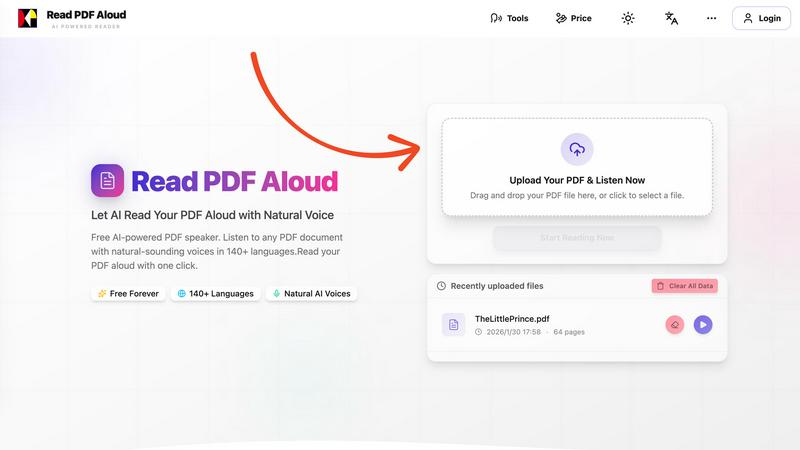
Welcome to the future of reading with Read PDF Aloud, the browser-based application that turns your PDF documents into stunningly natural-sounding speech. If you've ever wished you could just listen to a PDF instead of squinting at the screen, then this is your jam! With next-level OCR (Optical Character Recognition) technology, it reads even the trickiest scanned PDFs and image-based documents—yes, even those handwritten notes you thought were lost to time. Whether you’re a student drowning in textbooks, a professional needing to digest reports on the go, or just someone who loves to multitask, Read PDF Aloud is here to save the day. This powerful tool delivers a smooth listening experience with high-quality neural voices across 142+ languages, all while keeping your data safely within your browser. Enjoy seamless access on any device, transforming reading from a chore into a delightful experience.
Features of Read PDF Aloud
Free to Use
Dive into the world of audio PDFs without spending a dime! Read PDF Aloud is absolutely free, offering daily credits to all registered users. Say goodbye to subscription fees and hello to unlimited listening.
PDF OCR
With cutting-edge optical character recognition, Read PDF Aloud decodes even the most complex documents. Scanned PDFs? No problem. Handwritten notes? Bring it on! This feature ensures you never miss a word, making it perfect for all types of content.
Natural AI Voices
Choose from a diverse library of realistic AI voices that make your PDF reading experience engaging and enjoyable. Whether you prefer a soothing tone or a more dynamic delivery, there's a voice that fits your vibe, enhancing comprehension and retention.
Cross Platform Compatibility
Read PDF Aloud works seamlessly across all devices—Windows, Mac, iPhone, iPad, Android, or Linux. Just fire up your modern browser, and you're good to go! No downloads, no hassle, just instant access to your favorite documents.
Use Cases of Read PDF Aloud
Study Buddy
Rev up your study sessions by letting Read PDF Aloud read your textbooks aloud. Perfect for auditory learners who absorb information better through listening. Plus, you can multitask while reviewing material—talk about efficiency!
Accessibility for All
Read PDF Aloud is a game-changer for individuals with visual impairments or reading difficulties. The conversion of text to speech makes information accessible, empowering everyone to engage with written content effortlessly.
Proofreading Made Easy
When it's time to proofread that important document, let Read PDF Aloud do the heavy lifting. Listening to your work read back helps you catch errors and awkward phrasing that your eyes might miss. It's like having a personal editor on standby!
Enjoying eBooks On-the-Go
Transform your favorite eBooks into audio files and enjoy them on your daily commute or while exercising. Whether you’re jogging or sipping coffee, Read PDF Aloud makes it easy to enjoy stories without being glued to a screen.
Frequently Asked Questions
How does Read PDF Aloud handle scanned PDFs?
Read PDF Aloud uses advanced OCR technology to extract text from scanned PDFs and image-based documents, allowing you to listen to any type of content effortlessly.
Is my data safe when using Read PDF Aloud?
Absolutely! All processing happens locally in your browser, meaning your data never leaves your device. Your privacy is our priority.
Can I use Read PDF Aloud on mobile devices?
Yes! Read PDF Aloud is designed to work on any modern browser, making it fully accessible on mobile devices like iPhones, Android phones, and tablets.
What languages does Read PDF Aloud support?
With support for over 142 languages, Read PDF Aloud lets you choose from a vast array of options, ensuring you can listen in your preferred language and voice.
Explore more in this category:
Similar to Read PDF Aloud

Convia Studio
Turn every podcast or video episode into a coordinated campaign: posts, clips, newsletter and show notes, published to 9 platforms.

Quick Viral Notes
Turn a long-form article into Substack Notes and social posts. Paste the URL and schedule posts from the Chrome extension. By Build to Launch.

TextFlick
Turn a written chat into a vertical text message video for TikTok, Shorts and Reels, with typing, sounds and an AI script writer.

ScaleReach
Clip videos by chatting with Claude or ChatGPT through ScaleReach's MCP server. 100 free minutes for new accounts.

Captions Generator
AI captions for any video in your browser. Fix words, pick a style, translate into 100+ languages, export MP4, SRT, VTT or TXT. Free, no sign-up.

FlipHTML5 Downloader
Turn any FlipHTML5 flipbook into a high-quality PDF in your browser - free, open source, and no signup required.

Cardify
Write Markdown on the left, get a finished knowledge card on the right. 30+ themes, custom size and fonts, PNG/SVG/PDF export.

Tip Toeing in My Jordans
Upload a photo and get a 12-second AI video of the viral tip toe meme: you play Rumpelstiltskin, a friend can play the woman in the hay.