Mimo AI vs Shrinkpad
Side-by-side comparison to help you choose the right AI tool.

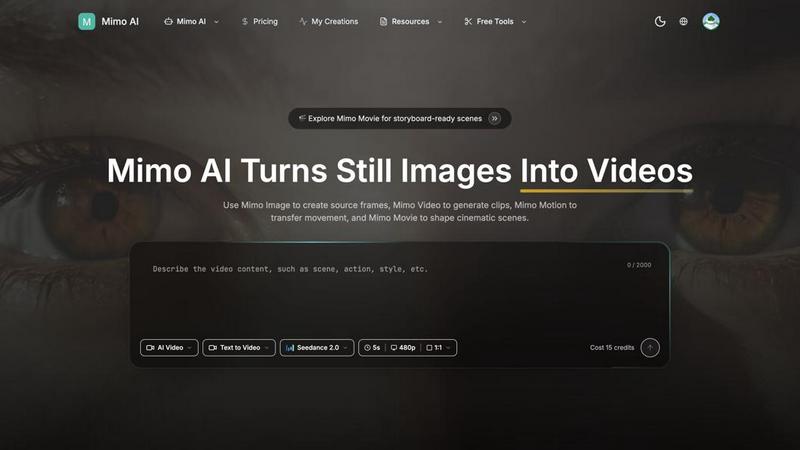
Mimo AI transforms your images into stunning videos, making content creation fast, easy, and cinematic for every creator.
Last updated: March 26, 2026

Shrinkpad
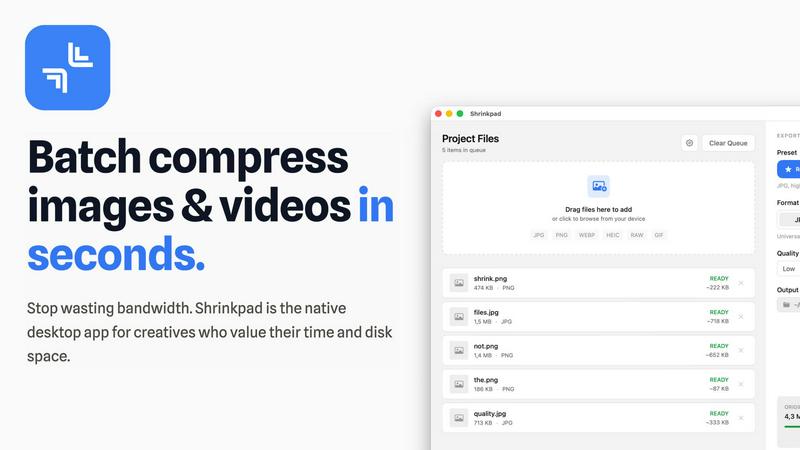
Shrinkpad crushes image and video sizes in bulk, saving you time and space with effortless one-drop compression.
Last updated: February 26, 2026
Visual Comparison
Mimo AI
Shrinkpad
Feature Comparison
Mimo AI
Image to Video AI
Turn your static images into lively videos that captivate your audience. Mimo AI's powerful algorithms analyze your images and add natural movements and cinematic effects, making your content pop without breaking a sweat.
Text to Video
Got a vision? Just describe it! Mimo AI takes your textual prompts and turns them into fully-fledged videos that align with your creative intent. This feature is a lifesaver for those who want to see their ideas come to life in a flash.
Multiple AI Models
Choose your flavor! Mimo AI offers a selection of AI models, including Kling and Runway, each optimized for different styles and quality levels. This flexibility allows you to tailor your video output to fit your unique brand aesthetic.
Fast Generation
Why wait around? With Mimo AI, videos are generated in mere seconds, thanks to an optimized AI pipeline. This means you can churn out high-quality content quickly, keeping your audience engaged and your projects on schedule.
Shrinkpad
Lightning Fast Compression
Say goodbye to sluggish processing times. Shrinkpad is optimized for Apple Silicon, using multi-threaded compression to handle thousands of files in minutes. This means you can spend less time waiting and more time creating.
Folder Mode
With Shrinkpad's Folder Mode, you can drop an entire folder and watch as it automatically detects and compresses all supported images and videos inside. This one-drop import feature eliminates tedious dragging and dropping, making batch processing a breeze.
Smart Detection
Never worry about file formats again. Shrinkpad's Smart Detection automatically identifies over 30 image formats, including RAW, and all major video formats. Non-media files are safely ignored, allowing you to focus only on what matters.
Auto Compression Settings
Stop guessing your compression settings. Shrinkpad intelligently analyzes the visual complexity of each file, applying the perfect compression ratio without sacrificing quality. This means cleaner files with no artifacts, giving you results that truly matter.
Use Cases
Mimo AI
Social Media Content Creation
Influencers and content creators can leverage Mimo AI to produce daily videos from their image libraries, saving time and effort while still delivering eye-catching content that resonates with their followers.
Marketing Campaigns
Marketers can craft compelling ad visuals and promotional videos that stand out in a crowded digital landscape. With Mimo AI, you can create professional-quality content that drives engagement and conversions.
Educational Videos
Educators and trainers can utilize Mimo AI to transform instructional images into engaging video lessons. This makes learning more dynamic and helps keep students interested and informed.
Storytelling in Animation
Artists and animators can use Mimo AI to generate storyboards and animated sequences from their concepts. This powerful tool allows them to visualize their narratives and present them in a captivating manner.
Shrinkpad
Creative Professionals
Photographers and designers can batch compress multiple images simultaneously, saving precious time while ensuring their portfolios maintain high visual standards. Shrinkpad helps keep your creative workflow smooth and efficient.
Web Development
Web developers can significantly reduce app bundle sizes and website load times, enhancing user experience. Faster loading times improve LCP scores, which can lead to better SEO performance and user engagement.
Video Production
Videographers can optimize large video files for quicker uploads and smoother streaming. With Shrinkpad, compressing high-resolution footage is a snap, ensuring that your media retains its quality without taking up unnecessary space.
Team Collaboration
For small studios or teams, Shrinkpad streamlines asset management by enabling bulk processing. This allows everyone on the team to access optimized media without clogging up shared drives, fostering better collaboration and efficiency.
Overview
About Mimo AI
Mimo AI is the ultimate game-changer for creators, marketers, and teams looking to supercharge their visual content production. By merging Mimo Video, Mimo Image, Mimo Motion, and Mimo Movie, it delivers a seamless workflow that transforms traditional content creation into an electrifying experience. Whether you're crafting stunning visuals for social media, generating engaging marketing materials, or simply playing around with creative ideas, Mimo AI has got your back. The platform allows you to create eye-popping images, convert static stills into dynamic videos, and animate scenes with a few clicks. With flexible credit-based usage, Mimo AI caters to both casual users and professionals, making high-quality visual production faster, easier, and more accessible than ever before. Get ready to unleash your creativity and elevate your storytelling with cutting-edge AI technology!
About Shrinkpad
Shrinkpad is the ultimate game-changer for creatives looking to streamline their image and video compression process on Mac. This native desktop app is designed for those who value their time and resources, allowing you to batch compress hundreds of media files in mere seconds. No more waiting around for uploads or dealing with cloud storage; Shrinkpad operates entirely on your device, ensuring maximum privacy and zero internet dependency. Whether you're a photographer, designer, or developer, Shrinkpad empowers you to optimize your assets with unparalleled efficiency. With support for over 50 formats, including JPG, PNG, HEIC, WebP, MP4, and MOV, you can reduce file sizes by up to 90% while maintaining stunning visual quality. It’s not just about saving space; it’s about reclaiming your creative flow.
Frequently Asked Questions
Mimo AI FAQ
What is Mimo AI and how do the tools fit together?
Mimo AI is an all-in-one creative platform that integrates Mimo Video, Mimo Image, Mimo Motion, and Mimo Movie to streamline the video generation and visual creation process, allowing creators to work smarter, not harder.
What types of images work best with Mimo AI?
Mimo AI supports JPG, PNG, and WebP formats. High-resolution images with clear subjects typically yield the best results, as they provide the AI with the necessary detail to create dynamic videos.
How long does it take to generate a video?
Thanks to Mimo AI's optimized AI pipeline, videos are generated in just seconds. This rapid turnaround allows you to quickly produce and share content without lengthy editing processes.
How does the credit system work?
Mimo AI operates on a flexible credit-based system, allowing users to start with free credits and scale their usage based on their needs. This pay-as-you-go model makes it easy to manage costs while accessing high-quality tools.
Shrinkpad FAQ
Can I use Shrinkpad for free?
Yes, Shrinkpad offers a Free Starter plan that provides essential tools for casual use, allowing you to batch compress up to 10 files at a time.
What file formats does Shrinkpad support?
Shrinkpad supports over 50 formats, including common ones like JPG, PNG, HEIC, WEBP, MP4, and MOV, making it versatile for all your media needs.
Does Shrinkpad support video compression?
Absolutely! Shrinkpad not only compresses images but also handles various video formats, ensuring that your media files are optimized for any platform.
How many files can I process at once?
With the Free Starter plan, you can process up to 10 files per batch. However, upgrading to the Personal or Team plans allows for unlimited batch processing, giving you the freedom to work without limits.
Alternatives
Mimo AI Alternatives
Mimo AI is an innovative powerhouse in the realm of content creation, merging advanced capabilities in image-to-video conversion, AI image generation, motion transfer, and cinematic storytelling. This slick platform is a creative’s best friend, designed for anyone from solo designers to bustling marketing teams who crave efficient visual production at their fingertips. With its all-in-one workflow, Mimo AI takes the guesswork out of crafting compelling visuals, making it a go-to tool for those in the design and video realms. However, users often find themselves on the hunt for alternatives to Mimo AI, driven by factors like pricing, specific feature sets, or platform compatibility. The landscape of AI tools is ever-evolving, and what works for one project might not fit another’s vibe or budget. When seeking an alternative, it's crucial to consider factors such as user-friendliness, the breadth of features offered, and how well the platform integrates with existing workflows. Emphasizing flexibility and capability will guide you toward the right fit in your creative journey.
Shrinkpad Alternatives
Shrinkpad is your ultimate sidekick in the world of batch image and video compression, specifically crafted for Mac users who crave speed and efficiency. This power-packed app allows creatives to streamline their workflow, effortlessly dragging and dropping tons of files or entire folders for instant compression. With a local processing approach, privacy is paramount, and users can compress their media without the hassle of waiting or relying on cloud services. Despite Shrinkpad's stellar features, users often seek alternatives due to various factors like pricing, unique functionalities, or compatibility with different platforms. When hunting for an alternative, consider the ease of use, file format support, compression efficiency, and whether it meets your specific needs as a creative. Finding the right tool can make all the difference in maintaining your creative flow without skipping a beat.