Manga Colorizer vs Nano Banana AI
Side-by-side comparison to help you choose the right AI tool.

Manga Colorizer
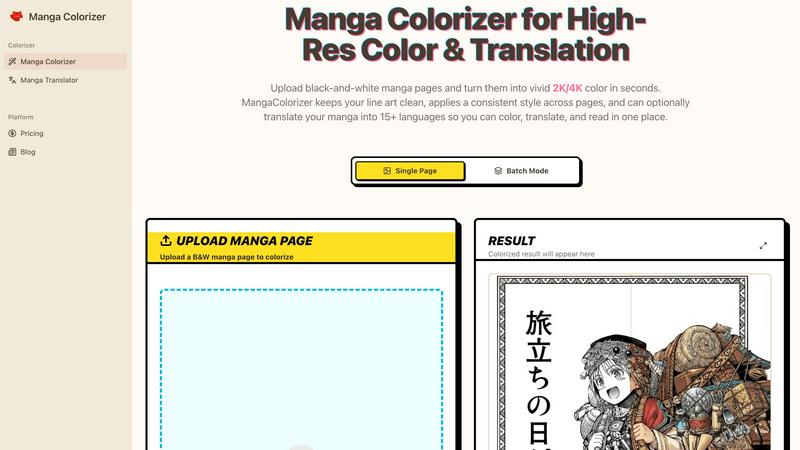
Transform black-and-white manga into stunning 2K/4K color with AI-powered translation in 15+ languages instantly.
Last updated: February 26, 2026

Nano Banana AI
Nano Banana AI instantly crafts and edits stunning images from your words, no design skills needed.
Last updated: March 18, 2026
Visual Comparison
Manga Colorizer
Nano Banana AI

Feature Comparison
Manga Colorizer
Intelligent Manga-Specific Colorization
Manga Colorizer employs cutting-edge AI technology optimized for manga art, ensuring that the line art remains crisp while applying consistent, rich colors. This feature allows users to achieve a professional look without sacrificing the integrity of the original artwork.
Seamless Translation Capabilities
Not only does Manga Colorizer colorize your pages, but it also translates text into over 15 languages. This ensures that dialogue, narration, and sound effects are accurately captured while maintaining the layout and aesthetic of the original manga.
High-Resolution Output
Unlike many online tools that limit quality, Manga Colorizer supports high-resolution 2K and 4K outputs. This means your colored manga looks sharp and clear on any display, perfect for sharing with friends or printing for conventions.
Batch Processing for Efficiency
For those looking to colorize multiple pages, Manga Colorizer offers a batch mode. This feature allows users to upload and process entire chapters at once, streamlining the workflow for indie creators and scanlation teams alike.
Nano Banana AI
Multi-Image Input & Blending
Stop thinking one image at a time. Nano Banana lets you upload up to 14 reference images in a single go and fuse their concepts, aesthetics, and subjects into one cohesive masterpiece. Want to blend the style of a vintage poster with the composition of a modern photo and your product? Just drag, drop, and describe. This feature unlocks next-level ideation, allowing for hybrid creations that were previously impossible without serious Photoshop skills.
Consistent Character Lock
Finally, an AI that remembers faces. This game-changing feature lets you generate a character—a person, a mascot, a product—and then keep them recognizable across a whole series of images. Change the background, the outfit, the action, or the era, and your core subject stays consistent. It’s the holy grail for storytelling, brand campaigns, and character design, ensuring your hero looks like the same hero in every scene.
Natural-Language Photo Editing
Forget layers, masks, and confusing sliders. With Nano Banana's natural-language edit, you just tell the AI what you want to change. Type "make the sky more dramatic," "put him in a cyberpunk city," or "change her jacket to leather," and it edits the existing image directly. It’s like having a genius graphic designer who understands exactly what you mean, executing complex edits with just a sentence.
Crystal-Clear Text Rendering
Most AI image generators choke on text, producing garbled nonsense. Nano Banana, powered by Gemini, nails it. Create posters, logos, social media graphics, and infographics with legible, well-integrated text right in the image. The AI understands layout and typography, rendering words that actually look good and make sense, turning it into a legit tool for design concepts and branded content.
Use Cases
Manga Colorizer
Colorizing Raw Manga
One of the primary use cases for Manga Colorizer is transforming black-and-white manga into vibrant color. This is perfect for artists and fans who want to see their favorite stories come to life with stunning visuals that enhance the storytelling.
Quick Drafts for Scanlation Teams
Scanlation teams can use Manga Colorizer as a first-pass tool to generate quick draft translations. This allows them to focus their time on refining character voices, cultural nuances, and maintaining consistency throughout the chapter.
Understanding Raw Releases
For manga enthusiasts who want to dive into the latest raw releases without waiting for official translations, Manga Colorizer provides a swift solution. Readers can upload their favorite manga pages and enjoy an immediate colorized and translated version.
Indie Creators Streamlining Workflow
Indie creators looking to publish their manga can leverage Manga Colorizer to streamline their entire process, from coloring to translating. This creates a more efficient pipeline, minimizing the time required to produce high-quality, polished chapters.
Nano Banana AI
Cinematic Storytelling & Concept Art
Transform written stories into breathtaking visual scenes. Authors, game developers, and filmmakers can generate concept art, storyboards, and cinematic stills by describing scenes from their script or novel. Create consistent characters in dynamic poses across different environments, building entire visual worlds to pitch ideas or fuel creative development without a massive art budget.
Agile Branding & Asset Creation
From zero to full brand kit in minutes. Entrepreneurs and marketers can generate cohesive visual identities—logos, mascots, color palettes, and sticker sheets—from a single prompt. Create photorealistic product mockups, ad variations, and social media assets on the fly. It’s perfect for rapid prototyping, campaign testing, and maintaining a fresh, on-brand visual presence without relying on external designers.
Educational & Informational Content
Make learning and explaining visually lit. Teachers, content creators, and consultants can craft detailed infographics, historical recreations, scientific diagrams, and educational posters simply by describing the concept. Turn complex information into engaging, easy-to-understand visuals that capture attention and improve comprehension, all tailored to your specific topic.
Creative Photo Editing & Manipulation
Reimagine your existing photos with AI-powered magic. Photographers, social media managers, and hobbyists can use the natural-language edit to radically transform images. Swap backgrounds, change styles (e.g., to anime or oil painting), add or remove elements, or enhance details—all through simple instructions. It’s like having the most advanced photo editor that works on command.
Overview
About Manga Colorizer
Manga Colorizer is the ultimate AI-powered tool designed specifically for manga lovers and creators who want to elevate their black-and-white pages into stunning, full-color masterpieces. This innovative platform combines advanced coloring techniques and translation capabilities to turn raw manga into vibrant, readable chapters that truly pop. With Manga Colorizer, you simply upload your black-and-white manga pages, select your desired style, and watch as the magic happens in seconds. The platform is tailored for everyone from casual readers to dedicated scanlation teams, ensuring that each page retains its original charm while becoming a more engaging visual experience. This tool excels in preserving the intricate details of manga art while providing a seamless translation into over 15 languages. Whether you are a fan eager to understand the latest raw releases or a creator looking to streamline your workflow, Manga Colorizer is the all-in-one solution that promises speed, quality, and creativity without compromise.
About Nano Banana AI
Nano Banana AI is your new creative sidekick, a powerhouse image generator that smashes the barrier between wild imagination and stunning visual reality. Powered by Google's cutting-edge Gemini models, it's built for anyone who needs to create, edit, and transform images without the headache of complex design software. Whether you're a marketer needing slick ads, a content creator crafting stories, a small business owner building a brand, or just someone with a killer idea, Nano Banana hands you the keys. Its core magic is simplicity: you talk, it creates. Describe anything from a cinematic scene to a product mockup in plain English, and watch it materialize in seconds. It goes beyond basic generation with next-level tools like multi-image blending, keeping characters consistent across scenes, and editing images just by telling it what to change. Ditch the subscription gatekeepers; this tool lets you start creating for free, right in your browser. This isn't just another AI art toy; it's a professional-grade visual engine designed to deliver photorealistic quality, razor-sharp text, and 4K exports, making it the ultimate one-stop shop for turning prompts into polished, ready-to-use assets.
Frequently Asked Questions
Manga Colorizer FAQ
How does Manga Colorizer ensure high-quality colorization?
Manga Colorizer uses advanced AI models specifically trained on manga art to ensure that colors are applied cleanly without smudging details. This results in a professional finish that respects the original artwork.
Can I upload multiple pages at once?
Yes! Manga Colorizer features a batch processing mode that allows you to upload and colorize multiple pages simultaneously, making it easier to work on entire chapters without the hassle of one-at-a-time uploads.
What file formats does Manga Colorizer support?
Manga Colorizer supports various file formats including PNG, JPG, and WEBP. This flexibility makes it easy to work with your existing manga files, regardless of how they are formatted.
Is there an option to customize the coloring style?
Absolutely! Users can upload colored images as style references to guide the AI in achieving a specific look. This feature allows for greater customization, ensuring that the final product aligns with your artistic vision.
Nano Banana AI FAQ
What AI model does Nano Banana use?
Nano Banana is powered by Google's state-of-the-art Gemini image generation model. This is what gives it superior capabilities in photorealistic rendering, understanding complex prompts, maintaining character consistency, and generating clear, legible text within images, setting it apart from many other generators.
Do I need design skills to use it?
Absolutely not. That's the whole point. Nano Banana is built for everyone. You create and edit images using simple, natural language. Just type what you want to see or describe the change you want to make. The interface is streamlined and intuitive, requiring zero technical or artistic expertise to get professional-looking results.
How many images can I use as a reference?
You can upload and use up to 14 reference images simultaneously in a single generation. This powerful multi-input feature allows you to blend styles, subjects, and compositions from multiple sources to guide the AI toward your unique vision.
What resolution can I export my images at?
Nano Banana supports high-resolution exports, up to 4K quality. You can also generate images in a wide range of 11 popular aspect ratios right from the start, ensuring your creations are sharp and ready for social media, print materials, websites, or campaign assets.
Alternatives
Manga Colorizer Alternatives
Manga Colorizer is an AI-driven manga translator that revolutionizes the way readers experience manga by translating pages instantly through advanced OCR and speech bubble detection. As a tool specifically designed for manga and comics, it ensures that the unique visual storytelling elements remain intact during translation. Users often seek alternatives to Manga Colorizer for various reasons, such as pricing, additional features, or compatibility with different platforms. When choosing an alternative, it’s crucial to consider factors like the quality of text recognition, layout preservation, speed of translation, and how well it handles the intricacies of manga art styles. The right tool can make all the difference in maintaining the integrity of the original work while delivering a seamless reading experience.
Nano Banana AI Alternatives
Nano Banana AI is your text-to-image genie, a slick tool in the AI art generation game that turns your wildest prompts into stunning visuals. It’s all about democratizing design, letting anyone cook up images, tweak photos, and swap aesthetics with zero formal skills required. It’s powered by heavyweight Google AI models, making complex creation feel like a casual scroll. So why the hunt for something else? The creative scene is vast, and one tool rarely fits all vibes. Maybe the pricing model doesn’t match your budget, or you need a specific feature it lacks. Perhaps you’re locked into a different platform or ecosystem. It’s all about finding the right digital paintbrush for your particular canvas. When scouting for other options, keep your non-negotiables front of mind. Crunch the numbers on subscription costs versus output. Dig into the core features—do you need more control, higher resolution, or a certain style? Check platform compatibility and see if it plays nice with your existing workflow. The goal is to find a tool that doesn’t just create, but amplifies your unique creative process.