

Manga Colorizer
Transform black-and-white manga into stunning 2K/4K color with AI-powered translation in 15+ languages instantly.
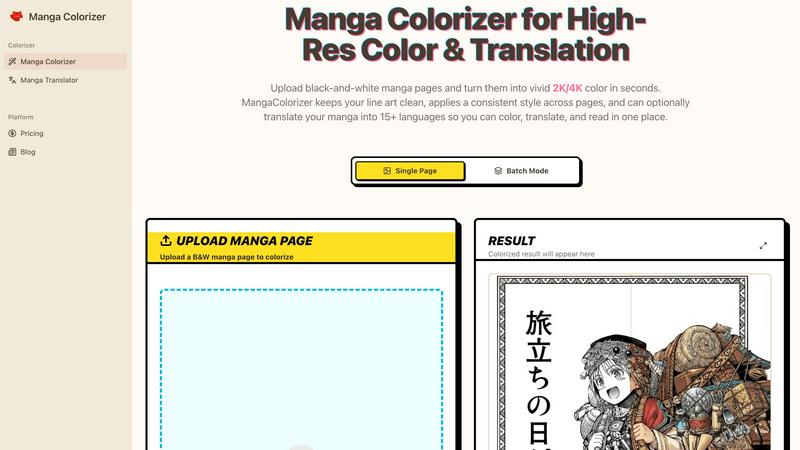
About Manga Colorizer
Manga Colorizer is the ultimate AI-powered tool designed specifically for manga lovers and creators who want to elevate their black-and-white pages into stunning, full-color masterpieces. This innovative platform combines advanced coloring techniques and translation capabilities to turn raw manga into vibrant, readable chapters that truly pop. With Manga Colorizer, you simply upload your black-and-white manga pages, select your desired style, and watch as the magic happens in seconds. The platform is tailored for everyone from casual readers to dedicated scanlation teams, ensuring that each page retains its original charm while becoming a more engaging visual experience. This tool excels in preserving the intricate details of manga art while providing a seamless translation into over 15 languages. Whether you are a fan eager to understand the latest raw releases or a creator looking to streamline your workflow, Manga Colorizer is the all-in-one solution that promises speed, quality, and creativity without compromise.
Features of Manga Colorizer
Intelligent Manga-Specific Colorization
Manga Colorizer employs cutting-edge AI technology optimized for manga art, ensuring that the line art remains crisp while applying consistent, rich colors. This feature allows users to achieve a professional look without sacrificing the integrity of the original artwork.
Seamless Translation Capabilities
Not only does Manga Colorizer colorize your pages, but it also translates text into over 15 languages. This ensures that dialogue, narration, and sound effects are accurately captured while maintaining the layout and aesthetic of the original manga.
High-Resolution Output
Unlike many online tools that limit quality, Manga Colorizer supports high-resolution 2K and 4K outputs. This means your colored manga looks sharp and clear on any display, perfect for sharing with friends or printing for conventions.
Batch Processing for Efficiency
For those looking to colorize multiple pages, Manga Colorizer offers a batch mode. This feature allows users to upload and process entire chapters at once, streamlining the workflow for indie creators and scanlation teams alike.
Use Cases of Manga Colorizer
Colorizing Raw Manga
One of the primary use cases for Manga Colorizer is transforming black-and-white manga into vibrant color. This is perfect for artists and fans who want to see their favorite stories come to life with stunning visuals that enhance the storytelling.
Quick Drafts for Scanlation Teams
Scanlation teams can use Manga Colorizer as a first-pass tool to generate quick draft translations. This allows them to focus their time on refining character voices, cultural nuances, and maintaining consistency throughout the chapter.
Understanding Raw Releases
For manga enthusiasts who want to dive into the latest raw releases without waiting for official translations, Manga Colorizer provides a swift solution. Readers can upload their favorite manga pages and enjoy an immediate colorized and translated version.
Indie Creators Streamlining Workflow
Indie creators looking to publish their manga can leverage Manga Colorizer to streamline their entire process, from coloring to translating. This creates a more efficient pipeline, minimizing the time required to produce high-quality, polished chapters.
Frequently Asked Questions
How does Manga Colorizer ensure high-quality colorization?
Manga Colorizer uses advanced AI models specifically trained on manga art to ensure that colors are applied cleanly without smudging details. This results in a professional finish that respects the original artwork.
Can I upload multiple pages at once?
Yes! Manga Colorizer features a batch processing mode that allows you to upload and colorize multiple pages simultaneously, making it easier to work on entire chapters without the hassle of one-at-a-time uploads.
What file formats does Manga Colorizer support?
Manga Colorizer supports various file formats including PNG, JPG, and WEBP. This flexibility makes it easy to work with your existing manga files, regardless of how they are formatted.
Is there an option to customize the coloring style?
Absolutely! Users can upload colored images as style references to guide the AI in achieving a specific look. This feature allows for greater customization, ensuring that the final product aligns with your artistic vision.
Explore more in this category:
Similar to Manga Colorizer

xfiles
PDFs, images and audio. No uploads. No account. No added watermarks.

FreeVideoGenerator
Free AI video generator: turn text prompts and photos into video clips with Sora 2, Veo 3.1, Wan and more. Free starter credits, no watermark download

Favore AI
AI images, videos, and editing in one creative workspace

VidhyaGen - Image Converter
All-in-one web platform for fast image conversion, compression, editing, and essential digital file utilities in one easy interface.

Turbotools
Free online web tools: PDF converter, image compressor, word counter, text reverse, JSON formatter & generator. 100% free with no sign-ups!

Artcraft AI
AI image and video studio in your browser: generate and edit images, turn photos into videos, edit clips by sentence.

ToonBee AI
ToonBee AI turns a script or a one-line idea into a narrated cartoon video, keeping the same character in every scene. 10+ styles, 16:9 or 9:16.

sakuttoAI
A free suite of online tools for everyday tasks like PDF compression, image conversion, text diff and CSV to Excel.