3DAIStudio vs JSON to Video
Side-by-side comparison to help you choose the right AI tool.

3DAIStudio
Transform your ideas into stunning 3D models in seconds with 3DAIStudio's effortless text and image conversion tools.
Last updated: April 4, 2026

JSON to Video
Craft stunning, on-brand videos in 60 seconds with precise JSON prompts for Veo 3.1 and Seedance 2.
Last updated: February 26, 2026
Visual Comparison
3DAIStudio

JSON to Video
Feature Comparison
3DAIStudio
Text to 3D
Transform your words into eye-popping 3D models in a flash! Just type a description, and our AI works its magic to generate a stunning, textured model ready for use. It's like having a personal 3D artist at your fingertips.
Image to 3D
Got a 2D image or a sketch? Turn it into a vibrant 3D model instantly! Upload any image, and watch as it morphs into a fully textured, export-ready asset. This feature is a game changer for artists and developers alike.
AI Texturing
Say goodbye to boring textures! With our AI texturing capabilities, you can effortlessly apply realistic, high-quality textures to your models. Generate PBR materials from simple prompts or paint custom details directly onto your creations.
Quad-Remesh
Optimize your models like a pro! Our Quad-Remesh feature automates the retopology process, cleaning up mesh topology and reducing polygon counts. This means you get production-ready assets that are smooth and efficient without the hassle.
JSON to Video
Structured Prompts for Precision
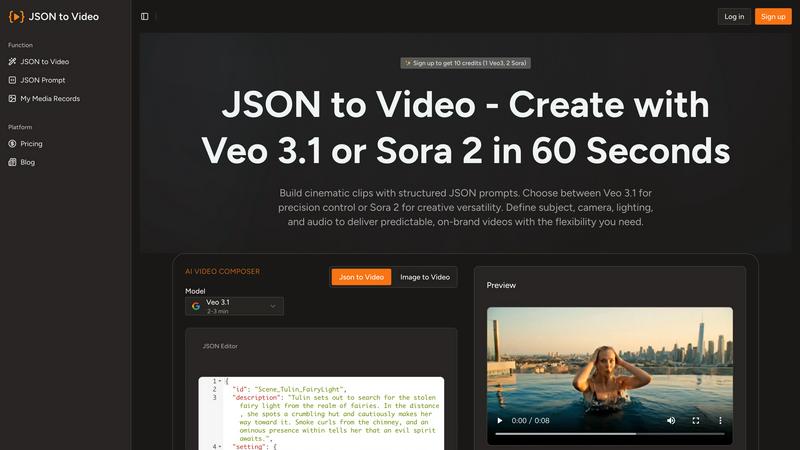
JSON to Video allows users to define the subject, camera settings, lighting, and audio in clearly named JSON fields. This structured approach means every render adheres strictly to the brief, eliminating guesswork and ensuring high-quality outputs.
Veo 3.1 and Seedance 2 Support
The platform is designed to work seamlessly with the latest models, including Veo 3.1 and Seedance 2. This dual model support enhances the versatility and creative possibilities, making it easier to generate stunning videos tailored to specific needs.
Brand Consistency with Reusable Templates
With JSON to Video, agencies can lock in their camera style, color grading, and audio signatures within reusable templates. This feature guarantees that every video produced remains consistent with brand identity, regardless of whether the output is 10 videos or 1,000.
Automated Batch Processing
Users can upload multiple JSON files at once, allowing for overnight render queues. This automation means that teams can wake up to a batch of ready-to-publish branded videos, saving hours of manual editing and significantly increasing productivity.
Use Cases
3DAIStudio
Game Development
Level up your game development process! Create characters, environments, and props in record time. 3DAIStudio helps you quickly generate the assets you need, allowing you to focus on gameplay rather than asset creation.
Product Design
Bring your product ideas to life faster than ever. Use 3DAIStudio to create 3D models for prototypes, marketing materials, or presentations. It's perfect for designers who want to visualize their concepts without the lengthy modeling process.
Education
Engage students with interactive 3D models. 3DAIStudio is an excellent resource for educators looking to enhance their teaching materials. Whether it's for science, art, or engineering, bring lessons to life with stunning visuals.
VR/AR Experiences
Create immersive virtual and augmented reality experiences effortlessly. With 3DAIStudio, you can generate assets tailored for VR/AR environments, making it easier than ever to craft engaging content that captivates users.
JSON to Video
Marketing Campaigns
Marketing teams can utilize JSON to Video to create cohesive video content for campaigns without the hassle of reshoots. By defining parameters in JSON, they can ensure every video aligns with campaign goals and brand standards.
Product Launch Videos
Brands can quickly produce promotional videos for new product launches by simply adjusting the JSON fields for various product attributes, enabling rapid production of high-quality video content that showcases features effectively.
Social Media Content
With built-in templates for different aspect ratios, JSON to Video is perfect for generating social media clips. Teams can create platform-specific videos for TikTok, Instagram, or YouTube without the need for extensive reformatting.
Educational and Training Videos
Organizations can produce training materials and educational content at scale using JSON to Video. By inputting educational content into JSON fields, they can create consistent and effective instructional videos that enhance learning experiences.
Overview
About 3DAIStudio
Welcome to the revolution of 3D creation with 3DAIStudio, the ultimate AI-powered toolkit that transforms your ideas into stunning 3D models in mere seconds. Whether you are a designer, developer, or creative genius, this platform is your new best friend. Imagine typing a simple prompt or uploading a reference image and, BAM, a high-quality 3D asset is generated for you! Gone are the days of tedious modeling and endless hours spent on texturing. With 3DAIStudio, you can unleash your creativity and produce professional-grade 3D content without the steep learning curve. Whether you want to create characters for your next game, design products, or explore educational projects, 3DAIStudio has got you covered. It is not just a tool; it is a gateway to a world where imagination meets technology, making high-quality 3D assets accessible to everyone.
About JSON to Video
JSON to Video is a game-changing generative video tool that redefines the way creators, brands, and marketing teams produce visual content. By leveraging the structured nature of JSON prompts, it transforms organized data into cinematic short videos that uphold a high standard of quality. This platform empowers users to meticulously outline every aspect of their video, from subjects and camera angles to lighting and audio tracks, all through easily identifiable fields. This structured methodology enhances the video creation process, providing a level of precision that resembles a storyboard approach. Unlike traditional text prompts that leave room for interpretation and uncertainty, JSON to Video guarantees that creators can generate brand-aligned video clips with predictability. With a suite of pre-built templates, the platform makes it effortless to export videos in various aspect ratios, such as 16:9 and 9:16, streamlining integration across different platforms. By converting static images into dynamic motion and eliminating the need for expensive shoots, JSON to Video allows teams to create on-brand marketing videos at scale, ensuring that every frame reflects the intended creative vision.
Frequently Asked Questions
3DAIStudio FAQ
How fast can I generate a 3D model?
With 3DAIStudio, you can generate 3D models in mere seconds! Just type your prompt or upload an image, and our AI will deliver a model ready for use almost instantly.
Do I need any 3D modeling experience to use 3DAIStudio?
Absolutely not! 3DAIStudio is designed to be user-friendly, making it accessible for everyone—from complete beginners to seasoned professionals. Dive in and start creating without any prior experience.
Can I export my 3D models for use in games?
Yes! Our models are production-ready and optimized for major game engines like Unity and Unreal. You can easily export your assets without the need for manual cleanup or additional modifications.
What industries can benefit from 3DAIStudio?
3DAIStudio is versatile and is used across various industries including film production, game development, product design, education, and VR/AR. It’s perfect for anyone looking to create high-quality 3D content quickly and efficiently.
JSON to Video FAQ
How does JSON to Video improve video production efficiency?
By using structured JSON prompts, users can reduce the number of attempts needed to create a satisfactory video. This leads to faster production times, allowing teams to focus on creativity rather than guesswork.
Can I use JSON to Video for different platforms?
Absolutely! JSON to Video allows for easy export in multiple formats, such as 16:9 for YouTube and 9:16 for TikTok, ensuring your videos are ready for any platform with minimal adjustments.
Is there a learning curve to using JSON to Video?
While there may be a slight adjustment period for those unfamiliar with JSON, the platform's user-friendly interface and structured prompts make it accessible for users at all skill levels, enabling quick mastery.
What types of videos can I create with JSON to Video?
You can create a wide range of videos, including marketing clips, product demonstrations, educational content, and social media posts. The versatility of the tool allows for creativity across various genres and styles.
Alternatives
3DAIStudio Alternatives
3DAIStudio is your go-to AI-powered toolkit that transforms images and text into stunning 3D models in a flash. This innovative platform caters to designers, developers, and creatives who crave high-quality 3D assets without the hassle. Despite its impressive capabilities, users often find themselves on the hunt for alternatives due to reasons like pricing, specific feature needs, or platform compatibility. With a plethora of options out there, it’s essential to focus on factors such as ease of use, the quality of output, and the flexibility of the tool when scouting for the perfect substitute. When choosing an alternative to 3DAIStudio, consider the specific features that align with your creative vision. Look for platforms that offer intuitive interfaces, robust customization options, and seamless integration into your existing workflows. Whether you're a hobbyist or a seasoned pro, finding the right tool can elevate your 3D modeling game to new heights. Don't settle for less; explore your options and unleash your creativity with the perfect 3D modeling solution.
JSON to Video Alternatives
JSON to Video is a revolutionary generative video tool that catapults creativity into the stratosphere, designed for creators, brands, and marketing teams alike. This game-changing platform converts structured JSON prompts into high-quality cinematic short videos, making it a standout in the video creation category. However, as users dive into the creative pool, they often seek alternatives due to factors like pricing, varied features, or specific platform requirements that better suit their unique needs. When searching for an alternative, it’s crucial to consider what aligns with your vision. Look for platforms that provide a similar structured approach, enabling precise control over video elements. Features such as customizable templates, export options, and platform compatibility can make or break your content creation experience. Ultimately, finding the right tool means ensuring it complements your creative workflow and enhances your storytelling prowess.