

JSON to Video
Craft stunning, on-brand videos in 60 seconds with precise JSON prompts for Veo 3.1 and Seedance 2.
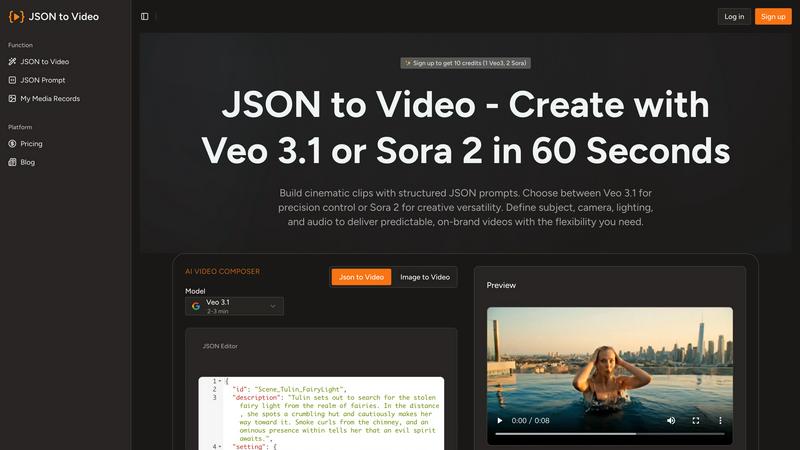
About JSON to Video
JSON to Video is a game-changing generative video tool that redefines the way creators, brands, and marketing teams produce visual content. By leveraging the structured nature of JSON prompts, it transforms organized data into cinematic short videos that uphold a high standard of quality. This platform empowers users to meticulously outline every aspect of their video, from subjects and camera angles to lighting and audio tracks, all through easily identifiable fields. This structured methodology enhances the video creation process, providing a level of precision that resembles a storyboard approach. Unlike traditional text prompts that leave room for interpretation and uncertainty, JSON to Video guarantees that creators can generate brand-aligned video clips with predictability. With a suite of pre-built templates, the platform makes it effortless to export videos in various aspect ratios, such as 16:9 and 9:16, streamlining integration across different platforms. By converting static images into dynamic motion and eliminating the need for expensive shoots, JSON to Video allows teams to create on-brand marketing videos at scale, ensuring that every frame reflects the intended creative vision.
Features of JSON to Video
Structured Prompts for Precision
JSON to Video allows users to define the subject, camera settings, lighting, and audio in clearly named JSON fields. This structured approach means every render adheres strictly to the brief, eliminating guesswork and ensuring high-quality outputs.
Veo 3.1 and Seedance 2 Support
The platform is designed to work seamlessly with the latest models, including Veo 3.1 and Seedance 2. This dual model support enhances the versatility and creative possibilities, making it easier to generate stunning videos tailored to specific needs.
Brand Consistency with Reusable Templates
With JSON to Video, agencies can lock in their camera style, color grading, and audio signatures within reusable templates. This feature guarantees that every video produced remains consistent with brand identity, regardless of whether the output is 10 videos or 1,000.
Automated Batch Processing
Users can upload multiple JSON files at once, allowing for overnight render queues. This automation means that teams can wake up to a batch of ready-to-publish branded videos, saving hours of manual editing and significantly increasing productivity.
Use Cases of JSON to Video
Marketing Campaigns
Marketing teams can utilize JSON to Video to create cohesive video content for campaigns without the hassle of reshoots. By defining parameters in JSON, they can ensure every video aligns with campaign goals and brand standards.
Product Launch Videos
Brands can quickly produce promotional videos for new product launches by simply adjusting the JSON fields for various product attributes, enabling rapid production of high-quality video content that showcases features effectively.
Social Media Content
With built-in templates for different aspect ratios, JSON to Video is perfect for generating social media clips. Teams can create platform-specific videos for TikTok, Instagram, or YouTube without the need for extensive reformatting.
Educational and Training Videos
Organizations can produce training materials and educational content at scale using JSON to Video. By inputting educational content into JSON fields, they can create consistent and effective instructional videos that enhance learning experiences.
Frequently Asked Questions
How does JSON to Video improve video production efficiency?
By using structured JSON prompts, users can reduce the number of attempts needed to create a satisfactory video. This leads to faster production times, allowing teams to focus on creativity rather than guesswork.
Can I use JSON to Video for different platforms?
Absolutely! JSON to Video allows for easy export in multiple formats, such as 16:9 for YouTube and 9:16 for TikTok, ensuring your videos are ready for any platform with minimal adjustments.
Is there a learning curve to using JSON to Video?
While there may be a slight adjustment period for those unfamiliar with JSON, the platform's user-friendly interface and structured prompts make it accessible for users at all skill levels, enabling quick mastery.
What types of videos can I create with JSON to Video?
You can create a wide range of videos, including marketing clips, product demonstrations, educational content, and social media posts. The versatility of the tool allows for creativity across various genres and styles.
Explore more in this category:
Similar to JSON to Video

FreeVideoGenerator
Free AI video generator: turn text prompts and photos into video clips with Sora 2, Veo 3.1, Wan and more. Free starter credits, no watermark download

Leadeon
AI growth tool for X and LinkedIn: write posts in your voice, schedule at your best times, find leads on X and see what works.

Artcraft AI
AI image and video studio in your browser: generate and edit images, turn photos into videos, edit clips by sentence.

ViewMax Studio
AI video generator that turns one prompt into shorts, UGC-style ads and faceless videos, with script, voiceover and captions included.

Gas Station Dance AI
Turn your photos into a viral gas station dance video with AI

ToonBee AI
ToonBee AI turns a script or a one-line idea into a narrated cartoon video, keeping the same character in every scene. 10+ styles, 16:9 or 9:16.


Bulin 47 Video Generator
AI Video Bulin47 lets you put yourself in the viral Bulin47 video trend with AI. Upload your photo, create a personalized Bulin47 video, and share it.