AIWriteBook vs Img Editor
Side-by-side comparison to help you choose the right AI tool.

AIWriteBook
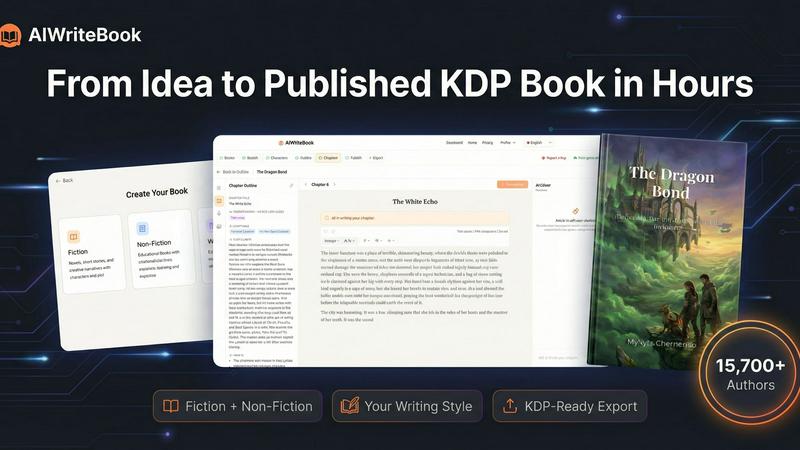
AIWriteBook turns your idea into a finished, ready-to-publish book on KDP in just hours.
Last updated: April 4, 2026

Img Editor
Create jaw-dropping AI images in seconds with Img Editor's powerful tech that transforms your imagination into stunning.
Last updated: February 26, 2026
Visual Comparison
AIWriteBook
Img Editor

Feature Comparison
AIWriteBook
Voice-Matched AI Writing
This isn't your average, soulless AI text generator. AIWriteBook learns your unique writing style. You can upload your previous manuscripts, blog posts, or any writing samples, and the AI analyzes your voice—your sentence rhythm, favorite phrases, and tonal quirks—to generate new chapters that feel like a natural extension of your own work. It captures your essence, ensuring your book has a consistent, authentic voice from the first page to the last, making the final product unmistakably yours.
Intelligent Story & Character Bible
For fiction authors, this feature is a game-changer. The AI doesn't just write characters; it builds living, breathing personas with deep backstories, complex motivations, and defined character arcs. It maintains a dynamic "story bible" that tracks every plot point, relationship, and setting detail across all chapters. This ensures absolute consistency—no accidentally changing a character's eye color or forgetting a key plot twist—keeping your narrative tight and professionally coherent from start to finish.
All-in-One Production Studio
Why juggle ten different apps? AIWriteBook consolidates your entire workflow. Inside the built-in editor, you can write, chat with AI to edit (with a diff view to accept or reject changes line-by-line), generate custom illustrations for your scenes, and produce high-quality audiobook narration with a variety of voices. This seamless integration means you can ideate, create, and polish every element of your book without the constant, productivity-killing context switching between separate tools.
KDP-Ready Publishing Suite
The journey doesn't end at "The End." AIWriteBook's publishing toolkit gets your book market-ready. Generate stunning, professional book covers with unlimited design variations. It provides smart KDP keyword research and competitor analysis to optimize your book's discoverability. Then, export your masterpiece as a perfectly formatted EPUB, print-ready PDF in standard trim sizes, DOCX, or even a full audiobook file, ready to publish directly on Amazon, Apple Books, Kobo, and more with a single click.
Img Editor
Lightning Fast Generation
Img Editor harnesses optimized AI algorithms to generate stunning images almost instantaneously. No more waiting around for results; you get pixel-perfect creations at the speed of thought, allowing for a seamless creative workflow.
Ultra-High Quality Output
Expect nothing less than professional-grade images with Img Editor. The platform delivers incredible detail and resolution, making it ideal for any creative project, whether you're designing social media posts or crafting art for print.
Advanced Style Customization
With Img Editor, you can choose from hundreds of artistic styles or even create your own unique aesthetic. The advanced controls let you tweak every aspect of your image, ensuring it aligns perfectly with your vision.
Intelligent Batch Processing
Create multiple images at once with Img Editor’s intelligent batch processing feature. This allows you to generate a series of images with similar traits or styles, saving you time while maximizing your creative output.
Use Cases
AIWriteBook
The Aspiring First-Time Novelist
You've had a story burning in your brain for years but the blank page is terrifying. With AIWriteBook, you just describe your core idea. The AI crafts a detailed chapter-by-chapter outline, populates it with compelling characters who have real arcs, and helps you write the first draft in your own voice. It handles the daunting structural work, so you can focus on the creative joy of storytelling and finally hold your finished novel in your hands.
The Non-Fiction Expert & Educator
You're a coach, consultant, or academic with valuable knowledge to share. Upload your research papers, lecture notes, or blog content. AIWriteBook structures it into a coherent, engaging book with logical chapter flow, built-in learning outcomes, practical exercises, and proper citations. It transforms your expertise into a polished, authoritative book that establishes your thought leadership and provides real value to your readers.
The Prolific Genre Author
You're a romance, sci-fi, or fantasy writer pumping out multiple series a year. Speed and consistency are your currency. Use AIWriteBook to rapidly outline new installments, ensure series lore and character details remain flawless across books, and generate chapters that maintain your signature style. It dramatically cuts down production time, letting you publish more often and keep your audience hooked without sacrificing quality.
The Hybrid Author with a Backlog
You have half-finished manuscripts or older, out-of-print books gathering digital dust. Import those .docx or PDF files directly. AIWriteBook can analyze the existing content, suggest revitalizing outlines, expand on weak sections, and help you rewrite or complete projects in a fraction of the time. It's the perfect tool to breathe new life into dormant work and get it back on the market.
Img Editor
Social Media Content Creation
Use Img Editor to create eye-catching visuals for your social media platforms. Whether it's a promotional graphic or an engaging post, Img Editor helps you generate professional images that stand out in feeds.
Marketing Campaigns
Elevate your marketing efforts by producing stunning visuals for advertisements, flyers, or digital campaigns. Img Editor allows you to quickly generate high-quality images that capture attention and drive engagement.
Personal Projects and Hobbies
For weekend creators and hobbyists, Img Editor is the perfect tool to bring personal projects to life. Whether you're creating art for your home or designing a unique gift, the possibilities are endless.
Professional Design Work
Designers can leverage Img Editor’s capabilities to enhance their workflow, producing high-quality visuals that can be utilized in presentations, portfolios, and client projects, all while saving time and resources.
Overview
About AIWriteBook
AIWriteBook is the ultimate power tool for modern authors, smashing the traditional barriers between a killer idea and a published book. It's an all-in-one AI book creation platform that lets you go from a blank page or a messy draft to a polished, professional book ready for major retailers in hours—not the agonizing months it usually takes. Trusted by over 15,700 authors who've created more than 58,000 books, this platform is for anyone with a story to tell or knowledge to share, whether you're a seasoned novelist, a first-time memoirist, or a non-fiction expert. Its core magic is creating content that sounds authentically like YOU, not generic AI slop. It handles the heavy lifting of outlining, character building, and plot consistency while giving you total creative control to write, edit, generate illustrations, and even produce audiobook narration—all without ever leaving the app. When you're done, it turbocharges your publishing game with cover design, KDP keyword optimization, and one-click exports to every major platform. It's your entire writing studio, condensed into one brutally efficient tool.
About Img Editor
Img Editor is revolutionizing the way we create digital art, providing a no-cost AI image generation tool that empowers everyone, from expert designers to enthusiastic hobbyists. This platform is designed for anyone with a spark of creativity, offering a seamless way to turn ideas into visually stunning images in mere seconds. With its innovative dual-mode engine, Img Editor allows users to either describe their vision in poetic terms or remix existing images to create something new and exciting. Say goodbye to subscription fatigue and credit-based systems; Img Editor is all about accessibility. With a generous daily allowance of free generations and a community-driven model for earning more, this tool is not just another image editor—it's a gateway to the future of visual creation, leveraging cutting-edge AI technology that truly understands your creative needs.
Frequently Asked Questions
AIWriteBook FAQ
Does AIWriteBook replace human authors?
Absolutely not. Think of AIWriteBook as the ultimate co-pilot and production assistant. It handles the time-consuming, technical heavy lifting—structuring, drafting, formatting—based on YOUR ideas and direction. You remain the creative captain, making all final decisions on plot, character, and voice. The tool amplifies your creativity and productivity; it doesn't replace the unique human spark behind a great story.
Who owns the copyright to the books I create?
You retain 100% full ownership and commercial rights to every single word, image, and audio file you create with AIWriteBook. The content generated is yours to publish, sell, and adapt as you see fit. The platform is a tool for creation, not a rights holder. You are the sole author and copyright owner of your finished work.
Can I really publish a book in just a few hours?
Yes, it's technically possible, especially for shorter works or by using robust existing drafts. The platform automates the most time-intensive parts: outlining, drafting, formatting, and cover design. While a deeply complex epic might take longer to refine, many authors use AIWriteBook to produce polished, publishable drafts in a single day—a process that traditionally takes months or even years.
What genres and languages does it support?
AIWriteBook is a beast of versatility. It supports over 30+ genres and categories, from hard sci-fi and fantasy to self-help, business, and memoir. It also supports creation in 30+ languages, allowing authors worldwide to write and publish in their native tongue, breaking down language barriers in the publishing world.
Img Editor FAQ
How does Img Editor generate images?
Img Editor uses advanced AI algorithms that interpret your text descriptions or uploaded images to generate stunning visuals almost instantly.
Is there a limit to how many images I can create?
Yes, Img Editor offers a generous daily allowance of free generations, and you can earn unlimited additional generations through community engagement, such as submitting your creations to the gallery.
What file formats does Img Editor support for downloads?
Img Editor allows you to download your generated images in various formats, ensuring compatibility with different platforms and applications for your creative needs.
Can I customize the styles of the images I generate?
Absolutely! Img Editor provides advanced style customization options, allowing you to choose from a wide range of artistic styles or create your own unique aesthetic to match your vision.
Alternatives
AIWriteBook Alternatives
AIWriteBook is the all-in-one AI book creation suite that’s become the go-to for thousands of authors. It’s the powerhouse in the AI writing and publishing category, designed to take you from a blank page to a polished, published book on Amazon KDP in a matter of hours. It’s the full package, handling everything from AI-assisted writing and editing to cover design and audiobook generation. But let’s be real, no single tool is a perfect fit for everyone. You might be hunting for alternatives because your budget is tight, you need a specific feature AIWriteBook lacks, or you just vibe better with a different platform’s workflow. Maybe you’re a minimalist who wants just the AI writing without the publishing bells and whistles, or perhaps you need deeper integration with other tools in your creative stack. When you’re scoping out the competition, keep your non-negotiables front and center. Think about what truly matters for your project: Is it raw, high-quality AI writing? Seamless formatting for print? A killer cover designer? Or maybe it’s all about the price tag. Know your must-haves, your nice-to-haves, and what you can live without before you dive in.
Img Editor Alternatives
Img Editor is your go-to AI image generator, redefining the digital art landscape with its revolutionary tech. As a free platform, it empowers everyone from seasoned pros to weekend warriors to bring their creative visions to life without breaking the bank. Users often seek alternatives to Img Editor for various reasons, such as budget constraints, specific features they need, or compatibility with different platforms. When hunting for a replacement, consider factors like ease of use, the versatility of features, and how well the tool aligns with your creative goals. Finding the right alternative means digging deep into what you really want in an image editor. Are you looking for advanced editing capabilities, a robust community for feedback, or seamless integration with other tools? Prioritizing these aspects ensures you land on a platform that not only meets your needs but also enhances your creative journey.