HuntingPad vs Tickari
Side-by-side comparison to help you choose the right AI tool.

Streamline your job search with HuntingPad, the AI tool that matches your resume and tracks applications effortlessly.
Last updated: February 26, 2026

The no-nonsense task manager that actually helps you get things done. No clutter. No complexity. Just you and your tasks.
Visual Comparison
HuntingPad
Tickari

Overview
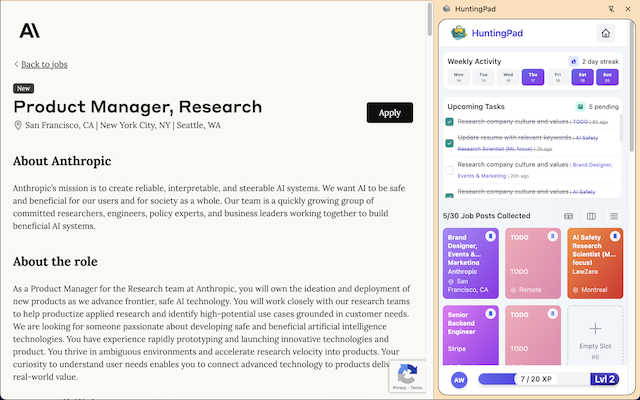
About HuntingPad
Tired of feeling like your job search is a part-time job in itself? Enter HuntingPad, the revolutionary Chrome extension that turns your browser into a powerhouse for career success. Designed specifically for ambitious job seekers, HuntingPad simplifies the chaotic job hunt by allowing you to capture job postings from any site, including LinkedIn, Indeed, and Glassdoor, with just a single click. It’s built for the modern professional who understands that applying for jobs is no longer about sending a handful of applications; it's about strategically submitting 100-150 tailored applications to stand out in a crowded field. With its AI-powered insights, HuntingPad helps you fine-tune your resume and provides reminders for follow-ups, ensuring you never miss an opportunity. Your data remains secure on your device, giving you peace of mind as you focus on what truly matters: networking, interviewing, and landing that dream job. Why juggle spreadsheets and endless tabs when you can streamline your job search with HuntingPad? Your career deserves a command center, not another full-time job.
About Tickari
Tickari is a deliberately minimal, no-nonsense task manager designed for people who are tired of overcomplicated productivity tools and just want to get things done. Instead of overwhelming you with features like complex boards, AI-generated suggestions, or endless customization, Tickari focuses on a simple, frictionless workflow: write a task, tick it off, and move on.
The product embraces a “less but better” philosophy—eliminating clutter, reducing cognitive overhead, and removing the need for onboarding tutorials or setup processes. There are no distractions, no unnecessary decisions, and no feature bloat—just a clean interface that works instantly the moment you open it. This makes it particularly effective for users who feel stuck organizing tasks instead of actually completing them.