

HuntingPad
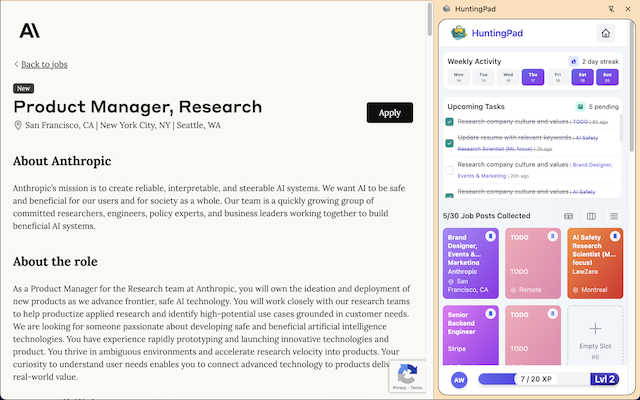
Streamline your job search with HuntingPad, the AI tool that matches your resume and tracks applications effortlessly.
About HuntingPad
Tired of feeling like your job search is a part-time job in itself? Enter HuntingPad, the revolutionary Chrome extension that turns your browser into a powerhouse for career success. Designed specifically for ambitious job seekers, HuntingPad simplifies the chaotic job hunt by allowing you to capture job postings from any site, including LinkedIn, Indeed, and Glassdoor, with just a single click. It’s built for the modern professional who understands that applying for jobs is no longer about sending a handful of applications; it's about strategically submitting 100-150 tailored applications to stand out in a crowded field. With its AI-powered insights, HuntingPad helps you fine-tune your resume and provides reminders for follow-ups, ensuring you never miss an opportunity. Your data remains secure on your device, giving you peace of mind as you focus on what truly matters: networking, interviewing, and landing that dream job. Why juggle spreadsheets and endless tabs when you can streamline your job search with HuntingPad? Your career deserves a command center, not another full-time job.
Features of HuntingPad
One-Click Job Capture
Easily save job posts from any career site with just one click. No more manual copying and pasting or losing track of opportunities. Just click the HuntingPad icon, and your job details are instantly organized for you.
Smart Reminders
Stay ahead of deadlines with intelligent reminders that keep you on track. HuntingPad ensures you know when to follow up on applications and interviews, so you never miss an opportunity to connect.
AI-Powered Insights
Enhance your job application with AI-driven suggestions tailored to each role. From customizing your resume to crafting standout cover letters, HuntingPad gives you the edge you need to impress hiring managers.
Seamless Integration
HuntingPad integrates effortlessly into your existing job search routine. Whether you're browsing LinkedIn, Indeed, or any other job board, the extension works right where you are, eliminating the need for additional apps or logins.
Use Cases of HuntingPad
Effortless Job Tracking
Imagine tracking dozens of applications without the stress of spreadsheets. With HuntingPad, you can keep all your job postings organized and easily accessible, making it simple to review and manage your applications.
Customized Applications
Tailor your resume and cover letters for each job with the help of AI insights. HuntingPad not only saves you time but also boosts your chances of success by ensuring your application stands out from the competition.
Time Management for Interviews
Prepare for interviews without the last-minute panic. HuntingPad reminds you of upcoming interviews and provides essential details about the roles you’ve applied for, so you can walk into any conversation feeling confident and ready.
Enhanced Networking Opportunities
Leverage the time saved on administrative tasks to focus on building connections. HuntingPad allows you to spend more time networking and less time managing your job hunt, giving you a strategic advantage in landing your next role.
Frequently Asked Questions
How does HuntingPad capture job postings?
HuntingPad uses a simple one-click feature that allows you to save job postings directly from any job board. This streamlines the process and keeps everything organized in one place.
Is my data secure with HuntingPad?
Absolutely! Your data is stored securely on your device, which means it never leaves your control. You can job hunt with confidence, knowing your information is private and protected.
Can I use HuntingPad on multiple job sites?
Yes, HuntingPad works seamlessly across major job platforms like LinkedIn, Indeed, Glassdoor, and more. This versatility allows you to capture opportunities wherever you search.
Do I need to pay to use HuntingPad?
HuntingPad is available for free, with no credit card required. You can set up the extension in just 30 seconds and start organizing your job hunt immediately.
Explore more in this category:
Similar to HuntingPad

@fuck.it - email with attitude
Private email. Pure. Secure. Exclusive. No ads, no tracking, no data selling. GDPR compliant, EU-hosted.

xfiles
PDFs, images and audio. No uploads. No account. No added watermarks.

FreeVideoGenerator
Free AI video generator: turn text prompts and photos into video clips with Sora 2, Veo 3.1, Wan and more. Free starter credits, no watermark download


VidhyaGen - Image Converter
All-in-one web platform for fast image conversion, compression, editing, and essential digital file utilities in one easy interface.

Flip a Coin
Free online coin flip, yes/no, dice, spin wheel & random number tools. No signup, truly random, works instantly on any device.

sakuttoAI
A free suite of online tools for everyday tasks like PDF compression, image conversion, text diff and CSV to Excel.

Zalcro
The pre-build planning tool for vibe coders and AI builders. Start with a conversation about your idea, get paste-ready prompts for your coding tool