
Cosy vs FilexHost
Side-by-side comparison to help you choose the right AI tool.

Revamp your Slack into a lively community hub with Cosy’s automated onboarding and instant member introductions.
Last updated: February 26, 2026

FilexHost lets you drag and drop files to create instant shareable links, making hosting and sharing a breeze.
Last updated: February 28, 2026
Visual Comparison
Cosy
FilexHost
Feature Comparison
Cosy
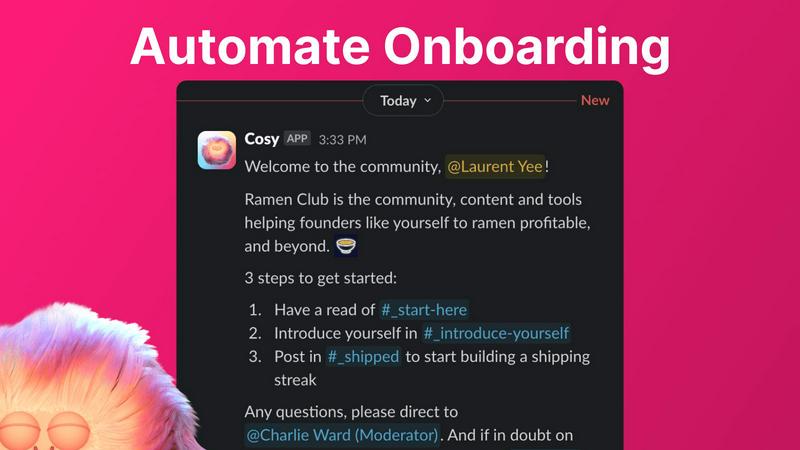
Automate Onboarding
Kickstart your community with an automated onboarding process that’s as smooth as butter. Create up to 10 unique welcome DM sequences, triggered the moment a new member joins your Slack workspace. Fully customizable messages ensure that each new member feels personally welcomed, whether it’s immediate or scheduled for later. You can even throw in some emojis for that extra flair!
Connect Your Members
Forget the awkward silences; let Cosy take care of the introductions! This feature automatically connects opted-in community members through DMs, fostering organic engagement and conversation. You can set the frequency and timing of these introductions, making it easy for your members to meet each other regularly. With a customizable intro message, you’ll spark conversations effortlessly.
Member Directory
Creating a member directory has never been easier! With Cosy, you can build a searchable directory of your community members without ever leaving Slack. Customize the fields and notify members to fill out their profiles. Searching for a specific member or skill? Just type in a keyword and let Cosy do the rest, making it easier than ever for members to connect.
Content Highlights
Keep your community buzzing with the best content by surfacing top posts and discussions. Cosy makes it easy to highlight engaging content, ensuring that your members never miss out on what’s happening. This not only boosts interaction but also keeps the community informed and inspired, creating a culture of sharing and collaboration.
FilexHost
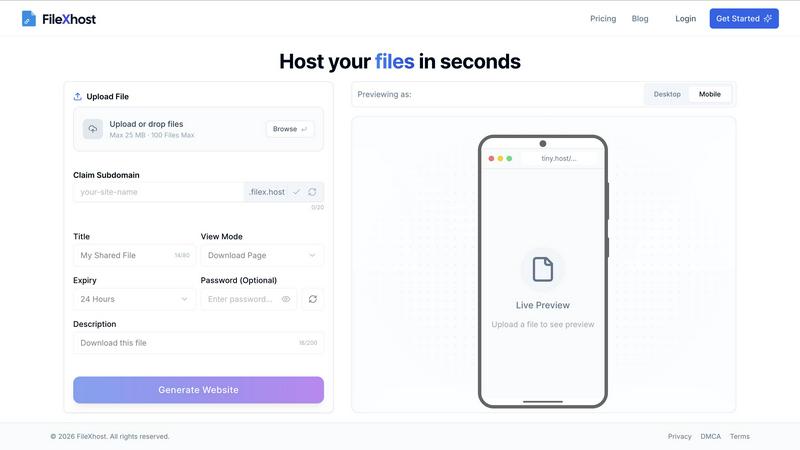
Simple Drag & Drop
Forget about complex setups and command-line nightmares. With FilexHost, all you need to do is drag and drop your file into the generator. It’s as effortless as it sounds—no tech expertise required. This feature is designed for everyone who craves speed and simplicity.
Built-In Viewers
FilexHost automatically renders a seamless experience for various file types. Whether it's a PDF, spreadsheet, or media file, the platform provides dedicated viewers for each format. This means your audience can engage with your content directly in their browser, elevating the sharing experience.
Secure by Default
Security is non-negotiable in today's digital landscape. FilexHost provides automatic SSL certificates for all hosted files, ensuring that your data is encrypted and safe from prying eyes. Plus, with optional password protection, you can keep your sensitive files under wraps.
Blazing Fast Global CDN
Speed is the name of the game, and FilexHost delivers with its global Content Delivery Network (CDN). Your files are served from the nearest server, ensuring low latency and quick load times anywhere in the world. Say goodbye to frustrating delays and hello to instant access.
Use Cases
Cosy
Streamlined Onboarding for New Members
Imagine welcoming new members into your community without lifting a finger. Cosy automates this process, ensuring that each new joiner receives a warm, thoughtful welcome message. This not only saves you time but also makes new members feel valued from day one.
Enhanced Member Interactions
No more missed connections! With automated introductions, Cosy facilitates regular meet-and-greets among community members, fostering relationships and collaboration. This feature encourages networking and helps build a sense of belonging, essential for any thriving community.
Effortless Directory Management
Tired of endless spreadsheets? Cosy’s member directory allows for easy profile management within Slack. Members can fill out their details, making it simple for others to find and connect with them. This streamlined approach enhances community interaction and collaboration.
Engagement through Content Curation
Keep your community engaged by showcasing the best content. Cosy highlights top discussions and posts, making it easy for members to stay updated on the latest and greatest in your community. This adds value to their experience and keeps the conversations flowing.
FilexHost
Quick Document Sharing
Need to send a report or a presentation without the fuss? FilexHost allows you to upload documents and get a shareable link in seconds. Perfect for last-minute submissions or collaborative projects—no login required for the recipient.
Showcasing Creative Work
Artists, designers, and creatives can host their portfolios effortlessly. With built-in viewers for images and PDFs, you can present your work in a professional manner that impresses clients and peers alike. It's all about making your creative vision shine.
Deploying Static Websites
Developers rejoice! FilexHost makes deploying static websites a breeze. Just zip your files, upload, and get a live URL to share with the world. Ideal for testing, demos, or even live projects, it saves you time and effort.
Storing Large Media Files
Got videos or high-resolution images to share? FilexHost supports large file uploads, making it the go-to solution for media professionals. With a dedicated media player and fast access, your audience can experience your content without any hiccups.
Overview
About Cosy
Welcome to the revolution in community management, folks! Cosy is your ultimate sidekick for transforming Slack into a powerhouse of connection and engagement. If you've been drowning in the mundane grind of onboarding new members, making introductions, and keeping engagement levels high, it's time to wave goodbye to those tedious tasks. Cosy automates the heavy lifting, so you can zero in on what really matters: cultivating relationships and building a thriving community. Designed for community managers and leaders, Cosy brings a suite of powerful features like automated onboarding, seamless introductions, a searchable member directory, and curated content highlights right into your Slack workspace. Say farewell to chaos and confusion, and say hello to organized, meaningful interactions. With Cosy, every member feels seen and valued, turning your Slack into a vibrant hub of activity. Get ready to save hours each week while fostering a space where everyone can connect and flourish!
About FilexHost
Welcome to FilexHost, the ultimate game-changer in file hosting that makes sharing files as easy as dragging and dropping. In a world where time is money and simplicity reigns supreme, FilexHost caters to everyone—from creatives needing to showcase their work, to professionals sharing important documents, and even developers deploying static websites. With a sleek interface and lightning-fast performance, FilexHost ensures your files are not just hosted, but served with style. You can host anything from presentations to videos, and even code snippets, all while maintaining a professional appearance with custom URLs. The magic happens in seconds, providing instant access to your files without the hassle of sign-ups or logins. Elevate your file-sharing experience with FilexHost, where speed, security, and simplicity converge.
Frequently Asked Questions
Cosy FAQ
How does Cosy automate onboarding?
Cosy automates onboarding by allowing you to create up to 10 distinct DM sequences that are triggered when a new member joins. This ensures that every new member receives an immediate or scheduled welcome message, tailored to your specifications.
Can I customize the member introductions?
Absolutely! When setting up the member introductions, you can customize the intro message, select the frequency of introductions, and choose the time that works best for your community. This makes each introduction personalized and relevant.
Is the member directory easy to use?
Yes! The member directory is incredibly user-friendly. Members can fill out their profiles directly in Slack, and with a simple search function, they can find other members based on keywords. No more clunky spreadsheets!
How does Cosy contribute to community engagement?
Cosy enhances engagement by automating introductions and curating the best content. This encourages members to interact with each other and stay informed about community happenings, fostering a lively and connected environment.
FilexHost FAQ
What is FilexHost?
FilexHost is a user-friendly file hosting platform designed for effortless file sharing. It allows individuals and businesses to upload and share any type of file instantly, with a focus on speed, security, and ease of use.
Is it really free?
Yes, FilexHost offers a free tier perfect for quick sharing and testing. You can host up to 1,000 files with a maximum of 25 MB per file, making it an excellent choice for personal or light-use scenarios.
What file types are supported?
FilexHost supports a wide variety of file types including documents (PDF, RTF, TXT), data files (XLSX, CSV), images (JPG, PNG, WEBP), and media files (MP4, MP3). This versatility makes it suitable for many different use cases.
How do I update my site?
Updating your files on FilexHost is as simple as re-uploading the new version. Just drag and drop your updated file, and the platform will generate a new link if necessary. Your audience will always have access to the latest version.
Alternatives
Cosy Alternatives
Cosy is your go-to tool for transforming Slack into an electrifying community hub, perfect for community managers who crave engagement and connection. As part of the productivity and management category, it takes the heavy lifting out of onboarding and member introductions, letting you focus on creating relationships that matter. Users often seek alternatives due to factors like pricing, feature sets that better suit their needs, or specific platform requirements that might not be met by Cosy. When hunting for the perfect alternative, consider what features are non-negotiable for you, how user-friendly the interface is, and whether the tool integrates seamlessly with your existing workflows. You want something that not only matches your budget but also enhances your community experience, ensuring every member feels like they belong in this vibrant space.
FilexHost Alternatives
FilexHost is a revolutionary platform within the file hosting category that simplifies the way we share and manage files. With its intuitive drag-and-drop interface, users can effortlessly create shareable links for a variety of file types, from images to documents. However, as needs evolve, users often seek alternatives to FilexHost for reasons such as pricing, feature sets, or specific platform compatibility. Whether you’re a creative, a professional, or a developer, finding the right file hosting solution that aligns with your unique requirements is essential. When exploring alternatives, it’s crucial to focus on user-friendly interfaces, security features, and the ability to handle multiple file formats smoothly. Additionally, consider the performance and speed of the platform, as well as any cost factors that may influence your decision. Ultimately, the right choice will elevate your file-sharing experience and meet your demands seamlessly.