

Cosy
Revamp your Slack into a lively community hub with Cosy’s automated onboarding and instant member introductions.
About Cosy
Welcome to the revolution in community management, folks! Cosy is your ultimate sidekick for transforming Slack into a powerhouse of connection and engagement. If you've been drowning in the mundane grind of onboarding new members, making introductions, and keeping engagement levels high, it's time to wave goodbye to those tedious tasks. Cosy automates the heavy lifting, so you can zero in on what really matters: cultivating relationships and building a thriving community. Designed for community managers and leaders, Cosy brings a suite of powerful features like automated onboarding, seamless introductions, a searchable member directory, and curated content highlights right into your Slack workspace. Say farewell to chaos and confusion, and say hello to organized, meaningful interactions. With Cosy, every member feels seen and valued, turning your Slack into a vibrant hub of activity. Get ready to save hours each week while fostering a space where everyone can connect and flourish!
Features of Cosy
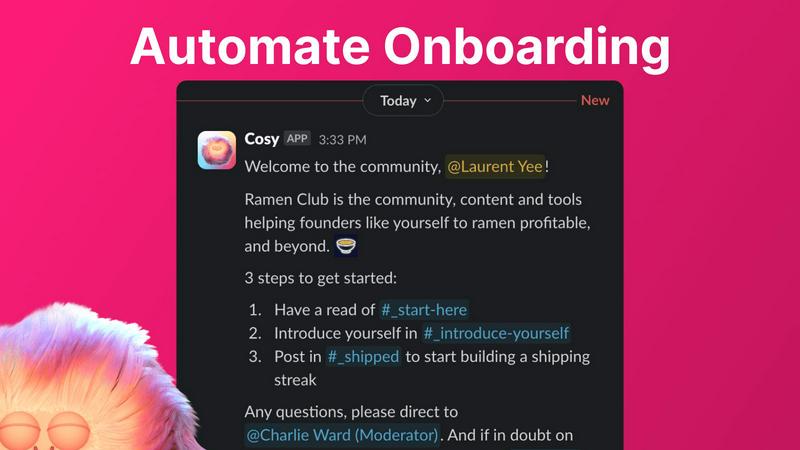
Automate Onboarding
Kickstart your community with an automated onboarding process that’s as smooth as butter. Create up to 10 unique welcome DM sequences, triggered the moment a new member joins your Slack workspace. Fully customizable messages ensure that each new member feels personally welcomed, whether it’s immediate or scheduled for later. You can even throw in some emojis for that extra flair!
Connect Your Members
Forget the awkward silences; let Cosy take care of the introductions! This feature automatically connects opted-in community members through DMs, fostering organic engagement and conversation. You can set the frequency and timing of these introductions, making it easy for your members to meet each other regularly. With a customizable intro message, you’ll spark conversations effortlessly.
Member Directory
Creating a member directory has never been easier! With Cosy, you can build a searchable directory of your community members without ever leaving Slack. Customize the fields and notify members to fill out their profiles. Searching for a specific member or skill? Just type in a keyword and let Cosy do the rest, making it easier than ever for members to connect.
Content Highlights
Keep your community buzzing with the best content by surfacing top posts and discussions. Cosy makes it easy to highlight engaging content, ensuring that your members never miss out on what’s happening. This not only boosts interaction but also keeps the community informed and inspired, creating a culture of sharing and collaboration.
Use Cases of Cosy
Streamlined Onboarding for New Members
Imagine welcoming new members into your community without lifting a finger. Cosy automates this process, ensuring that each new joiner receives a warm, thoughtful welcome message. This not only saves you time but also makes new members feel valued from day one.
Enhanced Member Interactions
No more missed connections! With automated introductions, Cosy facilitates regular meet-and-greets among community members, fostering relationships and collaboration. This feature encourages networking and helps build a sense of belonging, essential for any thriving community.
Effortless Directory Management
Tired of endless spreadsheets? Cosy’s member directory allows for easy profile management within Slack. Members can fill out their details, making it simple for others to find and connect with them. This streamlined approach enhances community interaction and collaboration.
Engagement through Content Curation
Keep your community engaged by showcasing the best content. Cosy highlights top discussions and posts, making it easy for members to stay updated on the latest and greatest in your community. This adds value to their experience and keeps the conversations flowing.
Frequently Asked Questions
How does Cosy automate onboarding?
Cosy automates onboarding by allowing you to create up to 10 distinct DM sequences that are triggered when a new member joins. This ensures that every new member receives an immediate or scheduled welcome message, tailored to your specifications.
Can I customize the member introductions?
Absolutely! When setting up the member introductions, you can customize the intro message, select the frequency of introductions, and choose the time that works best for your community. This makes each introduction personalized and relevant.
Is the member directory easy to use?
Yes! The member directory is incredibly user-friendly. Members can fill out their profiles directly in Slack, and with a simple search function, they can find other members based on keywords. No more clunky spreadsheets!
How does Cosy contribute to community engagement?
Cosy enhances engagement by automating introductions and curating the best content. This encourages members to interact with each other and stay informed about community happenings, fostering a lively and connected environment.
Explore more in this category:
Similar to Cosy

AI Email Filter
AI Email Filter sorts incoming mail into folders using plain-language prompts you write. Works with any IMAP mailbox; bring your own LLM if you want.

TrueProxies
Premium Residential & Datacenter Proxies with 15M+ IPs

Boomerr
Boomerr is an AI-powered uptime monitoring platform that monitors websites from multiple global locations and detects downtime, performance issues, SE

Memwyre
Memwyre is an AI memory platform that gives every AI tool, agent, and conversation a persistent, shared memory you can search and reuse.

Kody Tools
Free collection of online developer utilities, code formatters, and digital converters designed to streamline your daily workflow.

Map to GPS
Free GPX generator — draw a route on a map in your browser.


AutoDM
AutoDM is an Instagram automation platform for creators, businesses, and online sellers.