ConvertBankToExcel vs Fintrack
Side-by-side comparison to help you choose the right AI tool.

ConvertBankToExcel
ConvertBankToExcel instantly transforms your PDF bank statements to editable formats like Excel and CSV with 99%.
Last updated: February 28, 2026

Fintrack
Fintrack is your AI-powered money sidekick that tracks spending, reveals hidden savings, and transforms your finances into clarity.
Last updated: March 26, 2026
Visual Comparison
ConvertBankToExcel

Fintrack
Feature Comparison
ConvertBankToExcel
99%+ Accuracy Rate
You heard it right! Enjoy peace of mind with a CPA-verified accuracy rate that exceeds 99%. This means you can trust that the transaction data extracted from your bank statements is spot-on, every single time.
Instant Processing
Tick-tock! ConvertBankToExcel processes your statements in under 30 seconds. That means no more waiting around—get your data in a flash and keep your workflow moving at lightning speed.
Multi-Bank Support
With support for over 20 major US and Canadian banks, ConvertBankToExcel is like a universal remote for your financial statements. Whether you bank with Chase, Wells Fargo, or TD, we’ve got you covered, ensuring smooth conversions no matter your banking choice.
Batch Processing
Why stop at one when you can conquer many? With batch processing capabilities, ConvertBankToExcel allows you to convert multiple bank statements simultaneously. Save time and energy while you let the AI do the heavy lifting.
Fintrack
AI-Powered Insights
With Finny guiding you, get personalized financial insights that demystify your spending habits. It explains your finances clearly, helping you understand where your money goes and how to optimize it.
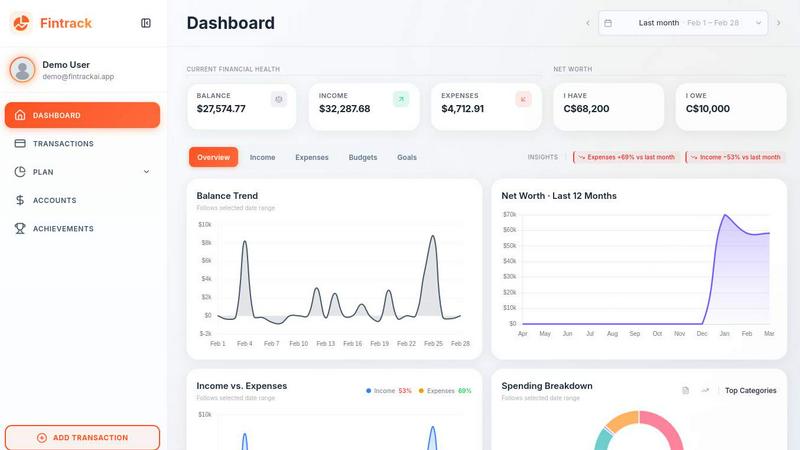
Comprehensive Dashboard
Experience a sleek, all-in-one dashboard that gives you an instant overview of your income, expenses, and goals. No more jumping between apps; everything you need is beautifully organized and easily accessible.
Benefits Wallet
Discover hidden treasures with the Benefits Wallet feature, where Finny surfaces unclaimed cashback, rewards, and credits. It ensures you never miss out on money that belongs to you, turning potential waste into wealth.
Real-Time Alerts
Stay in control with real-time spending alerts that notify you of unusual transactions or upcoming bills. It’s like having a financial watchdog that keeps your wallet safe and helps you avoid unnecessary charges.
Use Cases
ConvertBankToExcel
Mortgage Applications
Are you preparing documents for a mortgage lender? ConvertBankToExcel organizes your bank statements in a neat format that’s ready for submission. Impress lenders with clarity and accuracy, making your approval process smoother than ever.
Tax Preparation
Tired of scrambling through piles of statements come tax season? Our platform helps you organize and convert financial statements, making tax filing a breeze. Stay compliant with IRS requirements while reducing your stress levels.
Visa Applications
When applying for a visa, financial transparency is key. ConvertBankToExcel streamlines the process by converting your bank statements into formats required by immigration authorities, ensuring you have everything you need for a successful application.
Reconciliation Processes
Say goodbye to discrepancy headaches. With ConvertBankToExcel, you can easily identify and resolve mismatches between your accounts and bank statements. Reduce reconciliation time by up to 80% and keep your financial records in perfect harmony.
Fintrack
Monthly Budgeting Made Easy
Fintrack simplifies the budgeting process, allowing users to set and track their monthly budgets effortlessly. With clear visualizations, you’ll always know how much you have left to spend.
Family Expense Management
Couples and families can manage shared expenses with ease. Fintrack helps everyone stay on the same page, ensuring transparency and reducing arguments over money matters.
Savings Goal Tracking
Set savings goals and watch your progress in real-time. Finny offers tips and strategies to help you reach your targets faster, whether it’s for a vacation, a new gadget, or an emergency fund.
Fraud Detection and Prevention
With real-time alerts and an intelligent monitoring system, Fintrack helps identify suspicious activity in your accounts. This proactive approach protects your finances from potential threats and fraud.
Overview
About ConvertBankToExcel
ConvertBankToExcel is your go-to AI-powered wizard for transforming those tedious bank statements into slick, ready-to-use formats in mere seconds. Designed especially for accounting pros, this platform takes the grind out of manual data entry, letting you focus on what truly matters—growing your business. With an impressive 99%+ accuracy rate, verified by CPAs, it’s like having a data entry assistant that never sleeps. Whether you’re dealing with a single PDF or juggling multiple files, ConvertBankToExcel effortlessly extracts transaction data from PDF bank statements and whips it into Excel, CSV, or QuickBooks formats. Trusted by over 50,000 CPAs and bookkeepers, this tool has revolutionized the way financial professionals work with bank data, processing over a million statements and saving countless hours of labor. Plus, with a free tier that allows for 7 pages per day, there's no reason to keep wasting time when you can let AI handle the heavy lifting.
About Fintrack
Fintrack is your ultimate AI-powered financial sidekick, designed to rescue you from the chaos of money management. It’s not just for the finance-savvy; it’s for anyone grappling with the confusion of monthly expenses, lost in a sea of spreadsheets, or feeling the weight of unclaimed savings. Imagine having all your financial accounts seamlessly integrated into one stunning dashboard, where the intelligent AI copilot, Finny, takes the helm. Finny doesn’t just throw numbers at you; it speaks your language, clarifying your financial landscape and identifying hidden opportunities. Whether you’re a solo saver, a couple juggling shared expenses, or a family eyeing future goals, Fintrack transforms the daunting task of finance into an empowering daily habit. No more guesswork—just full visibility and actionable insights that empower you to make the most of every dollar.
Frequently Asked Questions
ConvertBankToExcel FAQ
How does ConvertBankToExcel ensure data security?
We take your security seriously. ConvertBankToExcel employs bank-grade encryption to protect your data, and all files are automatically deleted after 24 hours for added peace of mind.
Can I use ConvertBankToExcel for scanned PDFs?
Absolutely! Our AI-powered OCR technology handles both digital and scanned PDFs, ensuring that even your oldest bank statements can be converted into usable formats with stunning accuracy.
What formats can I export my data to?
You can export your converted data to a variety of formats including Excel, CSV, QuickBooks (QBO/QFX/IIF), JSON, and XML. Flexibility is the name of the game, and we ensure you have the options you need.
Is there a free trial available?
Yes! ConvertBankToExcel offers a generous free tier, allowing you to convert 7 pages daily without requiring a credit card. You can experience the convenience of our service risk-free!
Fintrack FAQ
How does Fintrack connect to my bank accounts?
Fintrack uses secure banking integrations that allow you to link your accounts seamlessly. Your data remains encrypted and private, ensuring your financial information is safe.
Can I customize my financial goals in Fintrack?
Absolutely! Fintrack lets you set personalized financial goals tailored to your needs, whether it’s saving for a trip, paying off debt, or building an emergency fund.
Is Fintrack suitable for small business owners?
While Fintrack is primarily designed for personal finance management, its features can benefit small business owners looking to track personal and business expenses in one place.
What if I have questions while using Fintrack?
Finny is always there for you! You can ask questions directly within the app, and it will provide insights and explanations tailored to your financial situation.
Alternatives
ConvertBankToExcel Alternatives
ConvertBankToExcel is the AI-powered productivity beast that slays the manual data entry dragon. It's the go-to tool for instantly converting PDF bank statements into Excel, CSV, or QuickBooks formats with insane 99%+ accuracy. It's built for accounting pros who need to move fast and ditch the grind. So why would anyone look elsewhere? Maybe the pricing model doesn't fit a specific budget, or they need support for a niche bank outside the major 20. Some users might crave different export formats or have unique platform requirements that demand a different solution. When hunting for a different tool, keep your eyes on the prize. You want killer accuracy, speed that doesn't waste your time, and broad bank compatibility. Don't settle for less than batch processing power and robust security—your financial data deserves a vault, not a cardboard box.
Fintrack Alternatives
Fintrack is your go-to AI money copilot that revolutionizes personal finance management. This innovative tool connects all your financial accounts into one sleek dashboard, offering insight and clarity that transforms the way you handle your money. Users often seek alternatives to Fintrack due to varying needs such as pricing, specific feature sets, or compatibility with different platforms. It's essential to consider what features matter most to you—like intuitive design, AI capabilities, or budgeting tools—when searching for the perfect fit. As you sift through alternatives, prioritize platforms that not only meet your financial management needs but also resonate with your lifestyle. Look for user-friendly interfaces, robust security measures, and insightful analytics that keep you informed about your spending habits. The right choice will empower you to take control of your finances with ease and confidence, just like Fintrack does.