AI Story Writer vs Video2Docs
Side-by-side comparison to help you choose the right AI tool.

AI Story Writer
Unleash your creativity with AI Story Writer, the ultimate tool to instantly turn your ideas into captivating stories with zero limits.
Last updated: March 11, 2026
Video2Docs
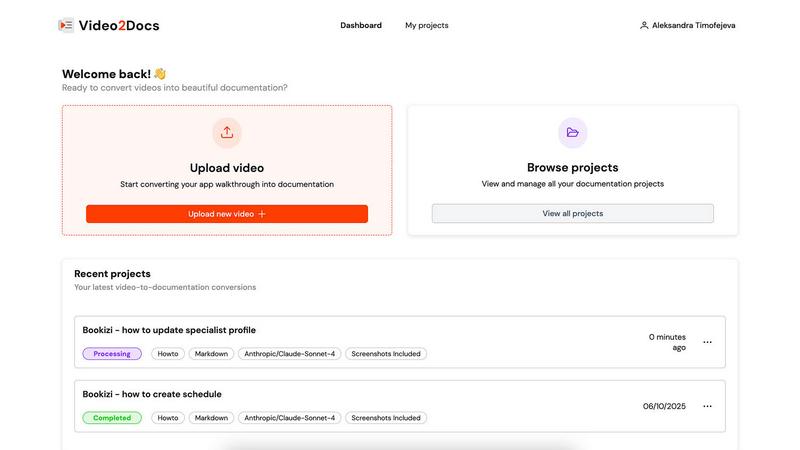
Transform your app walkthrough videos into sleek documentation in minutes, no audio or extra tools needed.
Last updated: February 26, 2026
Visual Comparison
AI Story Writer

Video2Docs
Feature Comparison
AI Story Writer
Story Generation from Prompts
With AI Story Writer, you can create complete stories from your prompts almost instantly. Just describe your core idea, select a genre, and watch as the AI crafts a fully formed narrative tailored to your specifications.
Multi-Version Output
This tool generates three unique versions of your story per request, giving you the creative freedom to choose the direction that resonates most. No more settling for one version; explore various paths and perspectives to find the perfect fit for your narrative.
Chapter Expansion
Once your outline is generated, you can click on any chapter to expand it into rich, detailed scenes. This feature allows for deeper plot development, emotional depth, and immersive world-building, making your writing process more dynamic.
User-Friendly Interface
AI Story Writer boasts an intuitive user interface that simplifies the creative process. From saving your work in the User Center to browsing community stories for inspiration, every aspect is designed for ease of use, ensuring you can focus on what really matters—your story.
Video2Docs
Works Without Audio Narration
Forget about needing a microphone or voice-over talent. Video2Docs analyzes your visual content, UI actions, and screen changes without relying on audio, making it easier than ever to create comprehensive documentation from any video.
Auto-Detects UI Actions
Video2Docs doesn't just watch your video; it understands it! This feature automatically identifies clicks, navigation, tooltips, and user flows, ensuring your documentation is thorough and reflects the actual user experience.
Multiple Language Model Options
Why settle for one when you can have five? Choose from a variety of powerful language models tailored to your needs. As we expand, you’ll have even more options to ensure your documentation fits seamlessly into your workflow.
Export in Various Formats
Need your documentation in Markdown, HTML, or a professionally formatted PDF? No problem! Video2Docs allows you to export your docs in multiple formats, giving you the flexibility to share and present your work in whatever way suits your audience best.
Use Cases
AI Story Writer
Overcoming Writer's Block
Whether you're staring at a blank page or struggling to find the right words, AI Story Writer serves as a powerful antidote to writer's block. Use it to generate fresh ideas or perspectives that can reignite your creativity.
Efficient Story Development
For writers pressed for time, AI Story Writer accelerates the content creation process significantly. Generate outlines and chapters in a matter of seconds, allowing you to focus on refining your narrative rather than getting bogged down in initial drafts.
Collaborative Writing
Writers looking to collaborate can use AI Story Writer to create a shared foundation for their projects. By generating initial outlines and story arcs, teams can build on a cohesive framework, facilitating smoother collaboration and brainstorming.
Educational Tool for Students
Students and aspiring writers can use AI Story Writer as a learning tool to understand story structure and narrative techniques. By generating stories based on their inputs, they can analyze plot development and character arcs in real-time, enhancing their writing skills.
Video2Docs
Create Training Materials
Transform your training videos into easy-to-follow guides that streamline onboarding processes. Video2Docs helps you create structured training materials that can be shared with new hires in just minutes.
Document New Features
Launching a new feature? Use Video2Docs to quickly turn your product demos into tutorials that highlight all the important aspects. Ensure your users know exactly how to take advantage of your latest offerings without the hassle of manual documentation.
Produce Quickstarts for Users
Need to provide your users with quick and effective starting points? Video2Docs allows you to generate concise quickstarts from your videos, ensuring that users can dive into your software without confusion.
Enhance Team Collaboration
Stop wasting time on back-and-forth emails about documentation. With Video2Docs, your team can easily generate and share comprehensive documentation, allowing everyone to stay aligned and focused on building great products together.
Overview
About AI Story Writer
AI Story Writer is a revolutionary writing tool designed to empower creators through structured story generation. Whether you're a budding novelist, a seasoned author, or just someone with a wild idea, this tool transforms your core concepts into fleshed-out narratives. By simply inputting your story idea, selecting a genre, and defining your characters, you can generate detailed outlines and chapters in a matter of seconds. The AI is versatile, supporting all major genres from fantasy to romance, ensuring that your story can fit seamlessly into whatever world you envision. With its step-by-step approach, AI Story Writer not only streamlines the writing process but also enhances creativity by offering multiple unique versions of your story, allowing you to explore different narrative paths. For anyone looking to craft compelling stories quickly and efficiently, AI Story Writer is the ultimate creative companion.
About Video2Docs
Welcome to the revolution in documentation with Video2Docs, your go-to tool for transforming video walkthroughs into slick, high-quality markdown documentation in a flash. Designed for developers, product managers, and anyone in the tech sphere creating software tutorials, Video2Docs leverages advanced LLM models to analyze your videos, making documentation not just easy, but fun. Say goodbye to the tedious grind of manual typing and formatting. With a few clicks, you can convert any app walkthrough into professional-looking tutorials, how-tos, or quickstarts—no audio needed! In just minutes, you can produce structured documentation that captures every click and screen change, allowing you to showcase new features or train your team efficiently. Embrace the future of documentation and focus on what you do best—building amazing products—while Video2Docs takes care of the writing for you!
Frequently Asked Questions
AI Story Writer FAQ
How does AI Story Writer generate stories?
AI Story Writer uses advanced language models to analyze your core idea and genre selection, creating structured outlines and detailed narratives in a matter of seconds.
Can I save my stories and come back later?
Absolutely! AI Story Writer allows you to save your work in the User Center so you can return anytime to continue crafting your chapters or make adjustments as needed.
Is there a limit on how many stories I can generate?
There are no monthly limits on story generation. You start with 10 free credits upon signup, and you can generate unlimited stories by purchasing additional credits as needed.
What genres does AI Story Writer support?
AI Story Writer supports all major genres, including fantasy, sci-fi, romance, mystery, thriller, adventure, and children's stories, making it a versatile tool for all types of writers.
Video2Docs FAQ
How does Video2Docs save me time and effort?
Video2Docs eliminates the tedious task of manual documentation by automatically generating structured markdown from your video walkthroughs. You just upload your video, and it does the rest, saving you hours of typing.
What kinds of videos can I upload?
You can upload any video that showcases your product, such as feature walkthroughs, training clips, or demo videos. The tool works effectively with videos that have no audio, making it versatile for various use cases.
What does the output look like?
The output is clean, structured markdown documentation that can be easily edited, shared, or exported in different formats like HTML and PDF. It captures every essential detail from your video, ensuring nothing is overlooked.
Do I need a credit card to start using Video2Docs?
Nope! You can start using Video2Docs with 10 free credits without needing a credit card. This allows you to test the tool and see how it can enhance your documentation process before making any financial commitments.
Alternatives
AI Story Writer Alternatives
AI Story Writer is an innovative tool in the content creation category, designed to help writers of all levels bring their stories to life with the help of artificial intelligence. This structured writing assistant guides users through the storytelling process, enabling them to transform their ideas into detailed outlines and chapters with ease. While AI Story Writer offers a range of powerful features, users often seek alternatives for various reasons, including pricing concerns, specific feature sets, or compatibility with different platforms. When exploring alternatives, consider factors such as the level of customization, the genres supported, ease of use, and community engagement options. Finding the right tool can significantly enhance your creative process and overall writing experience.
Video2Docs Alternatives
Video2Docs is your ultimate sidekick in the realm of documentation, transforming app walkthrough videos into slick, structured markdown docs in record time. Positioned in the knowledge management category, it caters to developers, product managers, and anyone who’s knee-deep in creating software tutorials. This tool taps into advanced LLM models to analyze your videos, making documentation as easy as pie. Users often find themselves on the hunt for alternatives due to factors like pricing, feature sets, or specific platform needs that Video2Docs may not fully meet. When searching for an alternative, consider the ease of use, integration capabilities, and the depth of features offered. The perfect match will not only streamline your documentation process but also enhance your overall productivity.