
Video2Docs
Transform your app walkthrough videos into sleek documentation in minutes, no audio or extra tools needed.
About Video2Docs
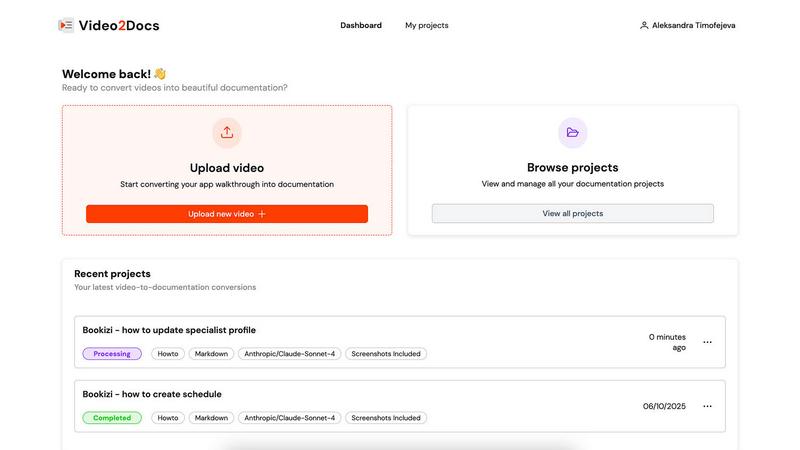
Welcome to the revolution in documentation with Video2Docs, your go-to tool for transforming video walkthroughs into slick, high-quality markdown documentation in a flash. Designed for developers, product managers, and anyone in the tech sphere creating software tutorials, Video2Docs leverages advanced LLM models to analyze your videos, making documentation not just easy, but fun. Say goodbye to the tedious grind of manual typing and formatting. With a few clicks, you can convert any app walkthrough into professional-looking tutorials, how-tos, or quickstarts—no audio needed! In just minutes, you can produce structured documentation that captures every click and screen change, allowing you to showcase new features or train your team efficiently. Embrace the future of documentation and focus on what you do best—building amazing products—while Video2Docs takes care of the writing for you!
Features of Video2Docs
Works Without Audio Narration
Forget about needing a microphone or voice-over talent. Video2Docs analyzes your visual content, UI actions, and screen changes without relying on audio, making it easier than ever to create comprehensive documentation from any video.
Auto-Detects UI Actions
Video2Docs doesn't just watch your video; it understands it! This feature automatically identifies clicks, navigation, tooltips, and user flows, ensuring your documentation is thorough and reflects the actual user experience.
Multiple Language Model Options
Why settle for one when you can have five? Choose from a variety of powerful language models tailored to your needs. As we expand, you’ll have even more options to ensure your documentation fits seamlessly into your workflow.
Export in Various Formats
Need your documentation in Markdown, HTML, or a professionally formatted PDF? No problem! Video2Docs allows you to export your docs in multiple formats, giving you the flexibility to share and present your work in whatever way suits your audience best.
Use Cases of Video2Docs
Create Training Materials
Transform your training videos into easy-to-follow guides that streamline onboarding processes. Video2Docs helps you create structured training materials that can be shared with new hires in just minutes.
Document New Features
Launching a new feature? Use Video2Docs to quickly turn your product demos into tutorials that highlight all the important aspects. Ensure your users know exactly how to take advantage of your latest offerings without the hassle of manual documentation.
Produce Quickstarts for Users
Need to provide your users with quick and effective starting points? Video2Docs allows you to generate concise quickstarts from your videos, ensuring that users can dive into your software without confusion.
Enhance Team Collaboration
Stop wasting time on back-and-forth emails about documentation. With Video2Docs, your team can easily generate and share comprehensive documentation, allowing everyone to stay aligned and focused on building great products together.
Frequently Asked Questions
How does Video2Docs save me time and effort?
Video2Docs eliminates the tedious task of manual documentation by automatically generating structured markdown from your video walkthroughs. You just upload your video, and it does the rest, saving you hours of typing.
What kinds of videos can I upload?
You can upload any video that showcases your product, such as feature walkthroughs, training clips, or demo videos. The tool works effectively with videos that have no audio, making it versatile for various use cases.
What does the output look like?
The output is clean, structured markdown documentation that can be easily edited, shared, or exported in different formats like HTML and PDF. It captures every essential detail from your video, ensuring nothing is overlooked.
Do I need a credit card to start using Video2Docs?
Nope! You can start using Video2Docs with 10 free credits without needing a credit card. This allows you to test the tool and see how it can enhance your documentation process before making any financial commitments.
Explore more in this category:
Similar to Video2Docs

Memwyre
Memwyre is an AI memory platform that gives every AI tool, agent, and conversation a persistent, shared memory you can search and reuse.

TryKlingAI
Kling AI video generation with text, image, motion, audio, and API workflows.

Compare stays and tours
Guided tours, holiday parks, bungalows and stays from multiple providers in one place. Filter by destination, price and type to find what fits you.


AI STL Generator
The fastest AI STL generator to turn prompts and images into 3D printable STL files.

Motiofy
Motiofy is an AI creative workspace that helps creators and teams turn ideas into polished visual stories.

VidRush AI
AI long video generator combining images, video, audio and text into controllable, production-ready AI videos.

Punchylime
AI ad generator for video, UGC, and image ads. Turn any prompt or product into scroll-stopping ads in minutes.