
Alternatives to GhostWriter
Explore the best alternatives and competitors to GhostWriter.
Explore 20 alternatives to GhostWriter. Compare features, pricing, and find the best fit for your needs.

LightScreen
Free light screen tool online. Turn any display into a flashlight, ambient light, or solid-color screen. No download or sign-up.

PLRental
Rental agency software: scan a customer ID, get a signed contract in under a minute, and manage fleet, customers, and invoices.

Agent Pets
Your Claude Code & Codex sessions as pets in Chrome. Approve, deny and reply to your coding agents from any tab.
Pixdok
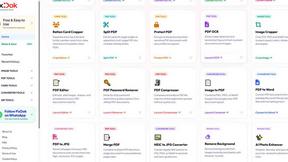
PixDok is a browser-based toolkit for common document and image tasks without requiring desktop software installation.

Screen Issues
Free Online Screen Test Tool - Instantly diagnose dead pixels, lines, color issues, and flickering. Multiple test modes, no download needed.

Mainspring
Mainspring turns the settings macOS hides into 90+ one-click, fully reversible power-ups for Finder, Dock, screenshots and more. $29 once.
Crumb
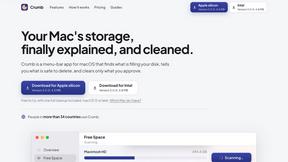
A Mac menu bar app for a full disk. See what is using your space, read whether it comes back on its own, and remove only what you tick.
Everywhere
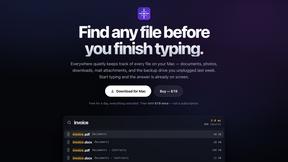
Fast file search for the Mac. Results as you type, files inside Mail and Photos, works with Wi-Fi off. $19 once.

Basalt
Eighteen PDF tools in one native Mac window: merge, split, compress, OCR, Bates numbering, forms, signing and redaction. Offline. $29 once.

Voice Keyboard Pro
Hold a key, say what you mean, let go. Clean, punctuated text lands at the cursor in any app on your Mac or iPhone.

Inkling
Catch a thought without leaving what you are doing. Notes, checklists and a little companion in your Mac's notch. $12 once.

Manatee
A Mac app that opens damaged video, PDFs, archives and documents and writes out everything it can still read. $9 once, no uploads.

Jake's Resume Builder
Free resume editor with real LaTeX PDF, Word exports and optional AI help.

Context Board
Context Board brings your numbers, docs, clients, content and day into one workspace that Claude and Codex can read and update.


Zeptap
Zeptap lets AI use your real iPhone like you do: open apps, read the screen, tap, swipe and type. Reply to DMs, post Stories, book rides, test apps.

Regentflow
AI stocktakes, staff rosters and voice-typed spreadsheets for cafes, bars and restaurants, plus free invoices, 30 PDF tools and custom merch.

@fuck.it - email with attitude
Private email. Pure. Secure. Exclusive. No ads, no tracking, no data selling. GDPR compliant, EU-hosted.

About GhostWriter Alternatives
GhostWriter is a slick AI-powered voice-to-text tool for macOS that lets you speak naturally into any app—think Gmail, Slack, VS Code, or Arc—and get polished, context-aware writing back in real time. It’s a heavy hitter in the productivity and management space, designed to kill the friction between thinking and typing by turning your voice into emails, code, or chat messages with zero hassle. But even the sharpest tools have their limits, and users start hunting for alternatives when they hit a wall—maybe the macOS-only vibe doesn’t cut it for cross-platform workflows, the pricing feels too steep for their budget, or they need features like offline-only mode, deeper app integrations, or support for languages beyond English. Others might crave more granular control over AI rewriting or want a tool that plays nicer with Windows or Linux. When you’re scoping out a replacement, don’t just grab the first shiny option. Zero in on what matters most to your grind: platform compatibility is king if you’re not glued to Apple hardware, so check for Windows, Linux, or even browser-based support. Dig into the transcription engine—fast local processing keeps your data private and cuts lag, while cloud-based models might offer better accuracy but raise security eyebrows. Look for customization chops like a robust personal dictionary, snippet saving, and tone controls that actually adapt to your vibe, not just a one-size-fits-all rewrite. And never sleep on pricing—some tools charge per month like a subscription tax, others offer one-time buys or free tiers with limited features. Keep your workflow tight, your wallet happy, and your voice the boss.
FAQs about GhostWriter Alternatives
What is GhostWriter?
GhostWriter is an AI-powered voice-to-text application built exclusively for macOS. It allows you to speak naturally into any app—such as Gmail, Slack, VS Code, or Arc—and instantly receive polished, context-aware writing. The tool uses fast local transcription combined with intelligent AI rewriting to transform your speech into emails, code, chat messages, and more without needing to touch the keyboard.
Who is GhostWriter for?
GhostWriter is designed for anyone who wants to write faster and more efficiently on macOS, including professionals, developers, content creators, and multitaskers. It’s especially useful for people who dictate emails, write code hands-free, or participate in chat-heavy workflows. If you spend hours typing and want to reduce strain while boosting output, GhostWriter fits your flow.
Is GhostWriter free?
GhostWriter is not free; it is a paid product for macOS users. While the exact pricing model may vary, it typically operates on a subscription or one-time purchase basis. There is no mention of a free tier in the provided content, so users should expect to invest in the tool to unlock its full voice-to-text and AI rewriting capabilities.
What are the main features of GhostWriter?
GhostWriter’s main features include hands-free voice dictation in any macOS app with a simple hotkey, automatic tone adaptation for different contexts (formal for emails, casual for chat, technical for code), a personal dictionary for custom words, reusable snippet saving, and automatic removal of filler words. It combines fast local transcription with intelligent AI rewriting to deliver polished text instantly, helping you write more in less time.