

The CAD Hub
The CAD Hub is your ultimate directory for comparing CAD, PLM, and engineering software tools and pricing.
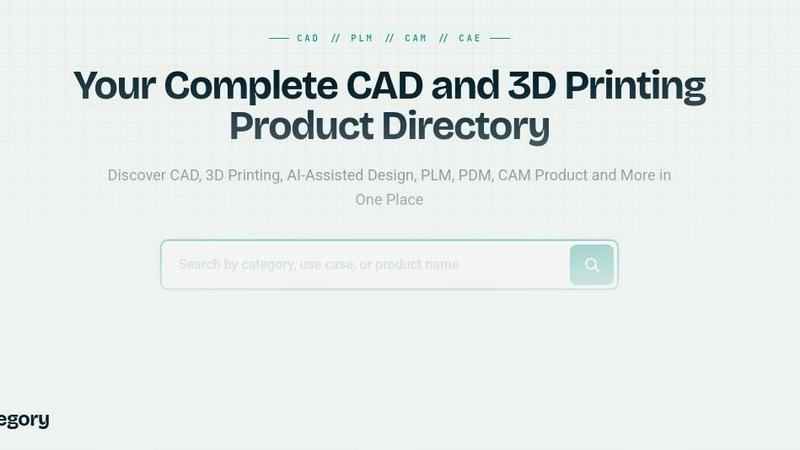
About The CAD Hub
The CAD Hub is the ultimate software directory engineered for the modern design and manufacturing grind. It is a curated battlefield for engineers, designers, manufacturers, and technical teams who are tired of sifting through garbage to find the right CAD, CAM, CAE, PLM, PDM, rendering, simulation, and 3D printing tools. This platform organizes the chaos into clear, weaponized categories, making it brutally easy to discover, compare, and evaluate products that actually matter. Whether you are deep in a 3D modeling session, optimizing a CNC toolpath, or managing a complex product lifecycle, The CAD Hub is your tactical map. Each listing packs a punch with detailed product descriptions, transparent pricing information, deployment options, target business sizes, relevant tags, screenshots, and critical metadata. It is designed to cut through the noise and help you instantly understand what each tool does, who it is built for, and how it stacks up against the competition. This is not just a list; it is a strategic advantage for anyone operating in the engineering software arena, from solo freelancers to massive enterprise teams.
Features of The CAD Hub
Curated Category Warfare
The CAD Hub organizes the entire engineering software ecosystem into razor-sharp categories like CAD, AI-Assisted Design, PLM, PDM, CAM, CAE, BIM, and 3D Printing. No more drowning in irrelevant results. You can drill down into specific niches, from generative design tools to visualization products, ensuring you only see the tools that are relevant to your specific workflow and mission.
Deep Dive Product Intel
Every listing is a dossier. You get more than just a name and a logo. The CAD Hub provides comprehensive product descriptions that explain exactly what each tool does, its pricing model (subscription, free, contact for quote), deployment options (cloud, on-premise), and target business sizes. This intel allows you to make informed, high-speed decisions without wasting time on demos for tools that are a bad fit.
Brutally Honest Comparison Capabilities
Stop guessing how tools stack up. The CAD Hub is built for comparison. Each listing includes a rich set of tags and metadata that highlight key features, supported industries (architecture, mechanical, manufacturing), and technical capabilities (2D, 3D, AI, collaboration, simulation). This structure lets you pit alternatives against each other and find the winner for your specific engineering battle.
Dynamic Search and Filtering
Navigate the directory with surgical precision. The platform offers powerful search and filtering options that let you slice and dice the database by category, pricing model, deployment type, and specific tags. Whether you need a free AI-assisted design tool or a premium cloud-based PLM system, you can zero in on the exact product type you need in seconds, not hours.
Use Cases of The CAD Hub
Scouting the Perfect CAD Software
You are an engineer tasked with upgrading your team from legacy 2D drafting to a modern 3D modeling powerhouse. Instead of blindly googling, you hit The CAD Hub. You filter by the CAD category, refine by subscription pricing, and drill into tags for 3D, mechanical, and collaboration. In minutes, you have a shortlist of contenders like Alibre and ARES Commander, complete with intel on their lifetime licenses or AI-assisted command controls.
Evaluating AI-Assisted Design Tools for Rapid Prototyping
Your startup needs to go from concept to prototype at lightspeed. You need an AI tool that converts natural language into parametric models. You navigate to the AI-Assisted Design category on The CAD Hub. You see Adam CAD and CAD with AI listed with their free pricing models and tags like Text-to-cad and Idea Generation. You can instantly compare their features and deployment options to decide which one will turbocharge your workflow.
Sourcing a Cloud-Native PLM Platform for a Distributed Team
Your hardware team is spread across three continents, and your file management is a nightmare. You need a cloud-native PLM or PDM solution. You go to the PLM and PDM category on The CAD Hub. You find options like Bild and Arena PLM. The listings show you their cloud deployment, collaboration tags, and version control features. You can quickly assess which platform will unify your data, BOMs, and engineering workflows.
Comparing CAM Solutions for a CNC Shop
You run a job shop and need to upgrade your CAM software to handle complex 5-axis milling. You head to the CAM category. You find BobCAD-CAM listed with details on its CNC milling and turning capabilities. The tags confirm it integrates 2D/3D design with advanced toolpath generation. You use the directory to compare it against other CAM tools, checking pricing and target business sizes to ensure the software fits your shop's scale and budget.
Frequently Asked Questions
Is The CAD Hub a free resource to use?
Yes, The CAD Hub is completely free to use for anyone looking to discover and compare engineering software. You can browse all categories, view detailed product listings, and use the filtering tools without any cost or sign-up requirement. It is a free directory designed to level the playing field for engineers and designers.
How does The CAD Hub make money if it is free?
The CAD Hub operates on a freemium model for software vendors. While the directory is free for users, software companies can pay for enhanced listings, sponsorship opportunities, or featured placements to increase their visibility. This allows the platform to remain a free and unbiased resource for the engineering community.
What types of software are listed on The CAD Hub?
The CAD Hub covers a massive range of engineering and design software. This includes Computer-Aided Design (CAD), Computer-Aided Manufacturing (CAM), Computer-Aided Engineering (CAE), Product Lifecycle Management (PLM), Product Data Management (PDM), Building Information Modeling (BIM), 3D Printing/Additive Manufacturing, Rendering and Visualization tools, and cutting-edge AI-Assisted Design tools.
Can I submit a new software tool to The CAD Hub?
Absolutely. If you have developed a tool or know of one that is missing from the directory, you can submit it directly through the Submit Tool option on the website. The team at The CAD Hub will review the submission to ensure it fits the directory's categories and standards before adding it to the database for the community.
Similar to The CAD Hub

Enhance My Photo
Online AI photo enhancer that sharpens portraits, products, scenery, pets and text images and exports JPEG/PNG/WebP without watermarks.

ToolVerified
A hand-tested directory of new AI tools and SaaS apps. Real people check every link, and community votes decide the daily charts.

ImageAgent
Create and edit AI images through conversation, using text or reference images and refining results in chat.

Engineering on Web
Free CAD, FEA simulation and SPC statistics in your browser, with an AI assistant that builds CAD features.

3D House Planner
Free 2D/3D home design in your browser: draw a floor plan, see it live in 3D, furnish it and get AI renders.

CloneWebsite
Clone any webpage pixel-perfect, export HTML/CSS/ZIP or React/Vue components.

AppIconGenerator
Generate iOS and Android app icons from any image and export all platform sizes for free.

HandFonty
Draw each letter in your browser and download your handwriting as a real OTF/TTF font. Your first font is free. No AI required.