

StyleCut
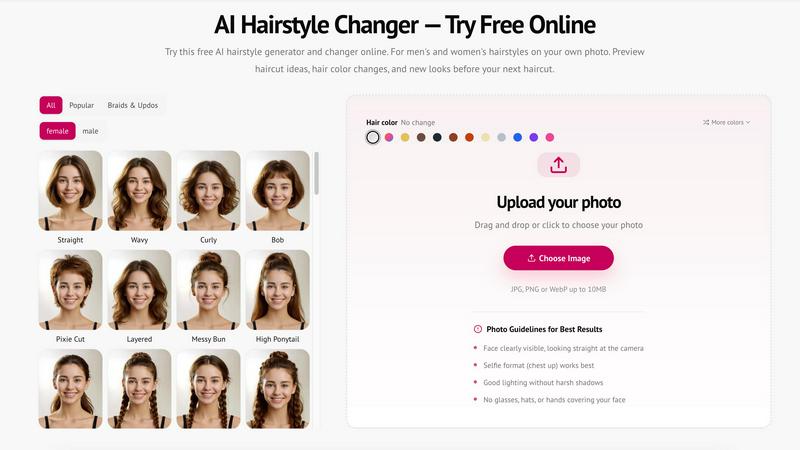
Try on 70+ salon hairstyles on your own photo instantly with StyleCut's AI generator and preview your next look.
About StyleCut
StyleCut is the AI-powered hairstyle preview tool that lets you try before you cut. No more scrolling through Pinterest wondering if that edgy pixie or cascading lob would actually look fire on you. This tool is your digital mirror that shows you exactly how over 70 different hairstyles will look on your actual face. Upload a clear front-facing photo and instantly see yourself with short pixie cuts, classic bobs, fades, curls, braids, bangs, or even wild hair color changes. The AI analyzes your unique facial features and generates hyper-realistic previews that match your face shape, hair texture, and proportions. It is built for anyone who is tired of guessing and wants to walk into the salon with total confidence. Whether you are a guy considering a fresh fade, a woman debating between curtain bangs and blunt bangs, or someone ready to go platinum blonde, StyleCut has your back. The best part? It is completely free with no account required. Everything runs in your browser, so there is no app to download and no data stored. You get HD-enhanced results that are sharp enough to show your barber or stylist. This is the ultimate risk-free way to experiment with your look before making a real commitment. Stop wondering and start visualizing.
Features of StyleCut
70 Plus Hairstyle Directions to Explore
StyleCut gives you access to over 70 curated hairstyle directions organized by type, length, and texture. From short and sassy pixie cuts to long bohemian braids, from classic fades to voluminous curls, and from sleek straight styles to messy buns, there is something for every vibe. You can filter by gender, hair type, and style category to find exactly what you are looking for. The database includes trendy cuts like shags and lobs, classic options like bobs and ponytails, and intricate styles like Dutch braids, fishtail braids, and space buns. You can even preview hair color changes to see how you would look with ombre, highlights, or bold fashion colors. This massive library ensures you never run out of ideas to test on your own photo.
Instant AI Hairstyle Try On
Upload your photo and pick a hairstyle direction, and the AI generates a realistic preview in seconds. The technology analyzes your face shape, hairline, and facial features to map the new hairstyle perfectly onto your image. You get a seamless transformation that looks natural and believable, not like a cheap Photoshop job. The tool adapts to different hair types and textures, so whether you have straight, wavy, or curly hair, the preview adjusts accordingly. You can compare multiple looks side by side to see which one suits you best. The instant feedback loop lets you experiment freely without any wait time, making it easy to cycle through dozens of styles in minutes.
HD Enhancement for Sharp Results
StyleCut includes an HD enhancement feature that upgrades the quality of your preview images. The AI sharpens details, improves clarity, and ensures that the hairstyle renders with crisp edges and realistic lighting. This means you get salon-quality previews that are ready to download and share. The enhanced results look great on your phone, tablet, or computer screen, and they print clearly if you want to bring a physical reference to your stylist. No more blurry or pixelated previews that leave you guessing. The HD enhancement ensures that every strand of hair, every curl, and every wave looks authentic and detailed.
No Account Required and Fully Private
StyleCut operates entirely in your browser with zero account creation needed. You do not have to sign up, provide an email, or share any personal information to use the tool. Just upload your photo, try on styles, and download your favorites. The platform also prioritizes your privacy. All photos are securely encrypted and processed in real-time. No images are stored on servers, shared with third parties, or used for AI training. Your hairstyle try on sessions are completely private and secure. This means you can experiment with wild looks without worrying about your data ending up anywhere it should not be. Your photos are yours alone.
Use Cases of StyleCut
Pre Salon Consultation for Decision Makers
You have been staring at the same haircut for months, maybe years, because you are terrified of making a wrong choice. StyleCut is your secret weapon for the pre salon consultation. Upload your photo and try on 10 different styles in five minutes. See how a blunt bob frames your jawline versus how soft waves soften your features. Compare a pixie cut against a lob to see which one makes your face pop. Walk into your salon appointment with a clear visual reference that you can show your stylist. No more vague descriptions that get lost in translation. You bring the exact look you want, and your stylist brings the scissors. Decision made with total confidence.
Color Experimentation Without Commitment
Thinking about going blonde, trying red, or adding caramel highlights? Color changes are a huge commitment that can damage your hair and drain your wallet if you hate the result. StyleCut lets you preview hair color changes on your actual photo before you ever touch a bottle of bleach. Test out natural shades like brunette and auburn, or go bold with fashion colors like pastel pink or electric blue. See how different tones interact with your skin undertones and eye color. The AI renders the color realistically, showing you how highlights, ombre, or all over color will look. You can experiment with dozens of color combinations until you find the one that makes you say yes.
Comparing Styles for Special Events
You have a wedding, prom, photoshoot, or big night out coming up, and you want your hair to be on point. StyleCut helps you plan the perfect look for any occasion. Try elegant updos like chignons, French twists, and ballerina buns to see which one works best with your dress neckline. Test glamorous waves or Hollywood waves for a red carpet moment. Compare braided styles like halo braids or waterfall braids for a boho wedding vibe. The side by side comparison feature lets you view multiple options at once, so you can narrow down your choices quickly. Show your stylist the exact look you want, and they can recreate it with precision for your big day.
Overcoming Hair Regret Fear
Everyone has that horror story of a bad haircut that took months to grow out. StyleCut eliminates the fear of hair regret by letting you visualize every option before you commit. If you are considering a drastic change like going from long hair to a pixie cut or shaving your head, this tool is essential. See yourself with the new length, shape, and texture before you make the leap. The realistic previews help you understand how the style will change your overall appearance, from your face shape to your personal style. You can test the waters with zero risk and zero cost. Once you see the preview and love it, you can book that appointment with absolute certainty.
Frequently Asked Questions
Is StyleCut really free to use with no account required?
Yes, StyleCut is completely free to use with no account creation needed. You do not have to sign up, provide an email address, or share any personal information. Just upload your photo directly on the website, pick a hairstyle direction, and see the preview instantly. You can try as many styles as you want, compare them side by side, and download your favorite results. There are no hidden fees, no subscription plans, and no credit card required. The tool is designed to be accessible to everyone who wants to experiment with their look without any barriers.
How does the AI generate realistic hairstyle previews on my photo?
The AI uses advanced machine learning algorithms trained on an extensive database of professional hairstyles from top salons worldwide. When you upload your photo, the AI analyzes your facial features, including your face shape, hairline, skin tone, and bone structure. It then maps the selected hairstyle onto your image, adjusting for perspective, lighting, and texture to create a natural looking result. The technology adapts to different hair types, from straight and wavy to curly and coily, ensuring the preview looks realistic on your specific hair texture. The HD enhancement feature further sharpens the output for crisp, detailed results.
What types of hairstyles and colors can I try on StyleCut?
StyleCut offers over 70 hairstyle directions covering a wide range of styles for both men and women. You can explore short cuts like pixie cuts, bobs, and fades. Try long styles with layers, waves, or straight textures. Experiment with braids and updos including French braids, Dutch braids, fishtail braids, space buns, top knots, and chignons. Test bangs like blunt bangs, side swept bangs, and curtain bangs. For color, you can preview natural shades like brunette, blonde, and auburn, as well as fashion colors and highlights. The library is organized by category so you can easily find what you are looking for.
Are my uploaded photos private and secure on StyleCut?
Your privacy is a top priority. All photos uploaded to StyleCut are securely encrypted and processed in real-time. The platform does not store any images on its servers, share them with third parties, or use them for any training purposes. Once you close your browser session, your photos are gone. Your hairstyle try on sessions remain completely private and secure. You can experiment with any look without worrying about your data being saved or misused. Your images are yours alone, and StyleCut does not keep any copies.
Explore more in this category:
Similar to StyleCut

Wheel of Names Picker AI
Wheel of Names Spin Wheel Picker tool for classrooms or events

FreeVideoGenerator
Free AI video generator: turn text prompts and photos into video clips with Sora 2, Veo 3.1, Wan and more. Free starter credits, no watermark download

Favore AI
AI images, videos, and editing in one creative workspace

Turbotools
Free online web tools: PDF converter, image compressor, word counter, text reverse, JSON formatter & generator. 100% free with no sign-ups!

Artcraft AI
AI image and video studio in your browser: generate and edit images, turn photos into videos, edit clips by sentence.

Gas Station Dance AI
Turn your photos into a viral gas station dance video with AI

ToonBee AI
ToonBee AI turns a script or a one-line idea into a narrated cartoon video, keeping the same character in every scene. 10+ styles, 16:9 or 9:16.

BaldLooks
See yourself shaved, no shaving required