

Screen Dub
Ship product demos in minutes by recording your screen once while ScreenDub auto-generates the script, voiceover, and translations.
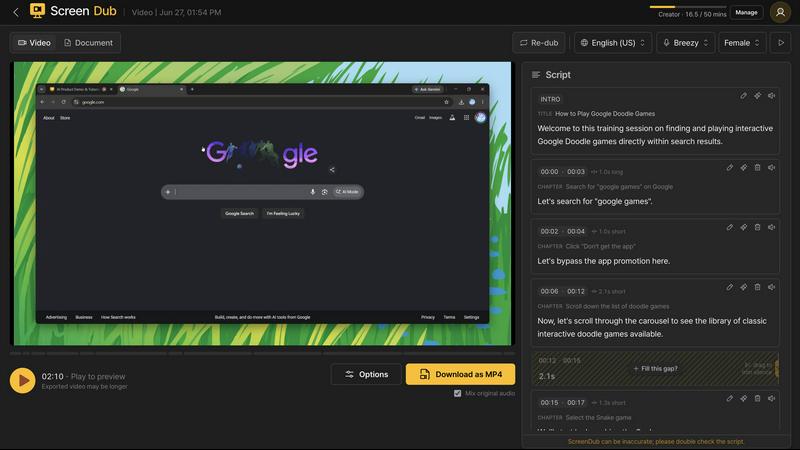
About Screen Dub
Screen Dub is the AI-powered video creation platform that obliterates the old-school grind of making demos, tutorials, and documentation. It takes a raw screen recording or a boring slide deck and magically transforms it into a polished, narrated video plus a written step-by-step guide. No script to write, no mic to record, no editor to learn. You just hit record in your browser, or upload an MP4, WebM, MOV, PDF, or PowerPoint, and the platform does the heavy lifting. It detects every single on-screen action, pins it to a timestamp, and writes a clean narration script you can tweak line by line. Then it voices that script in natural, studio-grade AI voices, synced perfectly to land on each action as it happens. From one recording, you can publish in 70+ languages with a single click. No reshooting, no hand subtitling, no voice talent per market. Every project exports as a polished MP4 plus a step-by-step PDF, so one capture becomes a demo, a tutorial, and documentation all at once. Built for the repetitive work teams hate: product onboarding, support answers, internal training, feature launches, sales demos, and SOPs. Record it once, reuse the link forever. Prefer your own voice? Record with a mic instead, or mix human and AI narration across projects. No download, no extension, no IT ticket. Recordings run up to 10 minutes at up to 2K. The Free plan gives you 10 minutes of export a month, no credit card. Paid plans start at $14.99 and remove the watermark, with minutes-based pricing so you pay for output, not seats. Record once. Narrate. Ship everywhere.
Features of Screen Dub
Auto Script and Voiceover
Screen Dub doesn't just record your screen; it reads your mind. As you click, scroll, and demo, the platform detects every on-screen action and automatically generates a clean, editable narration script. No more staring at a blank page or doing take after take. It then voices that script in studio-grade AI voices that sound like a pro voice actor, synced perfectly to land on each action as it happens. You get a finished, narrated video without ever touching a mic.
70+ Language Translation
From one single recording, you can publish your video in over 70 languages with a single click. No reshooting, no hand subtitling, no hiring voice talent per market. Screen Dub automatically translates your script and generates a natural-sounding AI voiceover in the language of your choice. This is a game-changer for global teams, SaaS companies, and anyone who needs to ship localized content without the insane cost and time of traditional dubbing.
Step-by-Step Doc Export
Every project exports as a polished MP4 video plus a written step-by-step PDF guide. One single recording becomes a demo, a tutorial, and documentation at the same time. This is perfect for creating knowledge bases, SOPs, and customer support articles that are always in sync with your video. No more writing docs from scratch or trying to remember what you did in a recording.
PowerPoint to Video
Upload a boring PowerPoint or PDF deck, and Screen Dub reads every slide, writes the narration, and voices it in 70+ languages. The same polished video and written handout, straight from the deck your team already presents. This turns sales decks, investor updates, training slides, and webinars into on-demand video content in minutes, without any video editing skills.
Use Cases of Screen Dub
Product Demos and SaaS Onboarding
Stop spending a day on a five-minute demo. Record your screen once, walk through your product naturally, and let Screen Dub generate a polished, narrated demo video with a step-by-step guide. New users get a clear walkthrough, and your team saves hours of scripting and recording. Perfect for onboarding flows, feature launches, and sales walkthroughs that need to be shipped fast.
Customer Support and Knowledge Base
Turn every support answer into a video. Instead of writing a long email or a confusing text guide, record your screen showing the solution. Screen Dub generates a narrated video and a written guide in minutes. You can even publish it in the customer's language with one click. This slashes support tickets and makes your knowledge base actually useful.
Internal Training and SOPs
Onboard new hires and train teams without the boring slide decks. Record a walkthrough of your internal tools, processes, or software, and Screen Dub creates a professional training video with a written SOP. New team members can watch it on demand, and you can update it in seconds by re-recording just the changed part. No more outdated documentation.
YouTube How-tos and Tutorials
Content creators, listen up. You can pump out high-quality how-to videos and tutorials without ever recording your voice. Just screen record your process, and Screen Dub writes the script and voices it in a natural, engaging tone. You can even publish in multiple languages to reach a global audience. This is the cheat code for scaling your channel without burning out.
Frequently Asked Questions
Do I need to download any software or install a browser extension?
Nope. Screen Dub is 100% browser-based. No download, no extension, no IT ticket waiting in a queue. You just open the site, hit record, and you are done. The newest person on your team can ship their first video today without any technical hurdles.
Can I use my own voice instead of the AI voiceover?
Absolutely. You can record with a mic instead of using the AI narration, or mix human and AI narration across different projects. Screen Dub gives you the flexibility to use your own voice for some parts and AI for others, so you can keep a personal touch while still automating the heavy lifting.
What file formats can I upload?
You can upload MP4, WebM, MOV video files, as well as PDF and PowerPoint presentations. Just drag and drop your file into Screen Dub, and it will analyze the content, detect actions or slides, and generate the script and voiceover automatically. It is that easy.
How long can my recordings be and what resolution is supported?
Recordings can run up to 10 minutes at up to 2K resolution. This is plenty for most demos, tutorials, and training videos. If you need longer videos, you can always break them into multiple projects. The Free plan gives you 10 minutes of export a month, no credit card required.
Pricing of Screen Dub
Screen Dub offers a Free plan that gives you 10 minutes of export a month with no credit card required. Paid plans start at $14.99 per month and remove the watermark. The pricing is minutes-based, so you pay for the output you actually use, not for seats or users. This makes it incredibly affordable for solopreneurs, small teams, and large enterprises alike. No hidden fees, no surprise charges. Just record, narrate, and ship.
Similar to Screen Dub

Tiny Desk AI Video Maker
Create a vertical Tiny Desk-style concert video from up to three photos with original music.


GenX
All-in-one AI workspace to generate images, videos, and audio with multiple leading AI models.

Uniclip
Clip pages, take full-page screenshots and batch-capture list data to Notion, Feishu, Obsidian, Markdown, CSV or JSON.

TroveKey
Search tabs, Chrome bookmarks and history, run browser commands, and save webpages and social posts locally—no account.

Foreman
See every app and what it's using in plain English, and end or slow down the one that's hogging your Mac.

Dot & Dash
Learn Morse code on a machine you can press. Write and send messages, turn Morse into text and back, and key Morse in any app on your Mac.

Typebar
Every key you press lights up on an on-screen keyboard, and each shortcut is named as you press it.