

QuickTextTools
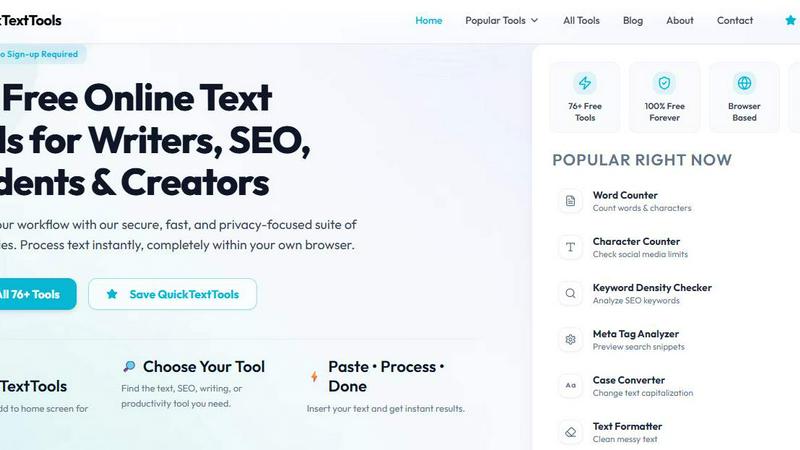
Turbocharge your writing with 76+ free online tools that supercharge your text, boost SEO, and skyrocket productivity, all in your browser.
About QuickTextTools
QuickTextTools is your ultimate online arsenal, packed with over 76 free, no-nonsense utilities designed to supercharge the productivity of writers, marketers, developers, students, SEO experts, and content creators alike. This sleek, browser-based toolkit is all about making your life easier by putting essential text formatting, SEO analysis, writing assistance, and keyword management tools right at your fingertips. Why deal with clunky software installations when you can process text and optimize your content in real-time, completely within your browser? QuickTextTools prides itself on being fast, easy to use, and fiercely privacy-focused, ensuring your data stays under your control. Whether you're tidying up a chaotic keyword list, analyzing SEO meta tags, converting text case formatting, or refining your writing process, QuickTextTools has your back. The platform is designed to help you work smarter, not harder, offering practical solutions that save you time and energy, all wrapped up in a secure and hassle-free experience.
Features of QuickTextTools
Word Counter
The Word Counter tool is your go-to for tracking your content's length like a pro. Instantly get accurate counts of words, characters, and sentences, making it easier to meet those pesky word limits and ensure your writing is on point.
Keyword Density Checker
Dig deep into your content with the Keyword Density Checker. This feature analyzes your text to reveal keyword frequency and density, helping you optimize for search engine visibility and ensuring your content packs the right SEO punch.
Meta Tag Analyzer
Get ready to preview how your content will shine in search results with the Meta Tag Analyzer. This tool lets you analyze and tweak your SEO meta tags, ensuring they’re primed for clicks and perfectly tailored to boost your site’s visibility.
Text Formatter
Say goodbye to messy text! The Text Formatter is here to rescue you from chaotic formatting. Easily clean up your content by removing extra spaces, hidden HTML tags, and unwanted characters, leaving you with polished prose that's ready for the spotlight.
Use Cases of QuickTextTools
Streamlining Content Creation
Writers can leverage QuickTextTools to streamline their content creation process. Use the Word Counter and Text Formatter to ensure your drafts are concise and polished, allowing you to focus on crafting compelling narratives.
Optimizing SEO Strategies
SEO professionals will find QuickTextTools indispensable for optimizing content. The Keyword Density Checker and Meta Tag Analyzer help fine-tune articles, ensuring they align with the latest SEO best practices and drive organic traffic.
Enhancing Student Projects
Students can elevate their assignments and projects by using QuickTextTools to conduct thorough text analyses and formatting. The Reading Time Calculator can also help gauge how long it will take to present their work, making them prepared for any class discussion.
Supporting Developers
Developers can take advantage of QuickTextTools' developer utilities for quick tasks like encoding URLs or generating QR codes. This toolkit complements coding workflows, helping them manage text data efficiently without breaking a sweat.
Frequently Asked Questions
Is QuickTextTools really free to use?
Absolutely! QuickTextTools is 100% free and requires no sign-up. Dive right into our suite of tools without any hidden fees or subscriptions.
What types of tools are available on QuickTextTools?
We offer a diverse range of over 76 tools spanning text formatting, SEO analysis, writing assistance, keyword management, and developer utilities, making it your one-stop shop for all text-related tasks.
How do I access QuickTextTools?
You can access QuickTextTools directly through your web browser. Just visit our website, choose the tool you need, paste your text, and get instant results—no downloads or complicated setups required.
Is my data safe when using QuickTextTools?
Yes! QuickTextTools prioritizes your privacy and security. All processing occurs in your browser, which means your text never leaves your device, keeping your information safe and sound.
Explore more in this category:
Similar to QuickTextTools

@fuck.it - email with attitude
Private email. Pure. Secure. Exclusive. No ads, no tracking, no data selling. GDPR compliant, EU-hosted.

xfiles
PDFs, images and audio. No uploads. No account. No added watermarks.

FreeVideoGenerator
Free AI video generator: turn text prompts and photos into video clips with Sora 2, Veo 3.1, Wan and more. Free starter credits, no watermark download


VidhyaGen - Image Converter
All-in-one web platform for fast image conversion, compression, editing, and essential digital file utilities in one easy interface.

Flip a Coin
Free online coin flip, yes/no, dice, spin wheel & random number tools. No signup, truly random, works instantly on any device.

sakuttoAI
A free suite of online tools for everyday tasks like PDF compression, image conversion, text diff and CSV to Excel.

Zalcro
The pre-build planning tool for vibe coders and AI builders. Start with a conversation about your idea, get paste-ready prompts for your coding tool