

Pixeliser
Pixeliser turns your photos into pixel art or hides sensitive details instantly, all locally in your browser with zero uploads.
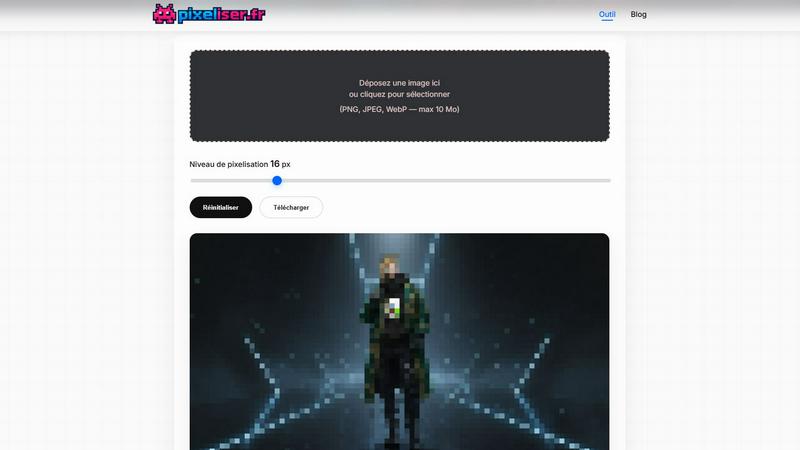
About Pixeliser
Pixeliser is the ultimate client-side image pixelization tool that operates entirely within your browser, ensuring your images never leave your device. This tool is designed for anyone who values privacy, speed, and simplicity. Whether you are a privacy-conscious individual looking to anonymize faces and license plates, a creative professional crafting retro pixel art, or a developer needing to redact sensitive data in UI mockups, Pixeliser delivers instant, secure results. The core value proposition is absolute confidentiality: no uploads to remote servers, no cookies, no tracking, and no account required. You simply drag and drop an image (PNG, JPEG, or WebP, up to 10 MB) onto the interface, adjust the pixel block size from a subtle 4-pixel mosaic to a bold 64-pixel retro effect, and see the preview update in real time. Once satisfied, download a lossless PNG file ready for social media, websites, or print. Pixeliser is completely free, works on both desktop and mobile, and offers a clean, intuitive interface that makes pixelization fast, fluid, and foolproof. It is the straightforward choice for anyone who needs to pixelize an image quickly and securely, without compromising on quality or privacy.
Features of Pixeliser
100% Local Processing
Your image never leaves your device. Pixeliser processes everything client-side inside your browser, meaning no data is ever uploaded to any server. This is the gold standard for privacy protection, making it ideal for anonymizing sensitive content like faces, license plates, addresses, or any confidential information before sharing online. No cookies, no tracking, no accounts.
Instant Real-Time Preview
Adjust the pixel block size using a simple slider, and the preview updates instantly with zero delay. You can test multiple pixelation levels from 4 pixels (light mosaic effect) to 64 pixels (strong retro pixel art) without re-uploading the image. This fluid, responsive experience works seamlessly on both desktop and mobile devices.
Customizable Pixelation Levels
Fine-tune your pixelation effect with precision. The slider offers a full range from 4 pixels for a subtle, almost transparent mosaic, up to 64 pixels for a bold, retro pixel art style. This flexibility lets you achieve everything from professional anonymization to creative 8-bit/16-bit aesthetics, all in one tool.
Lossless PNG Export
Download your pixelized image as a high-quality, lossless PNG file. This ensures your final output retains maximum detail and clarity, making it ready for social media, websites, print, or game assets. No compression artifacts, no quality loss, just a clean, pixel-perfect result every time.
Use Cases of Pixeliser
Privacy Protection and Anonymization
Pixeliser is your go-to tool for protecting identities and sensitive information. Use it to blur faces in photos before sharing on social media, anonymize license plates in witness testimonies, or redact addresses and phone numbers in screenshots. It is perfect for GDPR-compliant anonymization, ensuring your data stays secure while you share content publicly.
Creative Retro Pixel Art and Game Assets
Transform ordinary photos into stunning 8-bit or 16-bit sprites for indie games, Discord avatars, or nostalgic album covers. The strong pixelation effect (32-64 pixels) creates a classic retro aesthetic that is perfect for game development in engines like Godot, Unity, or RPG Maker. It is also ideal for lo-fi album covers, vaporwave art, and meme creation.
Social Media and Communication
Use Pixeliser to create artistic blur effects for teasing content on Instagram, TikTok, or Twitter. It is perfect for humorous or dramatic censorship in memes, creating anonymous stories for "finsta" accounts, or professionally masking sensitive data in LinkedIn posts. The tool gives you full control over the pixelation level for any social media need.
Professional and Legal Redaction
Pixeliser is a reliable tool for redacting sensitive data in UI mockups, legal evidence, or documentation screenshots. Journalists can mask sources in evidence, legal teams can anonymize case files, and developers can hide prices or personal information in product reviews. It is a fast, secure, and professional solution for any redaction task.
Frequently Asked Questions
How can I pixelize an image without sending my photos over the Internet?
Pixeliser processes everything locally inside your browser. Your image never leaves your device, so there is no upload to any server. This ensures absolute privacy and security, making it ideal for sensitive content.
What is the maximum image size supported?
Pixeliser supports images up to 10 MB in PNG, JPEG, or WebP format. This limit ensures fast processing and a smooth user experience while still accommodating most common image sizes for privacy and creative projects.
Can I pixelize only a part of the image?
Currently, Pixeliser applies the pixelation effect to the entire image. For targeted pixelization, you can crop your image to focus on the area you want to pixelize before using the tool. This is a simple workaround for anonymizing specific faces or license plates.
Is Pixeliser really free and without an account?
Yes, Pixeliser is completely free to use with no account required. There are no hidden fees, no daily limits, and no data collection. It sets no cookies and includes no tracking, making it a truly private and accessible tool for everyone.
What is the difference between pixelizing and blurring an image?
Pixelization creates a blocky, mosaic effect by grouping pixels into larger squares, resulting in a distinct retro or low-resolution look. Blurring uses algorithms to soften and blend details, creating a smoother, more diffuse effect. Pixelisation is often preferred for privacy as it is less reversible and creates a more stylized aesthetic.
Pricing of Pixeliser
Pixeliser is completely free to use with no account required. There are no paid tiers, no subscription plans, and no hidden costs. The tool is provided as a free, privacy-focused service for anyone who needs to pixelize an image quickly and securely.
Explore more in this category:
Similar to Pixeliser

ImageGPT
ImageGPT is an all-in-one AI creative platform for generating, editing and transforming images and videos using AI.

AI Album Cover Maker
Create release-ready album covers from a prompt or photo. Generate, refine, and export art for singles, EPs, mixtapes, and playlists.

Remove Background Online
Free background remover that runs entirely in your browser — zero uploads, full resolution, no watermark. Your photos never leave your device.

Sprite Sheet Maker
A free browser-based toolkit for creating, cutting, converting, and previewing sprite sheet animations.

Sprite Sheet Maker
Create pixel-art sprite sheets from text with AI, preview animations, and export PNG assets for game prototypes.

Reduce Image Quality
Free browser-based tool that lowers image quality and shrinks JPG, PNG and WebP files. No upload, no signup, no watermark.


Image to Layers AI
用 AI 把任意一张平面图片拆成可编辑的透明图层(PNG/PSD)