

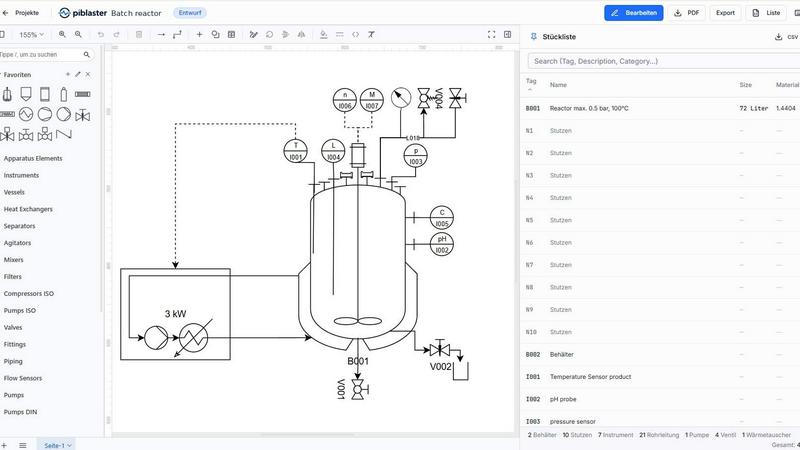
About piblaster (P&ID software)
piblaster is browser-based P&ID software for creating piping and instrumentation diagrams and process flow diagrams to ISA-5.1 and DIN EN ISO 10628 — built for process engineering.
Draw from a standards-compliant symbol library covering vessels, pumps, valves, heat exchangers and instrumentation. Tag numbers and bill of materials builds itself as you draw.
CSV export feeds straight into costing, ERP or procurement. PDF export produces review-ready documents.
Projects are versioned, and teams can work on one current revision with roles and permissions. Also included: custom shapes and libraries, pipe and insulation representation, multi-sheet projects, and a guided onboarding tour.
No installer, no license server, no IT rollout: piblaster just runs on Windows, macOS, Linux straight in the browser - a genuine alternative to Visio, AutoCad, PlantEngineer, M4 PLANT or Smap3D.
Free 30-day trial, no credit card required. Pro plan EUR 29 per user/month plus VAT.
Explore more in this category:
Similar to piblaster (P&ID software)

Zipic
Native image compression for Mac and Windows (Windows beta), with a local CLI and AI skill for automated image workflows.

ButterShare
Realtime peer-to-peer file transfer in the browser. Send files directly between devices, no account and no upload to a server.

Save X post
The easiest way to save X videos offline: no app to install and no account to create. Paste the link, choose HD or 4K, and the MP4 is yours.


Foreman
See every app and what it's using in plain English, and end or slow down the one that's hogging your Mac.

Dot & Dash
Learn Morse code on a machine you can press. Write and send messages, turn Morse into text and back, and key Morse in any app on your Mac.

Typebar
Every key you press lights up on an on-screen keyboard, and each shortcut is named as you press it.