

Online Keyboard Shortcuts
Stop fumbling with your mouse and level up your workflow with every essential shortcut for Windows, Mac, and Linux.
About Online Keyboard Shortcuts
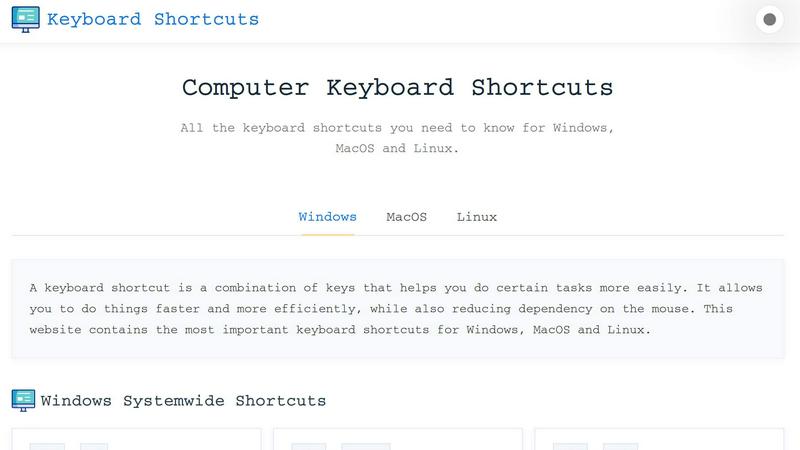
Online Keyboard Shortcuts, hosted at OnlineShortcuts.com, is your ultimate, no-BS cheat sheet for mastering keyboard shortcuts across Windows, MacOS, and Linux. This isn't some bloated software or a subscription trap. It is a clean, comprehensive, and completely free digital resource that puts the power of your keyboard back in your hands. Think of it as your personal command center, minus the mouse. The core idea is brutally simple: stop clicking, start commanding. By memorizing and using these key combinations, you can navigate your operating system and applications at lightning speed, dramatically boosting your workflow and efficiency. The site is meticulously curated to include the most important system-wide shortcuts for all three major operating systems, plus application-specific hotkeys for tools like Command Prompt, File Explorer, and web browsers. Whether you are a coding ninja, a spreadsheet warrior, or just someone tired of repetitive strain from endless mouse clicks, this resource is designed for you. It strips away the fluff and delivers exactly what you need: a clear, categorized list of shortcuts that actually matter. The value proposition is simple: learn these combos, and you will work faster, smarter, and with less friction. It is productivity on steroids, without the side effects.
Features of Online Keyboard Shortcuts
Cross-Platform Mastery
This isn't a one-trick pony. The site delivers a unified command library for the three titans of desktop computing: Windows, MacOS, and Linux. Instead of juggling three different bookmarks or mental maps, you get a single, organized hub. It breaks down system-wide shortcuts for each OS, so you can switch between your work PC, your personal MacBook, and your Linux dev machine without missing a beat. This feature is a lifesaver for tech professionals who operate in multi-OS environments, making muscle memory transfer seamless.
Application-Specific Shortcuts
Why stop at the OS level? Online Keyboard Shortcuts dives deep into the apps you actually use. It provides dedicated sections for Command Prompt, File Explorer, text editing, virtual desktops, and web browsers. For example, you will find the exact keystrokes to create a new folder in Explorer (Ctrl+Shift+N) or reopen a closed browser tab (Ctrl+Shift+T). This granularity transforms you from a casual user into a power user, unlocking hidden efficiencies in your daily tools. It is the difference between driving a car and piloting a spacecraft.
Downloadable Cheatsheets
We get it. You can't always be online. The site lets you download the entire shortcut library as a handy PDF or PNG image. Choose from a light or dark theme to match your vibe. This feature is perfect for pinning to your wall, keeping on your second monitor, or printing out for a quick reference card. It turns the digital resource into a physical tool, ensuring you have access to your shortcuts even when your internet is down or you just want to go old-school.
Edgy, No-Fluff FAQ Section
The FAQ is not your typical corporate Q&A. It is brutally honest, funny, and refreshingly direct. It answers questions like "How do I use this?" with "You'll figure it out." and "Can I request a new feature?" with "Think really hard and we will mentally receive your message." This feature sets the tone for the entire site: it is a tool for people who want results, not hand-holding. It cuts through the corporate jargon and gives you the straight dope, making the experience more engaging and memorable.
Use Cases of Online Keyboard Shortcuts
The Power User Workflow
You are a developer, a data analyst, or a designer who lives in their machine. You have three monitors, twenty tabs, and a million things to do. Using this site, you can quickly learn to snap windows with Win+Left/Right, switch virtual desktops with Win+Ctrl+Left/Right, and open Task Manager with Ctrl+Shift+Esc. This eliminates the need to reach for the mouse, keeping your hands on the home row and your brain in the zone. You become a multi-tasking god, navigating your digital kingdom with a few keystrokes.
The OS Switcher's Survival Guide
You are a tech consultant or a remote worker who bounces between a Windows desktop at the office, a MacBook at home, and a Linux server for your side hustle. The muscle memory from one OS can totally screw you up on another. Online Keyboard Shortcuts becomes your Rosetta Stone. You can quickly reference the MacOS equivalent of a Windows command (like Cmd+Tab vs Alt+Tab) or the Linux terminal shortcuts. It prevents frustration and keeps your productivity consistent, no matter what machine you are on.
The Mouse-Free Accessibility Advocate
You are dealing with repetitive strain injury (RSI) or just want to minimize your dependency on the mouse for ergonomic reasons. This site is your rehabilitation manual. You can learn to navigate your entire OS, open apps, manage files, and browse the web using only your keyboard. The shortcuts for Windows (like Win+E for File Explorer, Win+R for Run, and Win+I for Settings) become your new best friends. It is a practical, free solution to a serious health and comfort issue.
The Speed Learner for New Software
You just started using a new tool like Command Prompt or a different text editor. Instead of fumbling through menus, you head to Online Keyboard Shortcuts. You quickly learn the essential hotkeys like F7 to view command history in CMD or Ctrl+H for find and replace in a document. This allows you to ramp up your proficiency in a new application in minutes, not hours. You bypass the learning curve and start operating at an expert level almost immediately.
Frequently Asked Questions
What is Computer Keyboard Shortcuts?
Computer Keyboard Shortcuts is a comprehensive, no-nonsense guide to keyboard shortcuts for a wide variety of software applications and operating systems. It is designed to help users improve their productivity by providing quick and easy access to commonly used commands and hotkeys. Think of it as a cheat code for your computer, helping you work faster and more efficiently by reducing your dependency on the mouse. It covers Windows, MacOS, and Linux.
How do I use Computer Keyboard Shortcuts?
Browse the list of shortcuts on the site and find the one you need. It is that simple. The site is organized by operating system and application, making it easy to scan. Find the shortcut, press the keys on your keyboard, and watch the magic happen. You will figure it out. There is no tutorial, no video, and no hand-holding. Just pure, unadulterated productivity.
Are the shortcuts updated regularly?
No. Maybe. Let's see. The site is curated to be as accurate as possible for the specified software versions. However, software updates can sometimes change hotkeys, so it is always good practice to verify with the specific version you are running. The site's attitude is refreshingly honest: they try their best, but the tech world moves fast. If something is broken, just think really hard about the fix.
Is there a mobile version of the site?
The website is designed to be accessible and responsive, allowing you to view cheatsheets on mobile devices, tablets, and desktops. So yes, you can pull up the shortcut for locking your screen (Win+L) right from your phone if you forget it. The layout will adapt to your screen size, making it a handy reference on the go, even if you are not at your main computer.
Explore more in this category:
Similar to Online Keyboard Shortcuts

@fuck.it - email with attitude
Private email. Pure. Secure. Exclusive. No ads, no tracking, no data selling. GDPR compliant, EU-hosted.

xfiles
PDFs, images and audio. No uploads. No account. No added watermarks.

FreeVideoGenerator
Free AI video generator: turn text prompts and photos into video clips with Sora 2, Veo 3.1, Wan and more. Free starter credits, no watermark download


VidhyaGen - Image Converter
All-in-one web platform for fast image conversion, compression, editing, and essential digital file utilities in one easy interface.

Flip a Coin
Free online coin flip, yes/no, dice, spin wheel & random number tools. No signup, truly random, works instantly on any device.

sakuttoAI
A free suite of online tools for everyday tasks like PDF compression, image conversion, text diff and CSV to Excel.

Zalcro
The pre-build planning tool for vibe coders and AI builders. Start with a conversation about your idea, get paste-ready prompts for your coding tool