

Imgoe
Imgoe is the AI engine that blasts your product photos into high-converting detail pages for OZON and e-commerce storefronts.
About Imgoe
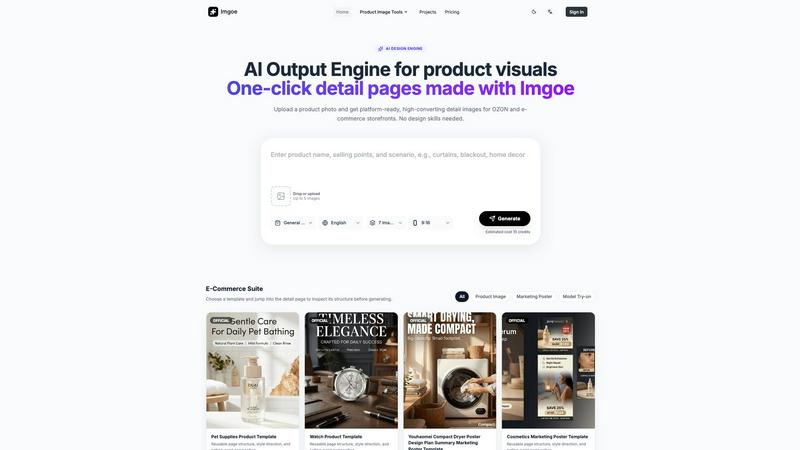
Imgoe is a browser-based AI output engine built exclusively for e-commerce visuals. It is not another generic AI image generator that spits out abstract art or random dreamscapes. Instead, Imgoe is a focused production tool designed for online sellers, cross-border operators, DTC brands, product marketers, and small design teams who need to turn simple product photos into store-ready assets without renting a studio or starting every design from scratch. The core workflow is brutally simple: upload a clean product image or SKU photo, describe the product, its selling points, the scene, or the platform requirement, choose an asset type or marketplace preset, and generate visuals that are ready to drop into product pages, galleries, ads, and online store listings. Imgoe organizes its output around practical product-page roles such as hero images, gallery images, detail modules, feature images, comparison visuals, lifestyle scenes, and selling-point graphics. It supports common seller workflows for major marketplaces including Amazon, Shopify, Etsy, eBay, TikTok Shop, Temu, and OZON. Platform presets automatically align aspect ratios, language, scene direction, and prompt constraints with the way product images are usually published, while blocking marketplace logos, fake badges, unsupported claims, and misleading UI elements. The platform also provides prompt and template examples for generating product photos, detail page assets, and marketplace-ready visuals. For teams tired of endless review rounds and inconsistent visual output, Imgoe delivers a template-first workflow that keeps style locked in and turnaround times fast. It is a visual production workspace, not a random image generator.
Features of Imgoe
Platform Presets for Major Marketplaces
Imgoe comes loaded with platform-specific presets for Amazon, Shopify, Etsy, eBay, TikTok Shop, Temu, and OZON. These presets automatically handle aspect ratios, language settings, scene direction, and prompt constraints so your generated assets match the exact requirements of each marketplace. The system also blocks common pitfalls like marketplace logos, fake badges, unsupported claims, and misleading UI elements that could get your listings flagged. This means you can generate assets tailored for OZON one minute and switch to TikTok Shop the next without manually adjusting every parameter. It is like having a compliance officer and a designer rolled into one.
Template-First Visual Production
Imgoe uses a template-first workflow that lets you start from a reusable page structure, style direction, and selling-point composition rather than a blank canvas. You can browse a library of official templates for product images, marketing posters, and model try-ons, then jump into the detail page to inspect the structure before generating. This approach ensures visual consistency across your entire product page set. Templates cover categories like pet supplies, watches, cosmetics, curtains, sunglasses, and scarves. Instead of briefing every page from scratch, you pick a close template, adjust it to your product, and generate launch-ready assets faster.
Asset Type Organization for Practical Roles
Imgoe organizes generated assets around practical product-page roles instead of random image outputs. You get hero images, gallery images, detail modules, feature images, comparison visuals, lifestyle scenes, and selling-point graphics. Each asset type is designed to serve a specific function on your product page or listing. This structure means you can generate a complete visual set for a product in one session: hero image first, then selling-point pages, then scene pages. The iteration cost is much lower than a traditional workflow because you are not guessing which image goes where.
Multi-Language and Multi-Variant Asset Generation
Imgoe supports generating assets in multiple languages and for multiple product variants from a single product photo. This is critical for cross-border operators who need the same product to appear on OZON in Russian, Amazon in English, and TikTok Shop in localized formats. The system lets you quickly turn one product into several marketplace-ready visual sets without starting over. Combined with the template workflow, this feature dramatically reduces the time spent on manual translations, resizing, and re-compositing. It is a production line for product-page assets.
Use Cases of Imgoe
Generating Complete Product Page Visuals for OZON
Cross-border sellers targeting OZON can use Imgoe to generate a full set of platform-ready detail images from a single product photo. The process starts with uploading a clean product image, selecting the OZON preset, choosing a template like the Pet Supplies Product Template or Watch Product Template, and generating hero images, gallery images, detail modules, and selling-point graphics. The platform automatically aligns the aspect ratio, language, and scene direction to OZON requirements while blocking fake badges and unsupported claims. This turns a multi-day design process into a few minutes of clicking.
Creating Consistent Marketing Posters for Multiple Categories
Brand owners and small design teams can use Imgoe to produce a series of marketing posters that maintain visual consistency across different product categories. For example, you can start with the Cosmetics Marketing Poster Template, adjust it for a skincare line, then use the Curtain Product Image Template for home goods, and the Sunglasses Poster Design Plan Summary Marketing Poster Template for accessories. The template-first approach ensures that the style direction, selling-point composition, and page structure stay aligned even when the products are completely different. This eliminates the need for multiple review rounds to align detail-page visuals.
Producing Model Try-On Assets for Fashion and Accessories
Fashion e-commerce managers can use Imgoe to generate model try-on images for products like scarves, watches, and accessories without organizing a photoshoot. The Paris Plaid Cashmere Scarf Try-On template, for example, provides a reusable page structure and style direction for showing products on models. You upload the product photo, select the try-on template, and generate lifestyle scenes that show the product in use. This is especially valuable for small teams that cannot afford studio time but still need high-converting model images for their storefronts.
Scaling Multi-Variant Visuals for DTC Brands
DTC growth consultants and content operators can use Imgoe to quickly generate visual sets for multiple product variants, colors, and sizes. Instead of manually re-compositing each variant, you upload the base product photo, describe the variant details, and generate a set of marketplace-ready visuals for each one. The multi-language support means you can also produce localized assets for different regions simultaneously. This use case is ideal for brands that launch frequent product drops and need to maintain visual consistency across hundreds of SKUs without expanding their design team.
Frequently Asked Questions
What types of assets can I generate with Imgoe?
Imgoe generates e-commerce specific asset types including hero images, gallery images, detail modules, feature images, comparison visuals, lifestyle scenes, and selling-point graphics. Each asset type serves a specific role on your product page or marketplace listing. The platform also supports marketing posters and model try-on images through its template library. You are not limited to random image outputs; every generated asset is organized around practical product-page roles.
Which marketplaces does Imgoe support with platform presets?
Imgoe supports platform presets for Amazon, Shopify, Etsy, eBay, TikTok Shop, Temu, and OZON. These presets automatically handle aspect ratios, language settings, scene direction, and prompt constraints for each marketplace. The system also blocks common compliance issues like marketplace logos, fake badges, unsupported claims, and misleading UI elements. This means you can generate assets that are ready to upload without manual adjustments or compliance checks.
How does the template-first workflow work in Imgoe?
The template-first workflow lets you start from a reusable page structure, style direction, and selling-point composition instead of a blank canvas. You browse the template library, select a template that matches your product category, and inspect its detail page to understand the structure. Then you upload your product photo, adjust the template parameters, and generate assets. This approach ensures visual consistency across your entire product page set and dramatically reduces the time spent on design iterations.
Can I generate assets in multiple languages with Imgoe?
Yes, Imgoe supports multi-language asset generation. You can select the language for your generated visuals when using platform presets or custom prompts. This is particularly useful for cross-border operators who need the same product to appear on different marketplaces in different languages. The system allows you to quickly turn one product into several marketplace-ready visual sets without starting over or manually translating text elements.
Explore more in this category:
Similar to Imgoe

Enhance My Photo
Online AI photo enhancer that sharpens portraits, products, scenery, pets and text images and exports JPEG/PNG/WebP without watermarks.

ImageAgent
Create and edit AI images through conversation, using text or reference images and refining results in chat.

WhiteBackground.app
Make photo backgrounds pure white with private, free browser processing.

Rhinobird
AI video ads, UGC-style videos, and product visuals for cross-border sellers and e-commerce brands.

AppIconGenerator
Generate iOS and Android app icons from any image and export all platform sizes for free.

Nano AI
Create and edit AI images, generate videos, and compare models in one creative workbench.

picttool
Create and edit images with a collection of easy-to-use AI tools
