

ekstrakt
Stop wasting hours on videos when ekstrakt serves you the juicy bits in seconds.
About ekstrakt
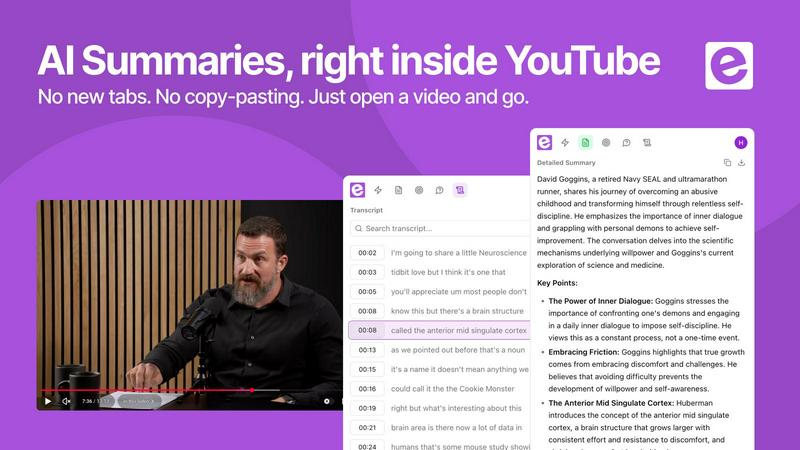
ekstrakt is an AI-powered YouTube video summarization platform that turns hours of video content into digestible, actionable text in seconds. It is built for anyone who watches YouTube to learn, not just to zone out. The platform works by letting you paste a YouTube link or open a video directly in the web app. It grabs the full transcript and then generates a summary in real time, streaming the text as it writes. No waiting, no guessing. You get the essence of the video instantly.
This tool is for students drowning in lecture recordings, researchers sifting through conference talks, professionals catching up on industry podcasts, and anyone who has a Watch Later playlist that is basically a graveyard of good intentions. ekstrakt solves the core problem of video content: valuable information is buried inside long formats that you cannot skim like an article. A two-hour lecture becomes a one-minute read. A three-hour podcast becomes a list of key moments. You decide in seconds whether the video answers your question or is worth watching in full. It saves you time, focus, and mental energy. With multiple summary types, full transcript access, and support for 22 languages, ekstrakt gives you control over how you consume video information. It is available as a web app, a Chrome extension for instant summaries on YouTube, and mobile apps are coming soon. You get five free summaries to start, no credit card required.
Features of ekstrakt
Four Summary Depths for Every Situation
ekstrakt does not give you a single wall of text. It offers four distinct summary types: Short for a quick overview, Detailed for a deeper dive, Straight to Answer for getting a direct response to a specific question, and Ask a Question where you can interrogate the video content. You can switch between these on the same video without paying extra or waiting again. This flexibility means you control how deep you go, whether you need a quick skim or a thorough analysis.
Real-Time Streaming Summaries
As soon as you paste a YouTube link, ekstrakt extracts the transcript and begins generating the summary. The text streams in real time as the AI writes it. You do not have to stare at a loading spinner. You see the summary build word by word, which is fast, engaging, and gives you immediate access to key insights. This feature makes the experience feel instant and responsive, perfect for when you are short on time.
Full Transcript View Alongside Summary
You do not have to trust the summary blindly. ekstrakt shows the full transcript right next to the generated summary. This lets you verify claims, check specific quotes, or dive deeper into a particular section. It is like having the original source material open on one side and a cheat sheet on the other. This transparency builds trust and gives you complete control over the information.
Available Everywhere You Watch
ekstrakt works across platforms. Use the web app from any browser for a full-featured experience. Install the Chrome extension to summarize videos directly on the YouTube page with one click. Mobile apps for iOS and Android are coming soon. This omnipresence means you can access summaries whether you are on your laptop, at your desk, or on the go. The tool fits into your workflow, not the other way around.
Use Cases of ekstrakt
The Two-Hour Lecture
You have to watch a recorded lecture for a class or professional development, but it is two hours long. ekstrakt extracts the key concepts in under a minute. You get the main arguments, definitions, and takeaways without sitting through the entire video. You can then decide if you need to watch specific sections in full or if the summary is enough. This turns a time-sink into a quick study session.
The Three-Hour Podcast Episode
Everyone is talking about that viral podcast episode, but you do not have three hours to spare. ekstrakt gives you the highlights and key moments in under a minute. You get the controversial takes, the big ideas, and the memorable quotes without the rambling. Now you can join the conversation at work or with friends without sacrificing your entire evening.
The Tutorial Buried in Filler
You found a 40-minute walkthrough video, but only five minutes of it is actually useful. The rest is intros, sponsorships, and tangents. Use ekstrakt's Straight to Answer feature. Ask a specific question like "How do I set up the API key?" and get the exact moment in the video with the answer. You skip the filler and get straight to the solution.
The Watch Later Graveyard
You have 200+ videos saved to Watch Later that you will never get to. The guilt is real. ekstrakt lets you skim summaries of all those videos in minutes. You can clear the list guilt-free by identifying which videos are worth watching in full and which ones you can delete. It is like a spring cleaning for your digital backlog.
Frequently Asked Questions
What is ekstrakt and how does it work?
ekstrakt is an AI-powered tool that summarizes YouTube videos. You paste a YouTube link into the web app or use the Chrome extension on the YouTube page. It extracts the video transcript and generates a summary in real time, streaming the text as it writes. You can choose from four summary types: Short, Detailed, Straight to Answer, or Ask a Question.
How long does it take to generate a summary?
Summaries are generated in real time and streamed to you as the AI writes them. For most videos under an hour, the summary is ready in seconds. Longer videos may take a bit longer, but the streaming experience means you start seeing results almost immediately. There is no long wait for a loading spinner.
Which YouTube videos can I summarize?
You can summarize any public YouTube video. This includes tutorials, lectures, podcasts, interviews, vlogs, and more. The tool works with videos in any of the 22 supported languages for summaries. Private or unlisted videos are not supported due to access restrictions.
How do I get started? Is there a free trial?
Getting started is easy. Go to the ekstrakt website and sign up. You get five free summaries immediately with no credit card required. This lets you test the tool on your own videos and see if it fits your workflow. After that, you can choose a paid plan based on your usage needs.
Explore more in this category:
Best Education & Learning AI tools
Similar to ekstrakt

Lemongraph
Seriously proactive personal productivity app

Wordler
Wordler is a free online platform featuring daily and unlimited word games, including Wordle and other word puzzles.

Speakeroo
AI speaking coach for English practice, pronunciation and public speaking, with feedback on pace, clarity and filler words.

Screen Issues
Free Online Screen Test Tool - Instantly diagnose dead pixels, lines, color issues, and flickering. Multiple test modes, no download needed.

QuickVeed
AI video studio: subtitles translated into 32 languages, AI dubbing in your own voice, podcast-to-clips and 34 free video tools.

Zeptap
Zeptap lets AI use your real iPhone like you do: open apps, read the screen, tap, swipe and type. Reply to DMs, post Stories, book rides, test apps.


Regentflow
AI stocktakes, staff rosters and voice-typed spreadsheets for cafes, bars and restaurants, plus free invoices, 30 PDF tools and custom merch.