

EditTextImage
EditTextImage swaps out text in your images online in 30 seconds, keeping fonts, colors, and perspective intact without Photoshop.
About EditTextImage
EditTextImage is the AI-powered, no-subscription tool that lets you edit text in any image while keeping the original font, color, layout, and perspective absolutely pixel-perfect. Forget Photoshop, forget hunting for font files, and forget expensive monthly subscriptions. This is the fastest way to change text in a photo online, clocking in at roughly 10 seconds per edit. Whether you are a marketer who needs to swap a headline for an A/B test, a designer who lost the source file for a client poster, or a business owner fixing a typo on a product label, EditTextImage is your secret weapon. The AI samples the typeface directly from the pixels of your uploaded image, meaning even paid fonts, hand-lettering, and custom calligraphy are handled flawlessly. You do not need to own the font or have any design skills. Just upload your image (PNG, JPEG, or WebP up to 10 MB), type in the original text and your replacement, and hit generate. The result is a clean, 2K-resolution image with the new text seamlessly embedded. It is built for speed, accuracy, and simplicity. No credit card is required to start, and you get one free credit to test it out. After that, it is a one-time payment of $9.90 for 30 edits that never expire. This is the ultimate tool for anyone who needs to edit text in image files for documents, posters, screenshots, e-commerce, social ads, or event materials without the hassle of complex software.
Features of EditTextImage
Pixel-Perfect Text Replacement
The core magic of EditTextImage lies in its ability to change text in image while keeping every other element intact. The AI does not just paste a generic font over the old text. It analyzes the surrounding pixels to sample the exact typeface, color, size, drop shadow, and even perspective from the original image. This means the replacement text looks like it was always there, blending seamlessly with the background and any visual effects. For paid fonts you do not have installed or unique hand-lettering, this feature is a lifesaver.
Blazing Fast 10-Second Edits
Time is money, and EditTextImage respects that. The entire process from upload to download takes approximately 10 seconds for a standard edit. There is no waiting for complex rendering or batch processing. You upload your image, type the old and new text, and the AI delivers a finished 2K-resolution image almost instantly. This speed makes it perfect for rapid iteration in A/B testing campaigns, last-minute fixes on marketing materials, or quick localization changes without slowing down your workflow.
No Subscription, Credits Never Expire
Say goodbye to monthly bills. EditTextImage operates on a simple, transparent credit system. You get one free credit to try the tool with no credit card required. When you need more, it is a one-time payment of $9.90 for 30 credits. These credits never expire, so you can use them whenever you need them. There is no subscription, no hidden fees, and no pressure to use them all at once. This is a straightforward pay-as-you-go model that gives you total control over your costs.
Commercial Use Included
Every edit you make with EditTextImage is cleared for commercial use. Whether you are updating product labels for your e-commerce store, creating ad creative for a client, or localizing app screenshots for a global launch, you own the output. There are no additional licensing fees or restrictions. This makes it an incredibly cost-effective solution for freelancers, small businesses, and agencies who need high-quality, editable images for professional projects without the overhead of design software.
Use Cases of EditTextImage
Edit Text in Image for Document Fixes
Lost the original Word file or InDesign document for an important contract, invoice, or report? No problem. With EditTextImage, you can edit text in image directly from a screenshot or scan. Correct a typo in a client proposal, update an invoice number, or fix a date on a certificate. The AI preserves the exact font and layout of the document, making the edit look completely natural. This is a game-changer for administrative professionals and legal teams who need quick, accurate fixes without recreating the entire file from scratch.
Edit Text in Image for Posters and Flyers
The date changed, the speaker dropped out, or the venue moved, but your designer is on vacation. Instead of panicking, use EditTextImage to edit text in image on the finished poster. Upload the high-res JPEG, type the old date and the new one, and the AI handles the rest. The font, color, drop shadow, and background all stay perfect. This saves you from expensive last-minute redesigns and keeps your event marketing on schedule. It is perfect for event planners, marketing teams, and small business owners.
Edit Text in Image for App Localization
App Store and Google Play require screenshots in multiple languages for global distribution. Instead of rebuilding every UI mockup in Photoshop or Figma for each language, use EditTextImage to edit text in image on your existing screenshots. Swap English text for Spanish, French, or Japanese in seconds. The AI ensures the replacement text fits the UI elements perfectly, maintaining the pixel-perfect look of your app. This dramatically speeds up the localization process and saves thousands of dollars in design costs.
Edit Text in Image for Ad Creative A/B Testing
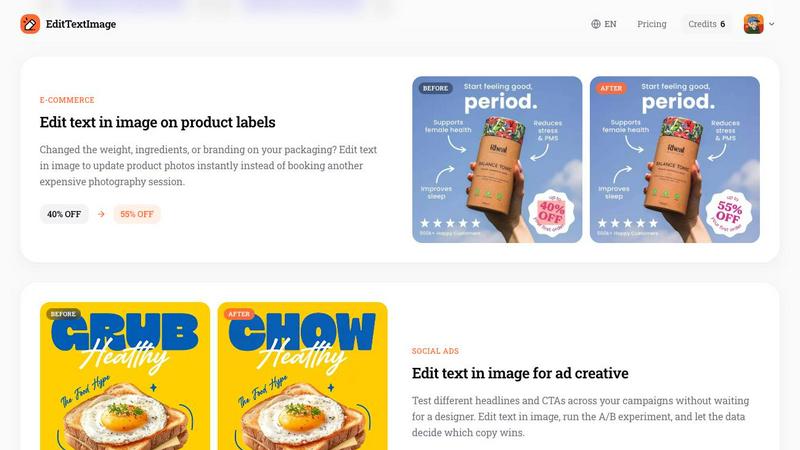
Marketers live and die by split testing. With EditTextImage, you can edit text in image to quickly swap headlines and CTAs on your social media ads, landing page banners, or email headers. Test different copy variations without waiting for a designer to recreate the graphic each time. Run the experiment, let the data decide which version converts best, and scale the winner. This feature empowers growth teams to iterate faster and optimize ad spend more effectively, all without a creative bottleneck.
Frequently Asked Questions
What file types and sizes does EditTextImage support?
EditTextImage supports PNG, JPEG, and WebP file formats with a maximum file size of 10 MB. For best results, upload the highest resolution image you have. The tool outputs the edited image at 2K resolution, so starting with a high-quality source image will yield the best pixel-perfect results.
How does the AI preserve the font if I do not have it installed?
The AI does not need the font file. It samples the typeface directly from the pixels of your uploaded image. It analyzes the shape, weight, spacing, and style of the existing text and then generates the replacement text to match those exact characteristics. This works for any font, including paid, custom, or hand-lettered typefaces.
Is there any risk of my image being misused or shared?
EditTextImage has a strict Acceptable Use policy. The tool is designed for legitimate edits like fixing typos or updating information. It is not to be used for deceptive purposes such as altering IDs, passports, visas, bank statements, or tampered receipts. Violations result in account termination, and request logs may be shared with law enforcement. Your uploaded images are processed securely and are not shared publicly.
What happens if my edit does not look perfect?
While the AI is highly accurate, results can vary based on the complexity of the image, such as text on highly textured backgrounds or extreme perspectives. The first edit is free, allowing you to test the tool with your specific use case. If you are not satisfied, you can use another credit to try a different approach or adjust your input text. The tool is designed for speed and ease, but complex scenes may require multiple attempts.
Pricing of EditTextImage
EditTextImage uses a simple, no-subscription credit system. You start with 1 free credit to edit text in image with no credit card required. When you need more, you purchase a one-time pack of 30 credits for $9.90. These credits never expire, and commercial use of all edited images is included. There are no monthly fees, no hidden charges, and no commitment.
Similar to EditTextImage

ImageAgent
Create and edit AI images through conversation, using text or reference images and refining results in chat.

GenX
All-in-one AI workspace to generate images, videos, and audio with multiple leading AI models.

AppIconGenerator
Generate iOS and Android app icons from any image and export all platform sizes for free.

Design.com AI Image Generator
Turn text prompts into polished, copyright-safe visuals that plug directly into branded templates

FastH3 Omni
Run FastH3 Omni in your browser. Up to 9 reference images plus 3 audio references become a 5–15s clip with synced audio. No install, no GPU.

Nano AI
Create and edit AI images, generate videos, and compare models in one creative workbench.

picttool
Create and edit images with a collection of easy-to-use AI tools

YIX
YIX combines AI image and video generation, photo editing, restoration, product visuals and free prompt tools in one browser studio.