

Dissect
A second brain that reads everything you save and answers questions about it, with citations.
About Dissect
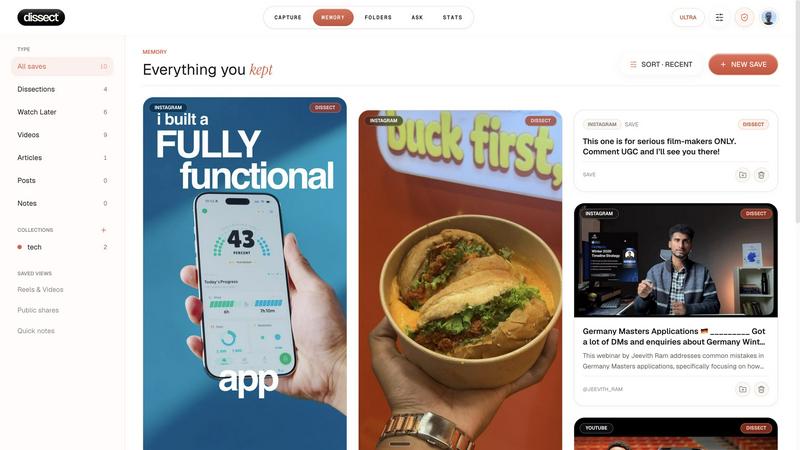
Dissect is a personal library that reads what you put into it.
Most save tools keep a title, a thumbnail and a link. That is the same information you already had when you saved the thing, so opening it later costs as much as reading it fresh, which is why nobody goes back to their saves. Dissect reads the item instead. The full text of an article, the transcript and key frames of a video, the contents of a PDF, a voice note you recorded on your phone.
Once it has been read, two things work. Search runs on meaning, so you can look for a colour, an object, a person or a half remembered idea rather than the exact words in the title, and it still lands if you spell it wrong or ask in another language. And you can ask the library questions directly. "What did I save about cold outreach?" gets an answer in plain words with links to the specific saves it came from. It will not answer from anything outside your own library, so it cannot invent a fact you never saved.
You can save from the web app, a browser extension, your phone's share sheet, or by forwarding a link to the WhatsApp bot.
Free tier is 10 saves a month. Paid is ₹99 or $4 a month for 100 saves and 50 questions, or ₹249 or $8 for unlimited.
Explore more in this category:
Similar to Dissect


Briefpanel
Monitor web pages and get the exact field that changed, item by item. Pay per page read, no subscription.

Zipic
Native image compression for Mac and Windows (Windows beta), with a local CLI and AI skill for automated image workflows.

ButterShare
Realtime peer-to-peer file transfer in the browser. Send files directly between devices, no account and no upload to a server.

Myfreshtools
A collection of powerful YouTube tools to export, organize, back up, and manage playlists and creator workflows.

Statement2QBO
Bank statement PDF to QBO, Excel and Xero. Runs in your browser; three pages a day are free.

Emailyy
Free email tools for signatures, subject lines, HTML previews, word counts, and email headers. Browser-based, simple to use, and no signup required.

Uniclip
Clip pages, take full-page screenshots and batch-capture list data to Notion, Feishu, Obsidian, Markdown, CSV or JSON.