

CtrlOps
CtrlOps is the local-first desktop app that lets you manage all your Linux servers with AI, no DevOps skills required.
About CtrlOps
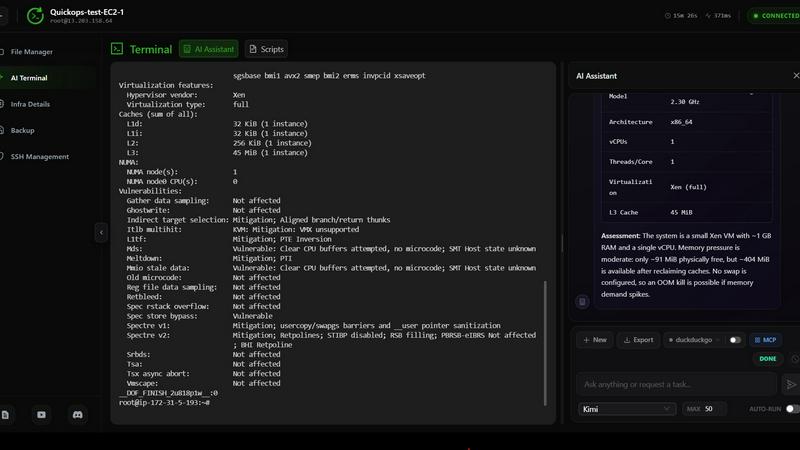
CtrlOps is a local-first desktop application that completely redefines how developers and technical teams manage their Linux server fleets. Forget juggling PuTTY, WinSCP, and a dozen terminal tabs. CtrlOps gives you a single, unified dashboard to deploy, debug, and manage every Linux server you own, without needing a dedicated DevOps engineer on payroll. The core of the product is its AI Terminal, a game-changer for server management. You describe what you need in plain, everyday English, and CtrlOps generates the exact Linux command, explains exactly what it will do, and then waits for your approval before executing a single thing. Nothing runs without your confirmation, keeping you in total control. It is 100% local, meaning your SSH keys, server IPs, and credentials never leave your machine. No cloud, no telemetry, no third-party servers holding your secrets. Built with Tauri and Rust, it offers native performance and a tiny memory footprint, making it lightning fast. CtrlOps connects directly to any server over SSH, regardless of your cloud provider, and requires no cloud API keys. It is the ultimate tool for solo developers, small teams, and anyone tired of slow, cloud-dependent web dashboards and manual server management.
Features of CtrlOps
AI Terminal with Human-in-the-Loop
The AI Terminal is the flagship feature. You type a request like "clear disk space on prod-web" or "check why nginx failed to start," and the AI instantly generates the precise Linux commands to accomplish the task. It then presents the command, explains what it will do step-by-step, and asks for your approval. You can run it, edit it, or discard it entirely. This eliminates guesswork, prevents accidental damage from bad commands, and makes server management accessible to developers who are not Linux wizards.
Multi-Server Fleet Management
Manage your entire server fleet from a single, organized interface. Forget memorizing IP addresses or bouncing between SSH sessions. CtrlOps lets you add all your servers, assign them aliases like "prod-web" or "db-01," and switch between them instantly. You can see the connection status for each server at a glance, and manage them all without context switching. Your whole infrastructure, one app.
Visual File Manager
Say goodbye to the pain of scp and rsync commands. CtrlOps includes a visual file manager that lets you upload, download, and unzip files on any of your servers with a single click. You can navigate your server's file system just like you would on your local machine. This feature dramatically speeds up common tasks like deploying static assets, transferring log files, or updating configuration files.
Real-Time Infrastructure Monitoring and Security Scanning
Keep your finger on the pulse of your infrastructure with live CPU, memory, disk, and network monitoring for every server. No more logging in to check htop manually. Beyond monitoring, CtrlOps can scan your entire fleet to see who has server access and who has sudo privileges. When a team member leaves, you can remove their access from every server at once, massively improving your security posture.
Use Cases of CtrlOps
Rapid Incident Response and Debugging
When a production server goes down, every second counts. Instead of frantically searching for commands or SSHing into multiple boxes, you can open CtrlOps, ask the AI Terminal "why is my web server down?", and get an instant diagnosis. The AI will check service status, port conflicts, and logs, then suggest the exact fix. You approve it, and the server is back online in minutes, not hours.
One-Click Application Deployment for Solo Developers
Solo developers and small startups often lack a full CI/CD pipeline. CtrlOps solves this with single-click deployments. You fill out one form with your GitHub repo, environment variables, and domain, and CtrlOps handles the rest. It sets up PM2 for process management, configures Nginx as a reverse proxy, and provisions an SSL certificate. Your app goes live without writing a single deployment script.
Streamlining Onboarding and Offboarding for Teams
When a new engineer joins, you need to grant them access to specific servers. When someone leaves, you need to revoke access everywhere. Doing this manually across dozens of servers is a nightmare. CtrlOps simplifies this by allowing you to scan your fleet for all user accounts and sudo access. You can then add or remove users from every server in one action, ensuring your infrastructure stays secure.
Centralized File Management and Transfer
Developers frequently need to move files between their local machine and remote servers. Instead of using separate FTP clients or wrestling with command-line tools, CtrlOps provides a built-in visual file manager. You can drag and drop files to upload, download logs for local analysis, or unzip archives directly on the server. This centralizes a common workflow and eliminates the need for additional tools.
Frequently Asked Questions
Is my data secure with CtrlOps?
Absolutely. CtrlOps is a 100% local-first application. Your SSH keys, server IPs, and all credentials are stored solely on your machine and never uploaded to any cloud service. The application speaks directly to your servers over SSH, with no intermediary cloud bridge that could be breached. Your data stays where it belongs: on your device.
Do I need to install agents on my servers?
No. CtrlOps connects to your existing servers over standard SSH. You do not need to install any agents, daemons, or third-party software on your Linux servers. Just provide your SSH key, and CtrlOps handles the rest. This keeps your server environment clean and reduces the attack surface.
Can I use CtrlOps with any cloud provider?
Yes. CtrlOps is provider-agnostic. It connects to any server that accepts SSH connections, whether it is hosted on AWS, Google Cloud, Azure, DigitalOcean, Linode, or a bare-metal server in your basement. You do not need to provide any cloud API keys, only your SSH key.
What happens if the AI generates a bad command?
The AI Terminal operates on a "human-in-the-loop" model. It generates the command, explains what it will do, and then waits for your explicit approval before executing it. You are in complete control. You can review the command, edit it, or reject it entirely. Nothing runs without your confirmation, preventing accidental damage.
Pricing of CtrlOps
CtrlOps offers a 1-month free trial with no credit card required. After the trial, you can choose a subscription plan that fits your needs. For the most current pricing information, including available plans and features, please visit the official CtrlOps website.
Similar to CtrlOps

xfiles
PDFs, images and audio. No uploads. No account. No added watermarks.

Turbotools
Free online web tools: PDF converter, image compressor, word counter, text reverse, JSON formatter & generator. 100% free with no sign-ups!

Ecommerce Data API
Amazon research data APIs for developers, sellers and AI agents. Integrate product, keyword and market research through REST APIs and MCP.

BlazePhoenix
On-chain DEX aggregator: the swap route is computed inside the transaction that executes it. No API key, no signup.


Zalcro
The pre-build planning tool for vibe coders and AI builders. Start with a conversation about your idea, get paste-ready prompts for your coding tool

SightRadar
Face recognition API, a drop-in replacement for AWS Rekognition. Index, search, compare and detect faces, billed per photo with no subscription.
