

Browser Notes
Browser Notes keeps your ideas safe in your browser with no signup, cloud, or drama.
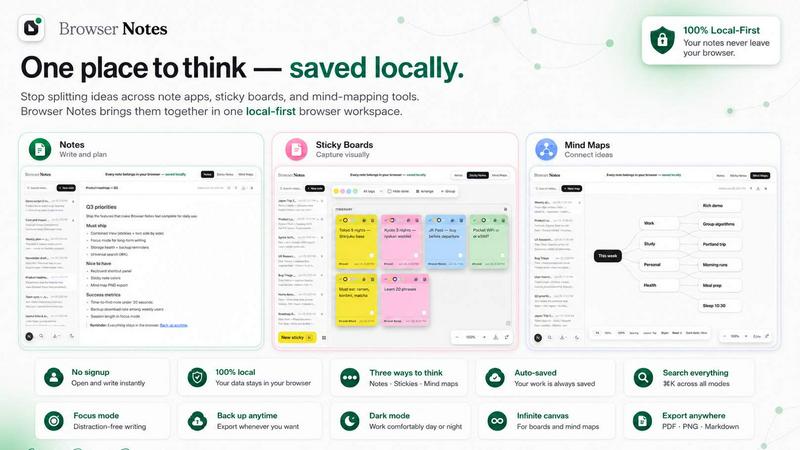
About Browser Notes
Let's be real. Your digital brain is a mess. Notes are scattered across a dozen writing apps, sticky notes are plastered on virtual boards you forgot existed, and your mind maps are locked in some subscription-based tool that just raised its prices again. Meanwhile, your private ideas are being pushed to the cloud, analyzed, and sold back to you. It is a chaotic, dystopian nightmare for your thoughts.
Enter Browser Notes. This is not another app begging for your email and tracking your every click. Browser Notes is a Chrome extension that turns your browser into a local-first command center for your ideas. It brings three essential tools -- notes, sticky notes, and mind maps -- into one unified workspace that lives entirely in your browser. No account. No tracking. No forced sync. It works offline, stores everything locally, and gives you the power to back up your data whenever you want. It is your private, offline, anti-cloud fortress for creativity.
This is for the privacy-conscious, the paranoid, the minimalist, and anyone who is tired of their ideas being held hostage by a SaaS company. It is for students, writers, developers, and project managers who need a fast, reliable, and zero-BS way to capture and organize thoughts. The main value proposition is simple: total ownership of your data, zero friction to start, and three powerful formats to think in. It is your browser, your rules, your notes.
Features of Browser Notes
Three Tools, One Local Workspace
Stop jumping between apps. Browser Notes bundles a markdown note editor, a freeform sticky note canvas, and a radial mind map creator into a single, cohesive interface. You can switch between them instantly without ever leaving your browser. This eliminates context switching and keeps your flow state intact. It is a Swiss Army knife for your thoughts, and every tool is razor sharp.
Local-First with No Account Required
This is the killer feature. Browser Notes does not want your email, your name, or your browsing history. It does not sync your data to any server. Everything you write, draw, or map is saved directly to your browser's local storage using IndexedDB. You are the only one who can access your notes. No cloud, no data mining, no privacy theater. It is just you and your browser, keeping secrets like a vault.
Offline-First and Fully Functional
The internet goes down. Your productivity should not. Browser Notes works perfectly without any network connection. You can create, edit, and organize notes on a plane, in a coffee shop with spotty Wi-Fi, or in a cabin in the woods. Because everything is stored locally, there is no loading spinner, no "connection lost" error, and no lag. It is instant, reliable, and built for the real world where Wi-Fi is a luxury, not a guarantee.
One-Click Backup and Restore
Your data is safe, but accidents happen. Browser Notes gives you the power to export a complete backup of all your notes, sticky boards, and mind maps as a single JSON file. You can store this file on your hard drive, a USB stick, or your own cloud storage. If you clear your browser data or switch to a new machine, just import that backup. It is a simple, transparent, and powerful way to own your data without relying on a third-party server.
Use Cases of Browser Notes
Rapid Idea Capture for Creative Professionals
You are a designer, writer, or marketer with a brain that fires ideas at 100 miles per hour. You need a place to dump them fast. Open a sticky note board, click anywhere, and start typing. No formatting, no folders, no friction. Use the canvas to cluster related ideas, draw connections, and watch your chaos form into a coherent concept. It is digital napkin sketching, but way more powerful and you never run out of napkins.
Project Planning and Brainstorming for Teams of One
You are a solo founder, a freelancer, or a student working on a big project. Use a mind map to branch out the core problem from the center. Add sub-branches for tasks, resources, and deadlines. Then, switch to a detailed markdown note to flesh out the execution plan. Everything lives in one place, linked by your own logic. It is a personal project management system that does not require a subscription or a tutorial.
Private Journaling and Personal Knowledge Management
You want to keep a journal, track your habits, or build a personal wiki without your data being scraped or sold. Browser Notes is your sanctuary. Write daily entries with markdown formatting, create a sticky note board for your mood tracker, and map out your life goals on a mind map. It is all local, all private, and all yours. No one is reading it, not even the developers. It is the ultimate digital diary for the privacy-conscious.
Offline Study and Research Note-Taking
You are a student or researcher who works in libraries, on trains, or in areas with poor internet. You need a reliable tool that works without a connection. Use Browser Notes to take lecture notes in markdown, create a mind map to connect complex theories, and use sticky notes to bookmark key quotes from your readings. When you get home, you can back up your entire session with one click. It is your academic partner that never needs a Wi-Fi password.
Frequently Asked Questions
Is my data really private?
Yes. Browser Notes stores all your data using the IndexedDB API inside your browser. No data is ever sent to any server, including ours. We do not have accounts, we do not track you, and we cannot access your notes. Your data is as private as the files on your own computer. If you clear your browser data, your notes will be deleted, which is why we recommend using the backup feature.
Can I use Browser Notes on multiple devices?
Browser Notes is a Chrome extension, so it is tied to your specific browser profile on a specific device. There is no cloud sync to move notes between devices. However, you can use the backup feature to export your data as a JSON file, transfer that file to another device (via USB, email, or your own cloud), and then use the import feature to restore your workspace on the new device.
Does Browser Notes work without an internet connection?
Absolutely. Browser Notes is fully functional offline. Because all data is stored locally in your browser, you do not need an internet connection to create, edit, or organize your notes, sticky boards, or mind maps. The only time you need a connection is to install the extension from the Chrome Web Store.
How do I back up my data?
It is simple. Open the Browser Notes interface, navigate to the settings or backup menu, and click the "Export backup" button. This will download a single JSON file containing all your notes, sticky boards, and mind maps. Store this file somewhere safe. To restore, click "Import backup" and select that file. Your entire workspace will be recreated exactly as it was.
Explore more in this category:
Similar to Browser Notes

@fuck.it - email with attitude
Private email. Pure. Secure. Exclusive. No ads, no tracking, no data selling. GDPR compliant, EU-hosted.

xfiles
PDFs, images and audio. No uploads. No account. No added watermarks.

FreeVideoGenerator
Free AI video generator: turn text prompts and photos into video clips with Sora 2, Veo 3.1, Wan and more. Free starter credits, no watermark download


VidhyaGen - Image Converter
All-in-one web platform for fast image conversion, compression, editing, and essential digital file utilities in one easy interface.

Flip a Coin
Free online coin flip, yes/no, dice, spin wheel & random number tools. No signup, truly random, works instantly on any device.

sakuttoAI
A free suite of online tools for everyday tasks like PDF compression, image conversion, text diff and CSV to Excel.

Zalcro
The pre-build planning tool for vibe coders and AI builders. Start with a conversation about your idea, get paste-ready prompts for your coding tool