

Bg Eraser
Bg Eraser zaps backgrounds from up to 20 images at once, no signup needed, and your privacy stays locked.
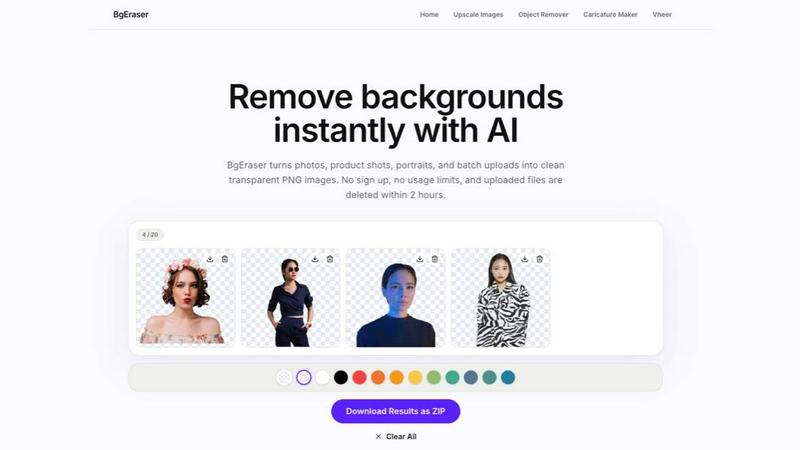
About Bg Eraser
Bg Eraser is a next-level, browser-based AI tool that vaporizes image backgrounds in seconds, no strings attached. Think of it as your personal photo editing ninja, ready to slice away messy backgrounds from product shots, portraits, logos, pets, apparel, and everyday snapshots without the headache of heavy software or complicated workflows. This isn't just another eraser; it's a full-on productivity beast designed for e-commerce sellers, graphic designers, photographers, content creators, and anyone who needs clean, professional images fast. The core value prop? You can batch process up to 20 images at once, dropping JPG, PNG, or WebP files into the workspace and watching the AI do its thing. The result? High-quality transparent PNGs with razor-sharp edges that are ready for websites, online stores, social media, marketing materials, or design mockups. No sign-up, no software installation, no usage limits. Just pure, unfiltered efficiency. And because privacy matters, your uploaded files are automatically deleted within two hours, keeping your work under lock and key. Whether you're launching a product line, sprucing up a presentation, or just want a killer profile pic, Bg Eraser delivers the goods without the fluff. It's the ultimate sidekick for anyone who needs to remove backgrounds at scale, with zero friction and maximum speed. Plus, you can download the desktop app for Windows or Mac for even more power. This is background removal, redefined.
Features of Bg Eraser
AI Background Eraser
The core engine of Bg Eraser uses advanced artificial intelligence to separate subjects from backgrounds with surgical precision. Whether you're dealing with a portrait with flyaway hair, a product with complex edges, or a logo with sharp lines, the AI analyzes every pixel to preserve the subject while obliterating the background. It keeps clean, crisp edges that look natural, not like a bad cutout job. No more manual masking or tedious pen tool work. Just upload, let the AI work its magic, and download a transparent PNG that's ready to drop into any design. This feature handles everything from simple solid-color backgrounds to tricky scenes with multiple objects or patterns, delivering consistent, high-quality results every time.
Batch Background Removal
Time is money, and Bg Eraser gets that. This feature lets you upload up to 20 images at once and remove their backgrounds in a single batch. Instead of editing each file one by one, you drop them all into the workspace, hit go, and let the AI process everything simultaneously. Perfect for e-commerce sellers with a catalog of product photos, photographers with hundreds of headshots, or content creators prepping a batch of social media assets. The batch mode keeps your workflow streamlined, saving you hours of repetitive editing. You can mix and match JPG, PNG, and WebP files in the same batch, and the tool handles each one with the same level of accuracy. It's like having a virtual photo editing team on speed dial.
Transparent PNG Output
Once the background is gone, Bg Eraser delivers clean, transparent PNG files that are ready for immediate use. No artifacts, no leftover pixels, no weird halos. The output is optimized for e-commerce listings, design mockups, profile pictures, presentations, and any project that needs a transparent background. The PNG format preserves the subject's quality and transparency, so you can place it on any color or background without a trace of the original. This feature is a game-changer for graphic designers who need layered assets, online sellers who want consistent product images, and anyone who needs professional-grade results without the hassle of manual cleanup.
Privacy-Friendly Cleanup
Bg Eraser takes your privacy seriously. All uploaded images and generated results are automatically deleted from the servers within two hours of processing. This means no long-term storage, no data hoarding, and no risk of your images lingering on some server. You don't need to create an account or sign up, so there's no personal information tied to your files. This feature is ideal for businesses handling sensitive product designs, photographers with client work, or anyone who values their digital privacy. You can erase backgrounds with total peace of mind, knowing your content is gone after you're done. Plus, the web-based tool runs directly in your browser, so nothing gets installed on your machine.
Use Cases of Bg Eraser
E-Commerce Product Photography
Online sellers need clean, consistent product images that pop against any background. With Bg Eraser, you can batch remove backgrounds from up to 20 product photos at once, turning cluttered shots into professional transparent PNGs ready for Amazon, Shopify, Etsy, or your own store. No more fussing with lighting or backdrops. Just shoot your products against any background, upload them, and let the AI strip it away. The result is a uniform catalog of images that look like they were shot in a studio. Perfect for launching new products, updating listings, or creating marketing assets that drive sales.
Social Media Content Creation
Content creators need eye-catching visuals fast. Bg Eraser lets you rip backgrounds from portraits, memes, and everyday photos to create transparent PNGs that you can layer onto custom backgrounds, templates, or brand colors. Whether you're making Instagram posts, TikTok thumbnails, YouTube thumbnails, or LinkedIn profile pictures, this tool gives you the flexibility to create unique, on-brand content in seconds. No need to fire up Photoshop or learn complex tools. Just remove the background, drop in a new one, and post. It's that simple.
Graphic Design and Mockups
Designers constantly need isolated subjects for mockups, presentations, and layouts. Bg Eraser delivers high-quality transparent PNGs of people, products, logos, and graphics that you can drop directly into your design software. No more wasting time with manual clipping paths or complex selection tools. Whether you're building a website mockup, a brochure, a pitch deck, or a digital ad, the AI handles the heavy lifting. The clean edges and precise cutouts make your designs look polished and professional, saving you hours of tedious work.
Personal Use and Profile Pictures
Need a sharp profile pic for LinkedIn, a dating app, or your gaming avatar? Bg Eraser makes it easy to remove the background from a selfie or portrait, leaving just you. Then you can drop in a solid color, a gradient, or a custom background for a clean, professional look. No need for a photo studio or expensive software. Just upload your photo, let the AI work, and download a transparent PNG that you can use anywhere. It's perfect for anyone who wants to level up their online presence without the hassle.
Frequently Asked Questions
What is Bg Eraser?
Bg Eraser is a free, browser-based AI tool that removes backgrounds from images automatically. It supports JPG, PNG, and WebP files, lets you batch process up to 20 images at once, and delivers transparent PNG outputs with clean edges. No sign-up, no software installation, and no usage limits. Your uploaded files are automatically deleted within two hours for privacy.
Can I remove backgrounds from multiple images at once?
Yes, absolutely. Bg Eraser supports batch background removal for up to 20 images at the same time. You can upload a mix of JPG, PNG, and WebP files, and the AI will process them all in one go. This is a huge time-saver for e-commerce sellers, photographers, and anyone with a large volume of images to edit.
Do I need to create an account to use Bg Eraser?
No, you do not need to create an account or sign up for anything. Bg Eraser is completely free to use directly in your browser. There are no usage limits, no hidden fees, and no personal information required. Just upload your images, remove the backgrounds, and download the results.
How does Bg Eraser protect my privacy?
Bg Eraser automatically deletes all uploaded images and generated results from its servers within two hours of processing. This ensures that your files are not stored long-term and remain private. Since no account is required, there is no personal data tied to your uploads. This makes it a safe and secure option for handling sensitive or confidential images.
Explore more in this category:
Similar to Bg Eraser

Vocaryn
AI job-application agent: ranks jobs by fit with your confirmed experience, tailors your resume to each and applies on the employer's site.

How Long How Many Tool
Timers and hourly checks to figure how out long until a certain time or how many days away.

AnyRedact
Free online auto redaction tool with AI for PDFs, images, Word, PowerPoint, Excel, text and audio. Files are never stored.


Briefpanel
Monitor web pages and get the exact field that changed, item by item. Pay per page read, no subscription.

Zipic
Native image compression for Mac and Windows (Windows beta), with a local CLI and AI skill for automated image workflows.

ButterShare
Realtime peer-to-peer file transfer in the browser. Send files directly between devices, no account and no upload to a server.

Myfreshtools
A collection of powerful YouTube tools to export, organize, back up, and manage playlists and creator workflows.